

Call Blocker - Block Numbers review
 Analysis by Appsdrops
Repeated calls from unknown numbers can turn a phone into a small chore: ignore the ring, check the voicemail, then decide whether the next call deserves an answer. Call Blocker - Block Numbers is aimed at that everyday irritation. I see its appeal in a simple promise: make unwanted calls easier to handle, without asking you to replace your phone’s usual calling habits.
What free access can—and cannot—tell you
This is a free communication app from Spam Call Blocker Apps, with optional in-app purchases ranging from $2.99 to $19.99 per item. That makes it possible to try the basic experience without paying upfront, while the purchase range is a reason to check the app’s purchase screen carefully before choosing any paid option. I would not assume that every useful blocking function requires a purchase, or that a particular purchase is necessary, without checking what is currently offered in the app.
The app has a 4.1 average from around 54,000 ratings, and more than five million installs. Those figures suggest it has reached a substantial audience, but they are not a guarantee that it will identify every unwanted caller correctly. Call-blocking depends on the numbers you receive and on how you want your phone to treat unfamiliar callers, so I would judge it by how well it fits your own call habits rather than by popularity alone.
It is rated for Everyone and is free to install. Its current version is 3.5.0.1948, and it requires Android 10 or later. If you use an older Android device, this is not an option for that phone. The app was released on August 25, 2017, so it is not a brand-new entry in the category; I would still check that the version available to your device suits your needs before making it part of my everyday call routine.
A practical layer between ringing and answering
The useful value of a call blocker is not just stopping a ring. It is reducing the small decisions that pile up around suspicious calls: whether to answer, whether to call back, whether to save a number, and whether the same caller might try again. Call Blocker - Block Numbers is built around that problem. I would treat it as a tool for managing interruptions, not as a substitute for sensible caution with unfamiliar callers.
A realistic example is a workday when you are expecting calls from customers or delivery drivers but also receive repeated sales calls. Blocking every unknown number would be too blunt, because it could catch the person you are waiting for. A more useful approach is to decide which numbers you recognize as unwanted and use blocking selectively, while leaving room to answer new contacts that might matter. That distinction is important: a call blocker is only as helpful as the rules you choose to apply.
One practical tip is to keep a brief note of numbers you have personally confirmed as unwanted before blocking them, especially if you manage family, work, and service calls on the same phone. This gives you a way to reconsider a decision if a legitimate caller later needs to reach you. It also discourages the tempting but risky habit of blocking every unfamiliar number after one annoying call.
Where it fits among the usual alternatives
Android users can often begin with the phone’s built-in call controls, while some carriers provide their own tools for unwanted calls. Those options may be enough if your needs are occasional and you prefer to keep call management in one place. A separate app makes more sense when you want a dedicated layer focused on blocking and are willing to review its settings as part of your phone setup.
Compared with manually rejecting each call, a dedicated blocker can make repeated nuisance calls less demanding to manage. Compared with silencing all unknown callers, selective blocking is usually the more balanced choice for people who still need calls from new numbers. The tradeoff is that any blocking system can be inconvenient if it catches a legitimate caller, so I would avoid setting rules so aggressively that important first-time calls become difficult to receive.
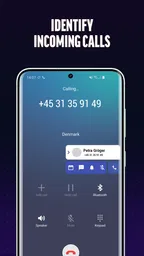
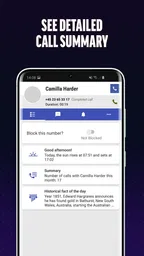
There is also a useful difference between preventing a call and dealing with one afterward. The app’s store summary points to handling spam and scam calls after calls, which suggests it is relevant to the cleanup side of the problem as well as call interruption. I would still be careful not to treat a label or warning as proof that a caller is malicious. If a caller claims to represent a bank, government office, or service provider, use a trusted contact method to verify the claim rather than relying on the call alone.
Small habits that make blocking more useful
First, review your blocked numbers from time to time rather than treating the list as permanent. A number you blocked in frustration may later turn out to belong to a legitimate business or a contact using a new line. Keeping the list tidy can prevent an old decision from quietly interfering with an important call.
Second, choose a threshold that reflects your routine. If you regularly receive calls from new clients, job contacts, clinics, or delivery services, preserve access to unfamiliar callers and block only numbers you have a clear reason to distrust. If nearly all your important contacts are already saved and unsolicited calls are a persistent nuisance, you may be comfortable with firmer filtering. Neither approach is universally right; the sensible setting depends on what a missed call costs you.
Third, do not confuse convenience with complete protection. Blocking can reduce interruptions, but it cannot make it safe to share passwords, payment details, or verification codes with someone who calls. I would use the app to manage unwanted contact and keep the same skepticism I would use on any unexpected call. That is a more reliable way to benefit from a blocker than expecting it to make every decision on your behalf.
Who is likely to get worthwhile use from it
I would consider Call Blocker - Block Numbers if repeated unwanted calls are a regular distraction and I wanted a dedicated app to help manage them. It is particularly relevant for people who receive frequent nuisance calls but still want to make their own choices about which unfamiliar numbers deserve attention. The free entry point is helpful for trying the app before deciding whether any paid option is worth considering.
It may be less suitable if you rarely receive spam calls, already find your phone’s built-in controls adequate, or depend on calls from people whose numbers you do not yet know. It is also not an answer for someone using an Android version earlier than 10. In those cases, a built-in tool or a carrier’s call-management option may be simpler, and skipping another app could be the better choice.
Because the developer offers in-app purchases, I would make the decision to pay only after checking what each item provides and whether it addresses a problem I actually have. The listed price range alone does not tell me which purchase is useful for a particular person. If the free experience handles your needs, there is no reason to spend simply because paid options exist.
My verdict on its value
For me, the case for Call Blocker - Block Numbers rests on a modest but worthwhile goal: making repeated nuisance calls less intrusive without forcing you to stop answering every new number. Its free access gives cautious users a way to try a dedicated blocking app, while optional purchases mean anyone considering payment should inspect the offer first. I would not buy into it on the assumption that a blocker can identify every scam or prevent every unwanted call.
My recommendation is to try it if unwanted calls are a recurring annoyance, keep your blocking decisions selective, and revisit them when your calling needs change. If your phone’s existing controls already solve the problem—or if you cannot afford to miss calls from unknown people—this is an easy one to skip. For someone who wants a focused, free-to-start way to manage nuisance calls on a compatible Android phone, it is a reasonable option, provided expectations stay practical.
What we like
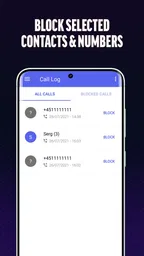
- Blocks unwanted calls from numbers you select.
- Can help reduce interruptions from telemarketers.
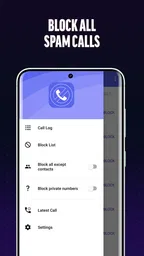
- A personal block list makes it easy to manage blocked numbers.
- Useful for screening calls from unknown or unwanted contacts.
- A simple call-blocking tool can be quick to set up.
What could be better
- Call-blocking behavior can vary by Android version.
- Some unwanted calls may come from changing numbers.
- Blocked calls may still appear in your call history.
- The app may need phone permissions to block calls.
- It cannot guarantee protection from every spam call.





