

Call Block: Filter and Blocker review
 Analysis by Appsdrops
I treat a call-blocking app as a practical tool, not a promise that every unwanted call will disappear. Call Block: Filter and Blocker is built around a simple need: help me identify unfamiliar callers and reduce interruptions from spam, fraud attempts, and automated calls. Its focus is narrower than a full phone or messaging suite, which makes it easy to understand, but also means its usefulness depends on how well its caller information and blocking controls fit my habits.
A focused tool for deciding which calls deserve attention
In the communication category, Call Block is an app from Appsbuyout designed for people who want more control over incoming calls than the basic options on a phone may provide. It is free to install, rated for Everyone, and has an average rating of 4.2 from around 24,000 ratings. More than 5 million installs suggest that unwanted calls are a familiar problem for a broad range of Android users, though popularity alone cannot tell me whether its caller identification will be accurate for every number I encounter.
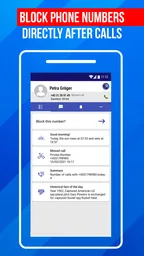
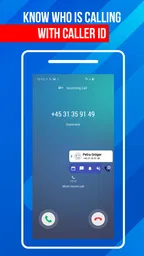
The core appeal is the combination of identifying unknown callers and blocking numbers after calls. That last part matters: a suspicious call does not always look obviously harmful before I answer or check it. Being able to act afterward gives me a straightforward way to turn a frustrating interruption into a decision—keep the number, block it, or treat future calls from it with caution.
I would not expect this to replace careful judgment. Caller identification can help me decide whether to answer, but it is not a guarantee that a displayed identity is correct or that every unwanted number will be recognized. I see the app as a useful layer between a ringing phone and my response, rather than as a complete shield from nuisance calls.
How it fits into an ordinary day
Imagine I am waiting for a delivery update while also receiving calls from numbers I do not recognize. Ignoring every unknown caller could mean missing something useful; answering each one could invite interruptions. A caller-identification and blocking tool offers a middle course: check who a call may be from, take the call when it seems relevant, and block a number that proves unwanted. That is the most convincing everyday use case for Call Block—not dramatic security, but less guesswork during a busy day.
It can also suit someone who receives repeated calls from the same nuisance number. Instead of relying on memory or repeatedly declining the call, I can use the app’s blocking purpose to make a lasting choice. The practical tip is to review an unfamiliar number before blocking it if there is any chance it belongs to a business, service provider, or person I need to hear from. Blocking is convenient, but an overbroad response can create its own problem.
People who rarely receive unwanted calls may find the benefit modest. A phone’s built-in call controls may already be enough if the main need is silencing or blocking a handful of numbers. Call Block makes more sense when unknown callers are a recurring source of uncertainty and I want a dedicated tool centered on that problem.
What the current version tells me
The current version is 3.1.0.2386, and the app first appeared on July 21, 2016. Those facts show that this is an established product rather than a newly introduced experiment. They do not, by themselves, reveal which features changed over time or how the caller database has developed, so I would not infer a particular redesign or improvement from the version number alone.
For someone already using it, the current release is the relevant experience to judge: the app is positioned around caller identification and call blocking, not a wholesale overhaul of the phone. If I were updating or installing it, I would focus on whether the current controls behave clearly on my own device and whether the numbers I care about are identified usefully. A version label can help distinguish the installed build, but it is not a substitute for checking whether the app suits my calling patterns.
That distinction is important when weighing the product’s evolution. Its release history establishes longevity, while the current version identifies the build available now. Neither fact proves that every older workflow has stayed unchanged or that the latest release adds a particular capability. I would treat the app’s current call-management role as the dependable point of reference and regard any future improvements as something to assess when they are actually available.
Where it stands beside built-in call controls
The usual alternative is to use the phone’s own call settings. Those controls are often the simplest choice when I only need to block a known number or silence calls in a predictable way. Call Block has a different draw: it brings unknown-caller identification into the same general task as blocking, which can be more useful when the number is unfamiliar and I need help deciding what to do.
That difference is not automatically an advantage for everyone. A built-in option may feel more direct if I prefer fewer apps involved in managing calls. A dedicated blocker may be preferable if unknown numbers are a regular nuisance and I want a focused place to handle them. I would compare the two by asking a concrete question: do I need help interpreting unfamiliar calls, or do I only need a simple way to reject numbers I already know?
There is also a trade-off between convenience and caution. The more I rely on an identification label, the easier it is to make a quick decision—but the label should be treated as guidance, not proof. If a call claims to be from a bank, government office, or other important organization, I would still verify it through a trusted channel rather than relying solely on the caller display. Call Block can reduce uncertainty; it cannot make every caller trustworthy.
Limits worth considering before installing
The app’s scope is deliberately call-centered. If I want a broad communications product for messages, contacts, or a complete replacement for my phone’s dialer, this is not the role it is presented to fill. That narrow focus is helpful when I want a specific tool, but less compelling if my main frustration lies elsewhere.
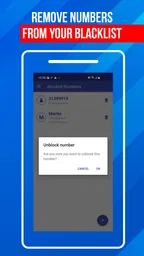
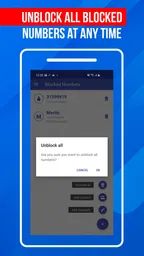
Another consideration is that blocking decisions can be inconvenient to reverse if I act too quickly. A legitimate caller may be unfamiliar, and some useful calls come from numbers I have not saved. My approach would be to use identification as a prompt to investigate, then block only when I am confident the number is unwanted. That small pause is particularly valuable if I am expecting calls about appointments, deliveries, repairs, or work.
The app is free, with optional in-app purchases ranging from $0.49 to $14.99 per item. I would start by seeing whether its basic call-management experience meets my needs before paying for anything. The existence of purchases does not tell me which extras a particular user will value, so I would judge them by the options shown in the app and avoid buying features simply because I hope they will solve a problem the core experience has not addressed.
Compatibility is another practical check: the stated minimum operating system is 10. If my device does not meet that requirement, this is not an option for it. Even on a compatible phone, I would take a moment after installation to understand how the app presents unknown callers and how I can undo a block. Clear controls matter more than an aggressive blocking style, because missed legitimate calls can be as frustrating as unwanted ones.
Who is likely to get the most from it
I would recommend considering Call Block if unfamiliar calls arrive often enough to interrupt work, family time, or errands, and if I want a dedicated way to identify and block numbers. It may be especially handy for someone who prefers to make a decision after seeing a call rather than manually building a block list from scratch. The app’s long presence and substantial user base make it a familiar option in its niche, while its average rating gives a useful, though not decisive, indication of how other users respond to it.
I would skip it if I almost never receive nuisance calls, if my phone’s built-in blocking already handles the issue, or if I am looking for protection that can guarantee every scam call is detected. I would also be cautious about depending on any caller-identification tool as the sole check for a high-stakes call. In those situations, a simpler built-in control or independent verification may be the better choice.
For a first-time user, a sensible workflow is to install the app, observe how it handles a few unfamiliar calls, and only then decide how readily to block numbers. I would keep a short mental distinction between “unknown,” “unwanted,” and “verified.” Unknown means I need more context; unwanted means I have a reason not to receive future calls; verified means I have checked the caller through a reliable route. That habit makes the app more useful without encouraging me to trust a label blindly.
My view of its next steps
Call Block has a clear job: make unknown calls easier to assess and unwanted numbers easier to block. Its present version gives me a concrete build to evaluate, while its release date shows that the product has been around for years. I would watch future releases for changes that make identification clearer, blocking easier to manage, or mistaken blocks simpler to correct—but those are the kinds of improvements I would hope to see, not claims about what the current version already does.
My overall recommendation is measured: if unknown callers are a regular nuisance, Call Block is worth considering as a focused call-management app. I would pair it with common-sense verification and avoid blocking numbers simply because they are unfamiliar. If basic phone controls already solve the problem, there may be little reason to add another app. For everyone else, its value comes down to one practical question: does it help me make calmer, better-informed decisions when the phone rings? That is the standard I would use before deciding whether to keep it.
What we like
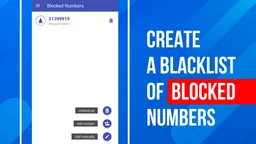
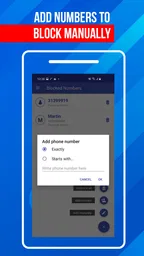
- Blocks unwanted calls from numbers you add to the list.
- Lets you review blocked calls for missed contacts.
- A straightforward interface makes blocking easy to manage.
- Can help reduce interruptions from repeat callers.
- Useful for keeping known nuisance numbers from reaching you.
What could be better
- Blocking unknown numbers may hide calls from legitimate contacts.
- Caller identification may be limited for numbers not in its database.
- Some features may require access to call and contact data.
- Blocked callers may still leave voicemail depending on your carrier.
- Effectiveness can vary with Android or iOS call-filtering rules.





