






Brave Private Web Browser, VPN review
 Analysis by Appsdrops
I judge a privacy-focused browser less by its promises than by the choices I can actually see and control. Brave is a communication app from Brave Software, but its day-to-day role is practical: it gives me a place to browse, search, and open links while keeping privacy tools close at hand. That makes it appealing if you want a browser that treats ad blocking and private browsing as central parts of the experience rather than add-ons you have to assemble yourself.
Privacy is most useful when it is visible
In ordinary browsing, the difference shows up in small decisions. I might open a news story from a message, look up a product while waiting for a bus, or check a page that asks me to sign in. Brave’s appeal is that it puts privacy-minded browsing within reach during those routines. Its store description also presents AI and VPN capabilities, though those should be considered alongside the browser’s actual controls and any purchase choices, not as a reason to assume every activity is automatically private.
The app has an average rating of 4.8 from around four million ratings, and it has passed over 100 million installs. Those figures suggest that many people have found it useful, but they are not a substitute for deciding whether its approach suits your habits. I would start by asking what you want to change: fewer ads and trackers, a separate space for private sessions, or a single browser that combines several tools. Brave makes the most sense when those goals are connected.
It is free to install and is rated for Everyone. The current version is 1.99.57, and the app requires Android 10 or later. In-app purchases range from $9.99 to $149.99 per item, so I would distinguish the basic browsing experience from optional paid services before committing. If you only need a straightforward browser, you can begin with the free app and decide later whether any paid offering is relevant to you.
What trust looks like in everyday use
For me, trust in a browser is not a single label. It comes from understanding what I am choosing in a particular moment. A normal tab, an incognito session, a sign-in form, and a paid service can all involve different expectations. Brave’s privacy-oriented identity gives me a reason to look closely at those distinctions, but I would still read each prompt and review the settings rather than treating the app name as a blanket guarantee.
That habit is especially useful when a page requests access to something sensitive or asks me to enter personal details. I pause to check whether the request makes sense for the task. A map may need location for directions; a random article generally does not. This is not a special trick unique to Brave, but it is a sensible way to use any browser, and it keeps the user’s decision—not a vague impression of “privacy”—at the center.
Brave is developed by Brave Software, a company whose name is closely associated with this browser. I find that context useful, but the practical test remains the same: can I see the controls I need, understand the choices in front of me, and avoid enabling extras I do not want? The app is strongest when I use it deliberately, rather than assuming that installing a privacy-focused browser removes the need to make informed choices.
Controls worth checking before you settle in
My first recommendation is to spend a few minutes exploring the browser’s settings instead of importing every habit from your old browser. Look for the controls related to privacy, ad blocking, and private browsing, then choose a setup that matches how you use the web. A person who reads public pages all day may prefer a different balance from someone who frequently signs into work, shopping, and banking accounts.
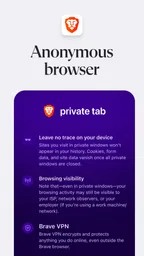
A useful workflow is to keep ordinary browsing for sites where you need a persistent sign-in and open a separate private session for a one-off lookup. For example, if I am comparing a product while borrowing someone else’s device or checking a topic I do not want mixed into my usual browsing routine, I can choose a private session for that task. Incognito browsing is not a magic shield: it should not be confused with anonymity from every service or network. The important benefit is having a distinct browsing mode for a specific purpose.
Another practical habit is to review a page before granting a request. If a site asks for a permission that does not fit what I am doing, I decline it and see whether the page still works. This prevents the familiar “allow everything to get past the prompt” routine. Brave can help make privacy choices more salient, but it cannot decide whether a particular website deserves access; that judgment is still yours.
I would also treat any VPN option as a separate decision from ad blocking or incognito browsing. These tools address different concerns, and one should not be assumed to replace the other. Before paying for a VPN-related service, check the offer and its terms in the app, confirm that it covers the devices or use you care about, and decide whether you need it. The presence of an option does not mean every user will benefit from buying it.
Where privacy choices meet real browsing
Imagine you are on a lunch break and a colleague sends a link to an unfamiliar article. You open it, find the page crowded with ads, and then follow a few links to compare the story with other sources. A browser designed around ad blocking can make that reading session feel less cluttered. If you then need to sign in to a service, it is worth switching from casual reading to a more attentive mode: check the address bar and the sign-in page, and avoid entering credentials just because a page looks familiar.
That example captures both the strength and the limit. A cleaner page can reduce distractions and make it easier to focus on the article, but ad blocking can also affect how some sites behave. If a page refuses to load a feature or asks you to disable protection, I would first decide whether the site is one I trust and whether that feature is necessary. I would not turn protections off reflexively for every prompt. When a particular site depends on advertising or scripts to function, another browser or a carefully adjusted setting may be the less frustrating choice.
AI is part of the way Brave is presented, but I would be cautious about using any AI feature for sensitive material unless I understand the specific interaction and its controls. For everyday questions or summarizing non-sensitive content, it may be convenient. For private documents, account details, health information, or work material, I would check what is being shared before submitting it. A browser’s privacy positioning does not automatically answer how every separate feature handles a particular input.
The same care applies to account access. When a service offers its own sign-in choices, I consider whether I need to be logged in at all. Reading a public page often requires no account, while syncing or personalization may. Keeping those decisions separate is a small but useful way to limit unnecessary sharing. It also makes troubleshooting easier: if a site behaves differently, I can test whether the issue is tied to the account, the page, or the browser’s protections.
How it compares with familiar browser choices
Compared with a browser that prioritizes familiarity and broad integration with an existing account, Brave feels more focused on blocking ads and giving privacy-minded browsing a prominent place. That focus is a good fit if you are tired of installing separate extensions or repeatedly adjusting a conventional browser. On the other hand, someone who depends on a particular browser’s ecosystem, synchronized workflow, or specialized extensions may find that staying with their current choice is more convenient.
Compared with using a dedicated private browser or a standalone VPN, Brave offers a more unified starting point, but those categories are not interchangeable. Private browsing is a mode, ad blocking changes what loads on pages, and a VPN is a separate service with its own scope and terms. If your main need is protecting traffic on public Wi-Fi, evaluate the VPN option specifically instead of assuming the browser’s other privacy features cover that need. If your main need is simply reading pages with less advertising, you may not need to pay for anything.
There is also a compatibility trade-off. Stronger blocking can occasionally disrupt a site’s login, embedded media, or interactive elements. When that happens, I prefer to make a narrow adjustment for the page I am using rather than weakening my normal setup everywhere. If you frequently use sites that break under blocking, or you need a browser that behaves exactly like a particular workplace environment, a more conventional option may save time.
Who I would recommend it to—and who should skip it
I would recommend Brave to someone who wants ad blocking and privacy controls built into a mobile browsing routine, and who is willing to inspect settings rather than relying on default assumptions. It is also a sensible option for people who open many links from messages and social apps and want a more controlled place to read them. The free starting point makes it easy to test whether the approach feels comfortable before considering optional purchases.
I would hesitate to recommend it to someone who expects a browser to make every privacy decision on their behalf. No browser can guarantee that every site is trustworthy, that every permission request is appropriate, or that every online interaction is anonymous. People who depend on a specific extension, a closely integrated account ecosystem, or a site that does not work well with ad blocking may be happier with a different browser for those tasks.
Before switching, I would test the sites you rely on most: banking, work tools, travel services, shopping, and any pages that require two-step sign-in or embedded media. Check that they function as expected with your preferred protections enabled. If something fails, identify the specific setting that affects it and decide whether a limited exception is worth making. That test is more useful than judging a browser by a single quick visit to a news page.
A cautious recommendation
My overall view is positive, with one important qualification: Brave is best understood as a set of useful browsing choices, not as a promise that privacy takes care of itself. I like the emphasis on ad blocking and the ability to separate ordinary browsing from an incognito task. I also appreciate that it can serve as a free everyday browser without requiring an immediate purchase. Its average rating and broad adoption offer context, but your own compatibility test matters more.
My practical recommendation is to install Brave, review its privacy controls, and use it for a week on the pages you actually visit. Pay attention to what works, what breaks, and whether the available choices are clear enough for you. Keep sensitive inputs out of features whose handling you have not checked, and treat paid VPN access as a separate purchase decision. If those habits fit your needs, Brave can be a thoughtful daily browser; if you need a tightly integrated ecosystem or maximum compatibility without adjustment, your existing browser may still be the better tool.
What we like
- Built-in ad blocking can reduce clutter on many websites.
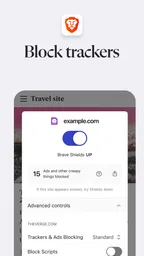
- Shields settings let you adjust protection for individual sites.
- Private tabs with Tor add an extra browsing option.
- Brave Wallet is available without a separate app.
- Bookmarks can sync across devices using a private sync chain.
What could be better
- Some websites may not work correctly until Shields are adjusted.
- Brave Rewards availability varies by region.
- The built-in wallet may be unnecessary for users who do not use crypto.
- Sync setup requires access to the existing device or recovery phrase.
- The VPN requires a paid subscription after its trial period.





