


Boost Mobile review
 Analysis by Appsdrops
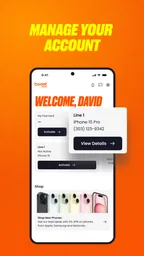
Managing a mobile account is not the same as communicating with people, but it can still affect how easily I stay connected. When I need to check my Boost Mobile service, I would rather handle the account from my phone than interrupt an ordinary day to look for a computer or make a call. Boost Mobile is a free communication app from DISH Wireless L.L.C. built around that practical, account-management role—not a messaging platform or a replacement for the phone service itself.
Keeping the account side of staying connected in order
The distinction matters. If you are looking for chat, video calls, or a shared inbox, this is the wrong kind of app. Its value is in giving Boost Mobile customers a mobile place to manage their account. That narrower purpose can be useful precisely because it avoids turning account upkeep into another stream of conversations and notifications.
I see the best fit as someone who wants a direct route to account tasks and prefers checking them when it suits them. Instead of treating every service question as a reason to contact support, you can start by opening the app and looking at your account. That does not guarantee every issue will be solved there, but it gives routine account management a more self-directed starting point.
It is also a specific choice: the app makes sense when your mobile service is with Boost Mobile. Someone using another carrier should look to that carrier’s own account tools, while a person who rarely needs to manage their service may be perfectly content with whatever account access they already use. The app is not inherently useful just because it is free; its relevance depends on whether you are a Boost Mobile customer who wants account access on a phone.
A quieter kind of communication workflow
Because this is an account app rather than a social one, its “conversation flow” is really the path between noticing a service question and taking a practical next step. The useful habit is to check the account when you have a reason, deal with the task at hand, and then leave—rather than letting a small uncertainty sit in your mind or turning it into a support interaction before you have looked for yourself.
A realistic example: you are about to head out and wonder whether you should take care of an account matter before the day gets busy. Having the carrier’s app on your phone gives you a place to begin. You can check what the account presents and decide whether you are done or need further help. This kind of quick, task-based visit can reduce the mental overhead of keeping service details in the back of your mind.
My practical tip is to use it with a specific question in mind. Open the app because you need to deal with your Boost Mobile account, not out of habit. That keeps the interaction focused and makes it easier to notice when the app has answered your question—or when the issue requires another route. It is a small distinction, but it helps prevent account checking from becoming aimless screen time.
There is a trade-off here. A dedicated carrier app keeps account management separate from texting and calls, which can make the task easier to find. But it also means one more app to keep on your device and remember when a service issue comes up. If you prefer handling everything through a browser or speaking with a person, the app may not change your routine much.
Attention, interruptions, and what the app is for
Boost Mobile belongs to the broad communication category, but I would not judge it by the standards of a messaging app. Its role is administrative: help customers manage the service that supports their everyday calls and data use. That focus is a strength for people who want account tasks kept apart from conversations, and a limitation for anyone expecting a single place to manage all their digital communication.
Account tools can also encourage more deliberate attention. Rather than calling support immediately whenever something feels unclear, I would first use the app as a self-service checkpoint. If the information available there resolves the concern, that is a more contained interaction. If it does not, I can move on to another support option with a clearer idea of what I need to ask. The important point is not to assume an app can settle every account question.
At the same time, adding an app does not automatically reduce interruptions. If you already have a routine that works, installing another tool may simply create another place to check. I would avoid opening it repeatedly without a concrete reason. Treating it as an on-demand account utility, rather than a feed to monitor, is the more sensible way to keep it from competing for attention.
That makes the app a poor fit for someone seeking communication features such as messaging people, organizing group conversations, or managing notifications across several services. It is also not the right answer if the underlying need is help with a complex issue that requires a human response. In those situations, the account app may be a starting point, but a direct support channel or another appropriate option is likely the better next step.
Boundaries that make account management easier
I like the boundary implied by a focused carrier app: personal conversations stay in their usual place, while service administration happens separately. That separation can help when you are trying to keep practical tasks from taking over your messaging apps. It also gives you a simple rule: open the carrier app when the question concerns your Boost Mobile account, and return to your day once you have handled what you came to do.
A second useful habit is to distinguish between an account question and a phone problem. The app is intended for managing the Boost Mobile account; it should not be treated as a general diagnostic tool for every issue with a handset, signal, or another app. Starting in the right place saves time. If your concern is specifically about the account, this is a reasonable first stop. If it is about the device or a separate service, the relevant device settings or support route may be more suitable.
One point to consider before relying on any account app is access. A mobile tool is convenient when your phone is available and you can sign in, but it is less useful if you cannot get into the account or do not want to handle account tasks on that device. I would keep an alternative way of getting help in mind for those moments. That is not a reason to avoid the app; it is simply a sensible boundary around what a phone-based account tool can do.
The app is free and rated for Everyone, which makes it easy to consider as a practical utility rather than a paid add-on. It has an average rating of 4.6 from around 317,000 ratings, and it has been installed over five million times. Those figures suggest that many people have chosen it for the same basic need, but they do not tell me whether it will suit your personal account habits. The deciding question is whether you want Boost Mobile account management available on your phone.
What to expect before making it part of your routine
The app was released on October 13, 2021, and its current version is 4.1.29. It requires Android 8.0 or later. If you are using an iPhone, check the app store for the version and device requirements that apply there before installing; the Android requirement should not be assumed to describe the iOS app.
Another practical question is whether you can use it without already being a Boost Mobile customer. Since its purpose is account management, I would approach it as a tool for existing customers, not as a general communication app or a way to compare carriers. If you are deciding whether to switch, first compare the service options that matter to you; an account-management app does not answer the larger question of which carrier fits your needs.
Compared with the usual alternatives, the choice is mostly about convenience and preference. A carrier’s mobile app puts account management on the device you already carry. A browser can be preferable if you would rather not install a dedicated app, and customer support is more appropriate when you need assistance beyond what self-service can resolve. None of those routes is universally best: I would use the app for a routine account check, a browser when I want a larger screen or fewer apps, and support when a person’s help is needed.
DISH Wireless L.L.C. develops the app, and the large group of users reflected in its roughly 36,000 written reviews gives prospective customers plenty of feedback to weigh alongside their own needs. I would still focus less on the headline figures than on the app’s purpose. A high average rating does not make it useful to someone who is not with Boost Mobile, and a carrier app cannot replace a broader communication tool.
My verdict: useful when the account is the task
Boost Mobile is worth considering if you already use the carrier and want a phone-based way to manage your account. Its strongest case is simple: it gives account maintenance a dedicated place, so you can handle a service-related task without mixing it into your messages or making every question a support call. For someone who checks their account only occasionally, that focused access may be enough to make the app worthwhile.
I would skip it if you are searching for messaging, cross-carrier account management, or a tool that can solve every phone and service problem. I would also avoid adding it just because it is available if your existing method is faster and you rarely need account access. The app is most useful when it fits a real, recurring need—not when it creates an extra stop in your routine.
My recommendation is to keep it as an on-demand utility if you are a Boost Mobile customer who values managing account matters from a phone. Use it with a clear purpose, and switch to a browser or human support when the situation calls for something else. In that role, it can make the administrative side of staying connected feel more orderly without asking to become another place you spend your attention.
What we like
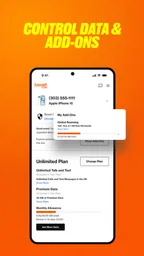
- Account tools make it easy to monitor data usage.
- Plan options can suit different budgets and usage habits.
- In-app support helps users find answers without calling.
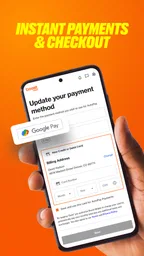
- Payment reminders can help prevent missed due dates.
- The app provides a convenient way to manage Boost Mobile service.
What could be better
- Some features may require an active Boost Mobile account.
- App performance can vary by device and operating system.
- Troubleshooting options may not resolve every network issue.
- Plan availability and features can differ by location.
- Some account changes may still require contacting customer support.





