

bitchat review
 Analysis by Appsdrops
I’m interested in chat tools that don’t assume every conversation has to work like a conventional messaging service. bitchat takes a different angle: it is a free communication app built around decentralized mesh chat. That idea gives it a distinct appeal, but it also means I would choose it for a particular kind of conversation rather than replace all my regular messaging with it.
What free access makes possible
There’s no purchase price to weigh against the app’s usefulness: bitchat is free to install. That makes trying it a low-commitment decision, especially if you’re curious about mesh-based communication or want to see whether it fits a group activity. Free access is a clear advantage, though it doesn’t by itself tell you how well the app will suit your needs.
The app is made by Verse Communication PBC and sits in the communication category. It has an Everyone age rating, so its store classification is broad rather than aimed at a narrowly defined age group. I’d still make sure anyone in a group understands what the app is for and how the group plans to use it; an age label doesn’t replace practical guidance about communicating responsibly.
Its reach suggests that it has attracted real interest: bitchat has over a million installs. The average rating is 3.7 from around 4,800 ratings, with 132 written reviews. I take that as a reason to approach it with measured expectations, not as proof that it will work equally well for every person or situation. For a communication app, personal fit and the conditions where you use it matter a lot.
A different kind of chat value
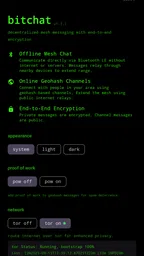
The useful distinction is the mesh approach. Rather than judging the app only by whether it feels like another familiar inbox, I’d consider whether decentralized chat solves a problem for your group. If your usual setup depends on everyone being comfortable with the same mainstream service, bitchat offers a different model to explore. That difference is the main source of its value, not a long list of features I can assume it has.
For a casual user, the first question is practical: can the people you want to reach use the same app at the same time, and does the way it communicates suit the setting? A messaging tool is only valuable when it fits the habits and circumstances of its users. I would try it with one small, willing group before asking friends or colleagues to move important conversations over.
That small trial can be more informative than installing it alone. Pick a low-stakes plan, such as coordinating who is meeting where, and see whether everyone understands how to join and keep track of the conversation. Notice whether the group can use it without repeatedly falling back to another messenger for basic coordination. If it takes too much explanation for your particular circle, that is a meaningful result, even if the concept appeals to you.
A useful, non-obvious way to evaluate a mesh chat app is to separate the technology from the social workflow. Ask one person to start the conversation and another to join without being coached through every step. Then check whether late arrivals can follow the plan and whether the group agrees on which app to check. This tests the actual coordination cost—the part that can make a promising tool frustrating in everyday use.
Where it might fit into an ordinary day
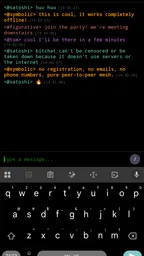
Imagine a few friends arranging to meet at a busy outdoor event. One person is sorting out the meeting point while another is running late, and the group wants a shared place to coordinate rather than sending separate updates. If everyone has already installed bitchat and knows to look there, it could be a useful alternative channel to try. I would keep the plan simple and avoid making the app the sole route for time-sensitive information until the group has confirmed that it works for them in that setting.
That scenario also points to a sensible habit: agree on a fallback before relying on a less familiar communication tool. A group can decide in advance what to do if someone misses a message or can’t participate. This isn’t a claim about a particular app feature; it’s a practical safeguard for using any chat service in a real-world meetup. It matters especially when the conversation is coordinating people who are moving around rather than sitting together.
Another thoughtful use is a temporary conversation for a shared activity, where people can experiment without disrupting the main messaging habits they already depend on. Keep the scope narrow: use it for the activity’s coordination, and leave ongoing personal or work conversations in whatever service the group already checks reliably. That makes it easier to judge whether bitchat adds something useful instead of turning a trial into an all-or-nothing migration.
Tradeoffs against familiar messengers
Most people already have an established messaging app, and that familiarity is a real advantage. Friends know where to look, groups have existing habits, and there is less need to explain a new setup. I wouldn’t switch a whole household or team simply because decentralized mesh chat sounds appealing. The alternative has to be useful in the specific situation, and the people involved have to be willing to use it.
The tradeoff is that choosing a different communication model can add friction before it removes any. A group may have to agree on when to check the app, how to handle missed updates, and whether it is meant for everyday messages or only a particular activity. If nobody wants another app to monitor, the practical value can disappear quickly. A free download still costs attention and coordination.
I also wouldn’t assume that the word “mesh” answers every question a prospective user might have about reach, reliability, privacy, or how conversations behave. Those concerns are important, but they need clear, app-specific answers rather than guesses based on the label. Before using any chat tool for sensitive discussions or essential coordination, I’d look for trustworthy explanations of how it works and decide whether those details meet my needs.
That caution is not a reason to dismiss the app; it is a reason to match it to the stakes. A casual group plan is a better first test than an urgent work exchange, a private conversation, or a situation where someone must receive a message at a precise moment. If a conventional messenger already handles your important communication reliably, keep using it for that job while you evaluate bitchat separately.
Who is most likely to get value
I’d recommend giving it a try if you are specifically curious about decentralized mesh chat and have a few people willing to test it with you. The best candidate is not necessarily someone looking for a new default messenger. It is someone with a concrete reason to explore this approach, a group that can coordinate a trial, and enough patience to judge the experience in context.
It may also suit people who enjoy comparing communication tools rather than treating every new app as a permanent replacement. A short, low-stakes trial can tell you whether your group finds the approach useful. Keep the test focused, ask participants what confused them, and decide together whether it earned a place in your routine. That process gives you a better answer than judging by the app’s concept alone.
I’d skip it for now if your main need is simply a familiar chat app that all your contacts already use. It is also a poor choice as your only channel for a critical plan before you have established that your group can use it comfortably. In those cases, the convenience of the service people already check may matter more than the appeal of trying a different model.
For newcomers, I’d start by installing it alongside—not instead of—their regular messenger. Invite a small group, choose a simple conversation, and agree on a backup channel. If that trial feels natural, you can decide whether to use it for more. If it creates confusion, you’ve learned that the idea or workflow is not a fit for your group without risking an important conversation.
My recommendation
In my view, bitchat is worth considering as a free experiment for people who have a genuine reason to explore mesh-based communication. Its value comes from offering a different approach, while the main tradeoff is the effort of getting a group to adopt and use another chat app. I would not recommend it as an automatic replacement for the messenger your friends already rely on.
With its average rating of 3.7, the app appears to inspire a mixed rather than universally enthusiastic response. That fits my practical advice: try it with a modest, low-risk use case and judge how well it works for your own group. The app is free, so there is no purchase decision to make, but there is still a decision about whether the extra coordination is worthwhile.
My buy-or-skip verdict is simple: there is nothing to buy, and curious users can test it without paying. I’d install it if I had a small group ready to explore decentralized chat and a specific activity to coordinate. I’d skip making it my primary communication app until it had proved itself in my own circumstances. Try it for a limited, low-stakes conversation first; keep your dependable alternative available.
What we like
- No account or phone number is needed to get started.
- Nearby chat can work without internet access.
- Bluetooth mesh can extend messages beyond direct range.
- End-to-end encryption helps protect private conversations.
- Open-source code can be reviewed by the community.
What could be better
- Offline range depends on nearby devices running the app.
- Few nearby users can make mesh chat less useful.
- Messages may not reach recipients who are out of range.
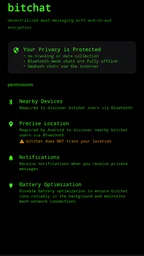
- Bluetooth and location permissions may be required.
- It is not a replacement for reliable emergency communication.





