






Bandana Job Search review
 Analysis by Appsdrops
Finding work nearby sounds simple until a promising listing turns out to be too far away, the pay is unclear, or the application process sends you elsewhere. Bandana Job Search is a business app from Bandana that puts location and pay near the center of a job search. I like that focus: it can help make the first pass through local openings more practical, though it is best treated as one tool in a broader search rather than a guarantee of a suitable job.
Start with the search that matters
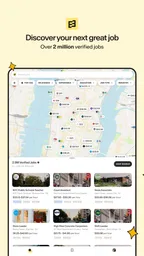
The app’s map-based approach is useful when geography affects whether a job is realistic. Rather than beginning with a long list of titles, I would first consider the area I can actually reach and use the map to explore nearby opportunities. That can be especially helpful if you are comparing several neighborhoods, relying on public transport, or trying to fit a new role around family responsibilities.
Bandana describes its job pool as containing more than two million verified opportunities. That is a substantial range to explore, but a large pool does not remove the need to check each listing carefully. “Near me” can still mean an inconvenient commute, and a job that looks suitable on a map may not match your schedule, experience, or preferred kind of work.
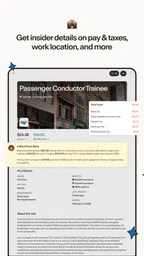
The pay information is another practical starting point. Seeing real pay details can help you rule out jobs that do not meet your needs before investing time in an application. I would still read the full listing rather than treating a pay figure as the whole story: hours, location, responsibilities, and other terms all matter when deciding whether a role is worth pursuing.
When map search helps—and when it can mislead
A map is more than a visual alternative to a list if your search area is flexible. For example, someone who can work in several nearby districts can scan the map, compare clusters of openings, and then focus on places that make sense for a regular commute. That is a more grounded way to search than applying widely and discovering later that the location does not work.
There is a trade-off, though. A map can make distance feel clearer without explaining every detail that affects travel. I would use it to narrow the search, then inspect the job information and judge the journey for myself. If you already know the exact title and employer you want, a conventional search engine or a company careers page may be faster than browsing a map.
One useful habit is to decide your acceptable travel area before opening listings. Otherwise, it is easy to keep expanding the map because another job looks promising. Setting a boundary—by commute time or familiar neighborhoods—keeps the search focused and makes comparisons between roles more meaningful.
Setup checks that save time later
Before relying on nearby results, make sure the location you intend to search is the one you are actually using. If you are looking for work in a different area from where you are now, search with that destination in mind instead of assuming a map centered on your current surroundings will answer the right question. This simple check can prevent an apparently empty or irrelevant search from sending you down the wrong path.
It also helps to know what you want before browsing: acceptable pay, preferred distance, and the kinds of roles you are willing to consider. You do not need a perfect plan, but a few clear boundaries make it easier to recognize a promising listing and avoid spending time on jobs that were never realistic. If results feel too broad, tighten one criterion at a time rather than changing everything at once.
The app is free, and its content rating is Everyone. Its current release is version 1.0.37, with Android support beginning at version 7.0. I would check that your device meets that requirement if installation is an issue, then make sure the app is up to date before troubleshooting further. Those are basic checks, but they can separate a compatibility problem from a search problem.
For a first-time user, I would begin with one location and a manageable set of job preferences. Browse a few listings, note which details are useful, and then adjust the search. Starting with a highly ambitious search across a wide area can make the results harder to judge, especially if you are still working out what kinds of roles you want.
Recovering a search when it goes off track
If you see few relevant opportunities, do not immediately assume the app has failed. First check whether the search area is too narrow, whether your chosen terms are unusually specific, or whether you have ruled out roles you would actually consider. Relaxing one constraint at a time gives you a clearer sense of what is limiting the results.
If a listing catches your eye but the application does not move forward as expected, return to the job details and confirm that you have followed the steps shown there. Bandana says applying is free, which removes an important cost barrier, but that does not mean every employer’s process will feel identical. Keep a note of the employer, role, and date you applied so you can track your progress without relying on memory.
A practical workflow is to review a small group of listings, shortlist the realistic ones, and apply with care rather than sending the same rushed application everywhere. Before moving on, check that the role, location, and pay still fit your priorities. This takes a little longer per application, but it reduces the chance of pursuing a job that looked appealing only because it appeared prominently on the map.
If the app seems unresponsive, close and reopen it, check your connection, and try the search again. If the issue persists, update the app and restart the device before repeating the same action. These general steps are worth trying because a temporary connection or device problem can interrupt a search; they are not a reason to assume that a particular Bandana feature is broken.
What the ratings can—and cannot—tell you
Bandana Job Search has an average rating of 4.7 from around 4,300 ratings, with about 232 written reviews. It has more than 100,000 installs. That gives a prospective user some indication that others have tried it, but ratings cannot tell you whether the available jobs fit your location, work history, or schedule. I would treat them as context, not as a substitute for checking the listings yourself.
The broad promise of verified jobs is reassuring as a starting point, but I would still use ordinary care with any job-search service. Read the listing closely, make sure the role and employer details make sense, and be cautious if someone asks for sensitive information or money in a way that does not fit a normal hiring process. Free applications are a welcome feature, but good judgment remains part of applying safely.
When a different route is the better one
This app is most compelling when nearby work and clear pay are central to your search. It may be less useful if you are pursuing a specialist profession with a narrow set of employers, seeking remote-only work, or already targeting a particular company. In those cases, professional networks, specialist job boards, or direct employer career pages may offer a more focused route.
It also cannot make a job suitable simply by placing it close to you. A nearby role may have hours that do not fit, while a farther one may be worth considering if its schedule or conditions are better. I would compare the whole opportunity rather than letting distance dominate the decision. The map is a useful filter, not a final verdict on where you should work.
If you are searching urgently, avoid depending on a single app. Use Bandana to explore local openings, but keep a simple application record and consider other relevant channels as well. That approach matters particularly when your preferred role is uncommon or your location has a limited selection. It also gives you a way to continue searching if one source is temporarily unhelpful.
My practical verdict
Bandana Job Search is worth trying if you want to compare local opportunities with location and pay in view, without paying to apply. Developed by Bandana, it is a focused business app rather than a universal answer to every career search. I find its strongest idea to be the map-led way of narrowing possibilities before committing effort to applications.
Its limitations are mostly the ones that come with any broad job-search tool: relevance still depends on your area and preferences, and a map cannot judge whether a role suits your life. The most useful way to approach it is to set realistic boundaries, inspect each listing, and keep track of applications. If that sounds like the kind of search you need, its free entry point makes it a sensible option to test; if you need a tightly specialized or employer-specific search, pair it with a more targeted source.
What we like
- Search job listings by title and location.
- Browse openings across a range of industries.
- Save interesting jobs for later review.
- Use a mobile-friendly interface while searching.
- Get a focused tool for finding employment opportunities.
What could be better
- Listing availability may vary by location.
- Some job details may require visiting an external site.
- Search results may include outdated openings.
- The app may not cover every employer or industry.
- Finding a suitable role can still take time.





