



Amazon A to Z review
 Analysis by Appsdrops
I would judge Amazon A to Z less by how impressive it feels on day one and more by whether it makes the small, recurring tasks of working at Amazon easier to keep on top of. It is a business app from Amazon Mobile LLC, aimed at people who need a phone-based place to manage their work life. That makes it a practical tool rather than a general-purpose productivity app: its value depends on whether you work at Amazon and whether the tasks you need are available to you there.
Useful quickly, but only for the right routine
In the first few days, the appeal is straightforward. Instead of treating work-related tasks as another collection of things to remember, you can use one app as your starting point for managing them. For someone settling into a new role, returning after time away, or simply trying to build a steadier routine, having a familiar place to check work matters can reduce the mental shuffle between personal errands and job responsibilities.
The app’s focus is also its main boundary. This is not a general work organizer for people at any company, and it is not a replacement for every communication or planning tool a workplace might use. If you are not an Amazon employee, it is unlikely to become part of your day. If you are, its usefulness depends on the work processes made available to you and how often you need to check them.
I would approach the first week as a setup and habit-building period, not as a test of whether the app can solve every workplace problem. Open it when you have a specific work-life task to handle, then notice whether it saves a step compared with your existing routine. That is a more useful test than browsing around and expecting a full-featured personal dashboard to reveal itself immediately.
A realistic example: before leaving home, you want to check a work-related matter rather than rely on memory or wait until you are at a computer. A phone app can be convenient in that moment, especially when the alternative is postponing the task. But convenience does not mean every issue should be handled on a small screen. For anything that needs careful reading, extended typing, or a broader view of workplace information, a larger device or the relevant workplace channel may be the better choice.
Where it fits among work apps
Most people already have a calendar, email, messaging app, and perhaps a notes tool. Those are useful for personal reminders and communication, but they are not necessarily the right place to manage employer-specific work matters. A to Z has a narrower purpose: it is designed around work at Amazon, rather than trying to compete as a universal task manager.
That distinction is helpful if it keeps work tasks separate from personal plans. It is less helpful if you expect it to replace your calendar or handle conversations with colleagues. I would keep using the tools that already work for scheduling and communication, and treat A to Z as the company-focused part of the routine. Duplicating the same reminder in several places can create its own burden, so decide which app is the source of truth for each kind of task.
The app is free, has an Everyone age rating, and has a minimum Android requirement of version 7.0. It was released on August 29, 2018, and its current version is 6.0.5098.0. Those details make it easier to assess basic fit before installing, particularly if you are using an older Android phone. On the app store, it has an average rating of 4.1 from around 100,000 ratings, alongside roughly 16,000 written reviews and over 5 million installs. Those figures suggest broad use, but they do not guarantee that it will suit your particular role or routine.
What keeps it useful after the first week
Novelty is not a lasting reason to keep an app. The better question is whether it becomes the place you naturally check when a work-life task comes up. For an Amazon employee who regularly needs the app, that repeated purpose can justify its place on a phone without requiring constant exploration or customization. Its value is likely to come from dependable, occasional use rather than from spending a long time inside it each day.
One practical habit is to connect opening the app with an existing moment in your routine, such as checking work matters before a shift or reviewing them after a workday. The point is not to check it compulsively; it is to choose a sensible moment so that important tasks do not depend on a hazy memory. If you find yourself opening it without a reason, then forgetting what you intended to do, that is a sign to make the habit more deliberate.
Another useful approach is to separate “check” tasks from “act” tasks. A quick glance can be done on a phone, while a task that requires concentration is better handled when you have time and a comfortable screen. This small distinction helps prevent a work app from turning every spare minute into an invitation to deal with something. It also makes the app’s role clearer: a convenient access point, not a demand to stay connected all day.
For people whose work schedules or responsibilities change, the app may be more valuable during transitions than during settled periods. A new role, a changed routine, or a return to work can create more questions and more reasons to check work information. Once things become familiar, use may naturally taper off. That does not necessarily make the app useless; a tool can earn space through dependable access when needed, even if it is not opened constantly.
Maintenance without turning it into another chore
The maintenance burden should be modest if you use the app only for its intended work-related purpose, but no app is helpful when it becomes an unmanaged source of distraction. I would keep its notifications and checking habits aligned with what you genuinely need. If alerts interrupt personal time without helping you act, review the phone’s notification controls and decide which interruptions are worth keeping. That is a general device setting, not a reason to check the app repeatedly.
It is also sensible to keep your phone’s operating system and the app reasonably current, especially when a work tool is part of a recurring routine. Updates can change how an app behaves, so after installing a new version, take a moment to confirm that your familiar workflow still works as expected. The current Android version listed is 6.0.5098.0, and the minimum system requirement is Android 7.0. If your device is older than that, you will need a different way to access the work resources you rely on.
For anyone sharing a device or using a phone that other people can access, treat a work app as a place for work-related information and use the phone’s normal privacy protections. I would avoid leaving a work session open on a device that is not under your control. This is a simple precaution that applies especially when a phone is shared at home or used by several people, rather than a claim about any particular security feature in the app.
There is also a useful limit to what a phone should be responsible for. If a task is important, do not rely solely on remembering that you once saw it in an app. Make sure you complete the relevant action through the appropriate work process, and use a separate reminder only if that genuinely helps. This avoids the common trap of treating “I checked” as the same thing as “I finished.”
Where fatigue can set in
The main source of fatigue is not necessarily the app itself; it is the feeling that work follows you everywhere simply because it is available on your phone. If checking work information starts to interrupt meals, downtime, or personal plans, the convenience has tipped into friction. A deliberate check-in routine and sensible notification choices can help, but someone who prefers a hard separation between work and personal devices may find any work app on a personal phone unwelcome.
A second limitation is that a focused employee app cannot replace the full range of tools people use at work. You may still need other channels for communication, detailed tasks, or information that is easier to review on a computer. That means A to Z can simplify one part of a work routine without making the whole routine self-contained. If your goal is one app for every work need, this is the wrong expectation.
It may also feel less useful once you have learned your regular process. That is normal for a utility: an app can become more valuable through consistency even as it becomes less interesting. If you are only evaluating it by how many times you open it, you might mistake low-frequency usefulness for failure. On the other hand, if you rarely need its work-focused functions and your existing routine is already clear, keeping it installed may not add much for you.
That is why I would not recommend it to someone who is simply looking for a generic business app, nor to someone outside Amazon who has no work reason to use it. A general calendar or task manager will be more suitable for organizing personal projects, freelance work, or a job at another employer. A to Z makes sense when its connection to your Amazon work is the reason you need an app in the first place.
A lasting place for a specific job
Amazon A to Z earns a lasting spot when it regularly removes a small piece of friction from your work routine. Its strength is not that it should occupy your attention all day; it is that it gives Amazon employees a dedicated mobile place to manage relevant work-life matters. That focused role is more useful than a broad promise to organize everything, provided you know what you want to use it for.
I would keep it installed if I worked at Amazon and found myself returning to it for recurring tasks or checks. I would also give it a fair first-week trial, pairing it with a specific moment in my routine rather than expecting immediate, dramatic change. After that, the decision is simple: if it saves effort when a real need comes up, it has earned its space; if it adds another place to check without helping you act, your existing tools may be enough.
Overall, this is a practical, narrowly aimed business app rather than an all-purpose productivity companion. The fact that it is free lowers the barrier to trying it, while its Amazon-specific purpose defines who is likely to benefit. My recommendation is measured: it is worth keeping for employees whose work routine makes use of it, but it is not a must-have for people who do not need that connection. The lasting value comes from a repeatable, useful habit—not from opening it just because it is there.
What we like
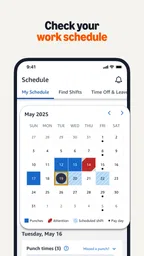
- Employees can check schedules and request time off in one place.
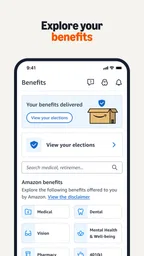
- Pay details and benefits are accessible from a mobile device.
- The app provides updates about workplace news and announcements.
- Employees can review their attendance and time records.
- Useful self-service tools reduce the need to contact HR for routine tasks.
What could be better
- Access is limited to eligible Amazon employees.
- Some features may vary based on role and work location.
- Login or verification issues can make account access difficult.
- Notifications may not always arrive promptly.
- Some tasks are easier to complete on a larger screen.





