All Document Reader:PDF Viewer review
 Analysis by Appsdrops
I judge a document reader less by the number of formats it claims to open and more by whether it helps me get to the information I need without extra effort. All Document Reader:PDF Viewer is a business app from One Stop Apps, built around opening everyday documents on a phone. Its appeal is straightforward: keep a PDF, a spreadsheet, and other work files within reach instead of hunting for a separate app for each one. In my view, that convenience matters most when reading is the main task. It matters less if you need to edit documents, collaborate with a team, or rely on a carefully tailored accessibility setup.
Reading and finding your way through documents
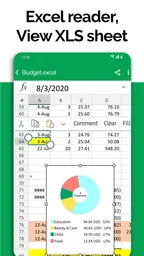
The app’s central job is to act as a reader for documents such as PDFs and Excel files. That makes it a practical option for checking a form, viewing a spreadsheet, or reading a file someone has sent you. The benefit is not that every document becomes easier to understand; it is that you can try opening different kinds of files in one place rather than switching immediately among several dedicated viewers.
For a short PDF, the useful test is simple: can I open it, read the relevant passage, and return to the rest of my day? For a spreadsheet, the more important question is whether I can inspect the information on a small screen without losing track of the row or column I care about. These are different reading tasks, and a general-purpose reader can be handy for both, but it should not automatically be treated as a full substitute for a desktop spreadsheet or a specialist PDF tool.
I would use it for quick reference rather than assume it is the best place to do detailed document work. A meeting agenda, a basic invoice, or a sheet of figures may be manageable on a phone. A long report with dense tables or a workbook that depends on careful comparison is a different matter: the phone display itself can make orientation and close reading harder, regardless of which reader opens the file.
One useful habit is to decide what you need from a file before opening it. If you only need one amount or a single paragraph, a general reader may be enough. If you need to compare several spreadsheet columns, verify the appearance of a complex PDF, or make changes that must remain intact, I would move to a tool designed for that job. This distinction saves time and avoids blaming a reader for limitations caused by the mobile screen or the document itself.
The app is free to install, and its average rating is 3.3 from around 10,000 ratings, with 204 written reviews. That mixed reception is a reason to keep expectations measured: it may suit people who want a convenient reader, but I would test it with the files I actually use before making it part of an important work routine. It has over 10 million installs, which suggests it has reached a broad audience, not that every workflow will feel equally smooth.
Small-screen reading takes planning
For people who find small text tiring, a phone is often the main obstacle. A document that looks comfortable on a laptop may require repeated zooming on a handset. I recommend checking whether the passage remains readable at a comfortable viewing size rather than trying to force an entire page onto the screen. That can mean reading a PDF in sections instead of scanning a full page at once.
With spreadsheets, I find it helpful to focus on a narrow question: locate a particular figure, check a short list, or confirm whether a value is present. Trying to understand a wide sheet as though it were a printed page can create needless visual and mental effort. If the spreadsheet is central to your work, a dedicated spreadsheet app or a larger screen is usually the safer choice for detailed review.
Document structure also affects readability. A clean, text-based PDF is generally a more comfortable reading prospect than a scan of a page, and a simple sheet is easier to inspect than one packed with small labels. That is a practical distinction to keep in mind when deciding whether the reader is enough: the app can open a file, but it cannot make every source document well organized or legible.
Motor and sensory needs deserve a real-world check
People with limited dexterity may find frequent pinch gestures, small controls, or repeated navigation tiring in any mobile document workflow. I would try the app with the kind of file I expect to read and notice whether I can move through it without awkward, precise gestures. If those actions are difficult, the better choice may be a device or reading setup that offers more comfortable controls, rather than assuming a general reader will solve the problem.
Visual comfort is personal, too. Some readers need larger text; others are sensitive to glare, contrast, or busy pages. Before relying on this app for extended reading, I would check how its document display behaves on my own phone and whether the relevant text is comfortable under the lighting where I usually read. I would not choose it on the assumption that it includes a particular accessibility mode or assistive feature unless I had confirmed that directly in the app.
That caution is not a knock on the basic idea. A single place to open common work files can reduce the effort of remembering which viewer handles which document. But fewer app switches do not necessarily mean less physical effort: if reading requires repeated zooming or careful touch input, the overall experience may still be demanding. A brief trial with a real file is more informative than relying on a broad promise of convenience.
Where it fits into an ordinary day
Picture receiving a PDF form while away from your desk and needing to check one date before replying. A general document reader is a sensible first stop: open the attachment, inspect the relevant section, and decide whether it is enough to answer. If the form is lengthy or the wording needs careful scrutiny, I would leave the final review for a larger screen rather than treating a quick phone check as a substitute for a thorough read.
A similar use case is checking a spreadsheet someone shares before a short conversation. You might want to confirm a total or remind yourself which figures are being discussed. That is different from building formulas, correcting a workbook, or auditing its contents. For those jobs, a dedicated spreadsheet editor is a better fit because the task calls for more than simply viewing information.
It can also be useful when you do not know in advance which familiar document type will arrive. A general reader reduces the need to install a new viewer just to inspect an occasional file. The trade-off is specialization: people who spend most of their day in PDFs or spreadsheets may prefer a dedicated app whose controls and tools are centered on that format.
Choosing between a general reader and specialist apps
Compared with opening every file in its own dedicated app, an all-purpose reader can make casual access simpler. I would consider it for someone who receives a mix of documents and mainly needs to view them. It is particularly reasonable as a lightweight first attempt when a file is not important enough to justify a more involved workflow.
Dedicated PDF apps are usually the more natural choice when the work depends on detailed annotation, document review, or a predictable reading process. Spreadsheet apps are preferable when you need to edit cells, inspect formulas, or compare a broad table carefully. A desktop remains stronger for tasks where a wide view and precise input matter. Those alternatives are not necessarily better for every person; they are better when the task demands capabilities beyond quick viewing.
There is also a practical decision to make around payments. The app is free, while in-app purchases range from $2.99 to $49.99 per item. I would first establish whether the free experience handles my ordinary files and only consider spending if a specific paid option clearly solves a problem I have. That is more sensible than paying simply because a file reader appears in a business category.
What to check before depending on it
When I try a document app, I start with a low-stakes file and work through the steps I will actually repeat: open it, find a useful section, read it at a comfortable size, and return to the file list. For a spreadsheet, I check whether the rows and columns I need are understandable on my phone. This small test reveals more than installing the app and assuming every format will behave equally well.
I would also separate “can open” from “can work with.” If your goal is to read a document, a reader may be all you need. If you need to make changes, add notes, share a revised version, or preserve formatting precisely, confirm that the app supports the exact action before building your process around it. When a document has consequences for work or finances, review it in the tool best suited to the task.
The current version is 3.2.7, and the minimum operating system requirement is Android 7.0. It is rated for Everyone, which makes it broadly suitable from an age-rating standpoint. Those details do not determine whether it will be comfortable for a particular person, though; device compatibility and personal reading needs are separate questions worth checking before regular use.
A measured verdict on inclusive everyday access
All Document Reader:PDF Viewer is most convincing as a convenient way to try opening common documents on a phone, especially when your need is occasional and straightforward. I can see it helping someone check a PDF between errands or glance at a spreadsheet before a conversation. The strongest case for it is reduced friction between receiving a file and seeing what is inside.
Its limits matter just as much. A general reader should not be mistaken for a robust editing suite, a specialist PDF workflow, or a comfortable solution for every visual or motor need. If repeated gestures, small text, dense tables, or careful document changes are part of your daily routine, I would compare it with a dedicated alternative and test both using the same file.
One Stop Apps has made a free business app that may suit people who value broad, quick access over deep tools for one format. I would recommend trying it with a simple, nonessential document first, then deciding based on readability and navigation on your own device. Its real value is convenience when the job is simply to read; the right alternative is the one that removes barriers when the job becomes more demanding.
All Document Reader:PDF Viewer is therefore worth considering for casual document checks, but I would not make it my only option for complex work or accessibility-critical reading without a hands-on trial. The app is at version 3.2.7, and its 3.3 average rating reinforces my practical approach: see how it handles your files, rather than expecting one reader to suit every task and every reader.
What we like
- Opens common document formats alongside PDF files.
- Includes a search function for finding text in documents.
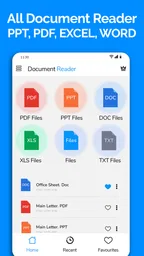
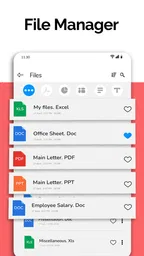
- Recent files are easy to access from the home screen.
- Zoom controls make small text easier to read.
- Works offline for viewing documents stored on your device.
What could be better
- Some file formats may not display with perfect layout fidelity.
- Large documents can take longer to open on older devices.
- Editing and annotation tools may be limited.
- Ads can interrupt the reading experience in the free version.
- The app may request broad file access to locate documents.





