

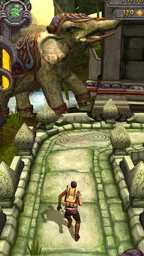
Temple Run 2: Endless Escape review
 Analysis by Appsdrops
I find Temple Run 2 easiest to enjoy in short bursts: one hand on the phone, eyes on the path, and a quick swipe or tilt when danger comes into view. It is an action game built around a straightforward idea—keep moving through a hazardous temple route for as long as you can—but the pace makes even a brief run feel lively. The appeal is immediate, though the controls and constant motion also mean it will not suit every player or every situation.
Reading the route and learning the controls
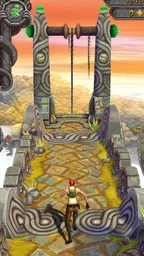
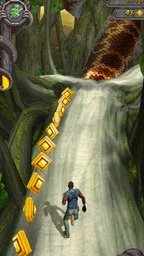
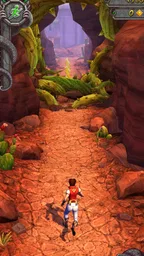
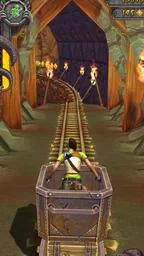
The screen communicates its main challenge through the route itself. I watch for gaps, turns, low obstacles and hazards, then respond with a swipe or a change in direction. There is little to learn before starting, which makes the game welcoming when I want to play rather than study a tutorial or manage a complicated menu. Imangi Studios keeps the core loop focused on reacting and trying again.
That simplicity does not make the course effortless. At speed, a bend or obstacle can arrive while I am still processing the previous one. A useful habit is to look a little farther ahead than the character rather than fixating on the runner. It gives me more time to distinguish a turn from a jump, and it reduces the rushed swipes that send a run off course. This is a small adjustment, but it matters more than tapping faster.
Visual clarity is also affected by the phone and the player’s viewing conditions. A bright screen, comfortable text and a steady grip can make it easier to follow the action, but I would not call the experience a low-stimulation one: the environment scrolls continuously and the player has to keep monitoring it. Someone who finds rapid visual changes tiring may prefer brief sessions, or a slower game that lets them inspect a scene before acting.
Temple Run 2 is listed as an action game, and its broad audience is reflected in an Everyone 10+ age rating. That does not mean its moment-to-moment demands are equally comfortable for everyone. A new player can understand the objective quickly, while someone who has difficulty tracking moving imagery may find the same constant forward motion hard to follow. I would try a short session first rather than assume that a simple premise guarantees an easy experience.
Why the familiar controls still require practice
The control scheme rewards deliberate gestures. I get better results by making a clean, decisive swipe when the route calls for one, rather than repeatedly dragging or flicking in panic. If a run ends, I treat the last mistake as information: was I late to turn, did I misread the obstacle, or was I holding the phone awkwardly? That quick review makes retries feel purposeful instead of purely frustrating.
There is a trade-off in the design. Swipes and tilting are easy to understand, but they rely on reliable touch input and physical movement. A player who has limited hand mobility, tremor, or difficulty making quick gestures may find that the controls demand more than the rules do. Since I cannot assume a personal control setting will solve that, I would not recommend buying into the game on the expectation that its basic interaction can be changed to suit every motor need.
Movement, sound and sensory comfort
The main sensory demand is visual: the scenery advances, hazards approach, and decisions have to happen promptly. That makes the game exciting when I am alert, but less comfortable when I am tired or already dealing with visual overload. I would keep sessions short if the movement starts to feel tiring, and avoid playing while walking, riding a bike, or doing anything else that needs attention.
Sound can be part of the atmosphere, but the central challenge is reading the path and reacting. That is helpful for people who prefer to play with audio low or off, provided they can still comfortably see the route. I would not rely on sound alone to anticipate every hazard; the game’s core loop is visual and movement-based. Headphones also make less sense when I need to remain aware of people or traffic around me.
There is a practical difference between playing with one hand and playing in a way that leaves both hands free. The game can suit a quick one-handed session when the phone is held securely, but a tilted grip can become awkward if I am carrying a bag or standing in a crowded place. Sitting down with the phone supported gives me more consistent control. That is not a special feature; it is simply the most forgiving way I have found to handle a game that asks for quick reactions.
Where it fits into a day—and where it does not
A realistic use case is a short wait before an appointment: I can start a run, focus on one attempt, and put the phone away when my name is called. The game’s repeatable structure works well for that kind of spare moment because I do not need to coordinate with a team or remember a long chain of objectives. It is less suitable if I have only a few seconds and must stop without warning; a sudden interruption can end a promising run.
For travel, I would choose my moment. A seated wait is fine if I can hold the phone steadily and keep my attention on the screen. Playing while walking through a station or crossing a street is a poor trade: the game asks for concentration at exactly the time I should be watching my surroundings. People prone to motion discomfort may also want to test cautiously, since the continuous forward movement can be unpleasant for some players even though it is the source of the game’s momentum.
Against a puzzle game, Temple Run 2 offers less room to pause and think, but more immediate physical rhythm. Against a slower platform game, it is more about recognizing the next response than exploring a level at my own pace. If I want a calm activity, a word game or a turn-based puzzle is a better choice. If I want a familiar reflex challenge that I can pick up quickly, this is a more direct fit than a game with lengthy setup or complex controls.
The game is free to install, with in-app purchases ranging from $0.99 to $44.99 per item. I would begin without spending and see whether the basic run-and-retry loop holds my interest. Purchases can be tempting when I want to extend progress or make a session feel more rewarding, so it is sensible to check the price of an item before confirming anything, especially if a child uses the device. The free starting point makes it easy to try, but it does not mean every optional purchase is necessary for enjoying a run.
Who will enjoy it, and who may want another game
I would recommend it to someone who likes short, reflex-led sessions and is comfortable reacting to a fast-moving screen. It is also a reasonable pick for a casual player who wants a clear objective without committing to a story campaign. The broad reach is reflected in its scale: it has passed one billion installs, and its average rating is 4.1 from around 9.8 million ratings. Those figures suggest a widely played game, not a guarantee that its pace or controls will fit a particular person.
I would steer away from it if quick swiping is painful, if visual motion is difficult to tolerate, or if the player wants complete control over the pace. A game built around a static board or deliberate turns would offer more time to respond and fewer demands on hand timing. For younger players, the Everyone 10+ rating is a useful age guide, but I would still consider whether fast action and optional purchases are appropriate for the child’s habits.
Version 1.137.0 is the current release, and the game first arrived on January 23, 2013. Its long-running presence is part of the appeal: the basic idea is familiar enough to grasp without a steep learning curve. I would not treat longevity as a substitute for checking whether it works comfortably on a particular device or for a particular player, though. The minimum operating-system requirement is version 7.0, so device compatibility is worth checking before installing.
My inclusive verdict
What I appreciate most is how quickly Temple Run 2 explains itself through play. I can recognize the route, make a choice and learn from a mistake without needing a long introduction. That clarity helps people who prefer simple objectives and minimal setup. The limitation is that clear rules are not the same as accessible interaction: fast visual tracking, precise gestures and sustained attention remain central to the experience.
For me, it works best as a short, seated distraction when I am alert and able to focus on the screen. I would keep the volume and surroundings in mind, avoid playing while moving through busy places, and try a brief session before deciding whether the motion feels comfortable. If those conditions suit you, this action game is an easy one to return to. If you need slower pacing, reduced visual stimulation or less demanding hand movement, I would choose a different kind of game instead.
Overall, Temple Run 2 is worth trying for players who want a quick reflex challenge and are happy to accept its fixed, fast-moving style. Its free entry point makes that decision low-commitment, while optional purchases and the demands of repeated gestures are worth keeping in view. I like it most when I treat each run as a small challenge rather than something to play for a long stretch; that approach captures its fun without ignoring who might find its pace a barrier.
What we like
- Swipe controls are easy to learn and respond quickly.
- Runs are short and work well for quick play sessions.
- Multiple characters offer different upgrade paths.
- Daily challenges add goals beyond standard runs.
- Offline play lets you run without an internet connection.
What could be better
- Frequent ads can interrupt the flow between runs.
- Reviving after a fall often requires premium currency.
- Some upgrades take many runs to unlock.
- Late-game obstacles can feel repetitive.
- Small screen controls may lead to accidental swipes.







