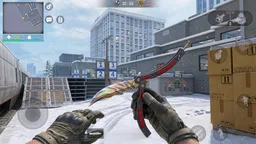
Modern Ops: Gun Shooting Games review
 Analysis by Appsdrops
I judge a shooter not just by how exciting its matches feel, but by whether I can understand what is happening and play comfortably in the situations I actually have time for. Modern Ops: Gun Shooting Games is a free action game from Edkon Games GmbH, built around first-person gunplay. Its appeal is easy to grasp: it puts the weapon and the immediate fight front and center. The harder question is whether that intensity works for players with different visual, motor, sensory, and everyday needs.
Reading the action and finding your way around
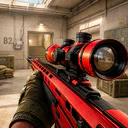
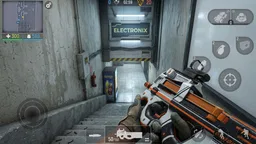
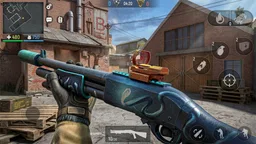
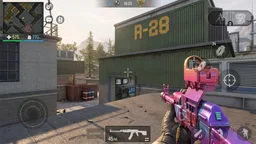
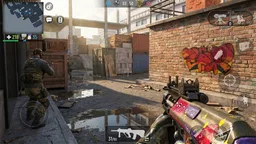
Modern Ops makes its basic purpose clear quickly: this is a game about aiming, shooting, and reacting to opponents, rather than a story-led adventure that asks you to learn a large world first. I find that directness helpful when I want to start playing without first working through lots of narrative context. The trade-off is that a first-person view can make the screen feel busy when several things demand attention at once.
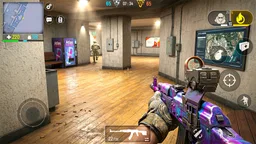
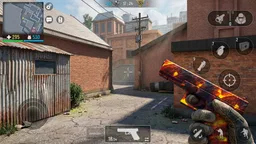
In a shooter, readability is not only about whether text is legible. It also means being able to distinguish the target, the environment, and the information needed to make a decision under pressure. If you are new to this style, I would give yourself a few low-pressure sessions to learn where the game places its controls and how much visual information you can comfortably track. A match that feels confusing at first may become easier once your eyes know where to look, but that learning curve is still real.
The game’s popularity suggests that many people have found a reason to keep coming back: it has a 4.7 average from around 1.6 million ratings and has passed 100 million installs. That does not tell me whether its presentation will suit any particular player, but it does make it a familiar choice in mobile action gaming rather than an obscure experiment. I would treat those figures as context, not as a promise that every match will feel clear or comfortable.
For navigation, my practical advice is to explore menus when you are not in a hurry to join a fight. Take time to notice where the game’s options and progression-related screens sit, and avoid making quick purchases just because a screen catches your eye. The game is free to start, while optional in-app purchases range from $0.89 to $199.99 per item. That wide span makes it especially sensible to slow down and check what you are selecting before confirming anything.
Learning the interface at your own pace
I would not recommend judging the controls from one rushed match. First-person shooters ask your hands to do several things while your attention stays on the scene, and that can make an unfamiliar layout seem harder than it is. Try a short session when you can focus, then take a break and return later. The goal is to find out whether the basic actions become more natural for you, not to force yourself through repeated frustration.
Modern Ops is currently at version 10.12, and its minimum operating-system requirement is 8.1. Those details matter when deciding whether your device is a suitable starting point, but meeting the minimum does not guarantee that a particular screen size, device condition, or personal setup will feel ideal. If small on-screen controls are difficult for you to use, check how they feel on your own device before investing much time or money.
Motor demands and sensory load
The central physical challenge is the combination of aiming and reacting while the action is unfolding. That makes Modern Ops a more demanding choice for someone who has difficulty with precise touch input, quick repeated movements, or coordinating several actions at once. Even a player who enjoys shooters may find that fatigue changes their accuracy over a longer session. I would keep early play periods short and notice whether your hands remain relaxed rather than gripping the device tightly.
A useful, non-obvious approach is to separate learning from competition. In one session, focus on understanding how your input affects aiming; in another, pay attention to how you respond when an opponent appears. Trying to improve both at once can make it difficult to tell whether trouble comes from the controls, the pace, or simply unfamiliarity. If the game continues to feel physically uncomfortable, that is a good reason to stop rather than treat discomfort as something you must overcome.
The visual and auditory intensity can also be tiring. Rapid movement, weapon effects, and the need to watch for threats may be a lot to process, particularly if you are sensitive to busy screens or abrupt sounds. I would choose a calm setting for a first session and avoid playing when you are already mentally overloaded. If you prefer a slower, more predictable experience, a turn-based action game or a shooter with less pressure may be a better fit.
Because I cannot assume that a particular accessibility control or sensory setting is available, I would not buy the game expecting it to solve a specific need. Instead, assess what you can directly see and use on your device. If you rely on a particular adjustment to make touch targets, motion, sound, or text manageable, confirm that it works for you before committing to extended play. That kind of check is more useful than relying on a broad label such as “mobile-friendly.”
When a phone game fits the day
Modern Ops can make sense when you have a short window and want an active game rather than a long story to resume. For example, I might use a spare break to play only when I can give the screen my full attention and have a stable place to hold the phone. A crowded commute, a dim room, or a moment when I need to keep listening for someone nearby is a poor setting for a fast shooter. The game’s intensity makes divided attention a genuine drawback, not just a matter of preference.
That distinction matters for players with sensory or situational needs. If you are in a noisy place, already dealing with fatigue, or sharing a room where sudden game sounds would bother others, it may be better to wait. Likewise, someone who needs to pause instantly and reliably should test how the game fits their routine rather than assume that every match can be interrupted without consequence. I would choose a quiet, comfortable moment and treat a session as something to focus on, not as background entertainment.
Compared with slower mobile action games, Modern Ops puts more weight on immediate aiming and response. Compared with a console or PC shooter, its phone-based play is more convenient to carry around, but the touchscreen context can be less comfortable for people who prefer physical controls or a larger display. If your priority is precision, longer sessions, or a more measured pace, another platform or a less reflex-heavy game may serve you better. If you want a direct first-person action game on a phone, this one is easier to consider.
What can still get in the way
The biggest limitation is that a competitive-feeling shooter is not equally comfortable for every body or every setting. Fast decisions can disadvantage players who need more time to process a crowded scene, while touch aiming may frustrate anyone who finds repeated fine movements difficult. Those are not small details: they affect the central activity, so they should guide your decision before you download rather than after you have become invested.
There is also a practical cost to the free-to-play model. You can begin without paying, but optional purchases can be substantial, so I would set a personal spending boundary before browsing any offers. Do not treat purchases as a shortcut to enjoyment; first decide whether you like the core action and whether it feels comfortable. The game is rated Teen, which is worth considering for households, but a content rating is not a substitute for a parent or player checking whether its gun-focused action suits them.
Another friction point is the difference between being able to open a game and being able to use it comfortably. A compatible operating system is only one part of the experience. Screen size, touch precision, tolerance for rapid visual motion, and the conditions in which you play can all change how accessible the game feels. I would test those factors on the device and in the environment where you expect to use it, especially if a specific adjustment is essential to you.
Who I would recommend it to
I would suggest Modern Ops to someone who likes compact, first-person mobile action, is comfortable with touch aiming, and can give a match focused attention. It is also a reasonable pick for a player who wants to try the genre without paying upfront, provided they keep the optional purchase range in mind. Its long-running presence since March 19, 2019, and broad install base make it a recognizable option for people who want to join a familiar mobile shooter rather than search for a niche release.
I would steer away from it if you want gentle pacing, minimal sensory stimulation, or controls that do not depend on quick and precise touch input. I would also hesitate if you need to keep one eye on other tasks or often play in places where sound and attention are constrained. In those cases, a slower action title, a game with turn-based decisions, or a shooter played with controls that suit your hands better is likely to be a more comfortable choice.
A practical inclusive verdict
My view is that Modern Ops has a clear appeal, but its central strength—immediate first-person action—is also the source of its main accessibility challenge. The game is easiest to recommend to players who enjoy fast reactions and can comfortably manage the visual and motor demands of mobile shooting. For everyone else, I would make the decision through a brief, deliberate trial: check the interface, notice how your hands and eyes feel, and stop if the pace becomes tiring.
My recommendation is to try it for the action, not to assume it will adapt to every player or context. Its free entry point makes that trial approachable, while its purchase options and Teen rating are worth keeping in view. If the controls and sensory pace work for you, it can be an engaging way to spend a focused break. If they do not, choosing a slower or more physically comfortable alternative is not settling for less; it is choosing a game that fits you better.
What we like
- Matches are quick and suit short play sessions.
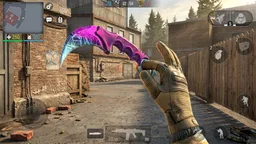
- Several weapon types offer different combat styles.
- Multiple maps help keep matches feeling varied.
- Controls are designed for touchscreen play.
- Free-to-play access makes it easy to try.
What could be better
- Progression can take time without in-app purchases.
- Online play depends on a stable internet connection.
- Frequent gunfire may feel intense for some players.
- Small screens can make distant targets harder to track.
- Match quality can vary with opponents and connection speed.







