



StarSavior review
 Analysis by Appsdrops
I look at StarSavior through a practical question: can its role-playing appeal work for people with different ways of reading, navigating, and playing, and in the everyday situations where a phone game has to fit around real life? It is a free game from STUDIOBSIDE, rated Teen, with a 4.5 average from around 22 thousand ratings and over 1 million installs. Those figures suggest a sizable audience, but they do not tell me whether the experience will suit your hands, eyes, schedule, or preferred pace. That depends on the details of how you use it.
Reading the game and finding your way
The store’s brief line, “Guide your Star-kissed Saviors,” gives the game a character-led role-playing frame, but little practical guidance about its interface. I would not assume that a story-focused game is automatically easy to read: dialogue, menus, and character information can each demand different kinds of attention. If you rely on larger text, strong contrast, or a simplified screen, check the current build on your device before settling in. The release date is Mar 17, 2026, and the current version is 2.70.2776851; interface details can change between versions, so an older impression may not match what you see now.
For a first session, I recommend treating navigation as something to test rather than rushing through setup. Look at whether important labels are easy to distinguish from decorative text, whether you can tell which screen or menu you are in, and whether returning to a previous task feels predictable. In a character-driven RPG, a small amount of menu friction can become tiring when you repeat it across several short sessions. A useful personal check is to pause after the opening stretch and see whether you can find your current objective and the character or team information you need without tapping around at random.
I also find that a game is easier to follow when I separate reading from decision-making. If a scene introduces several names or ideas at once, I take a moment before choosing what to do next rather than trying to absorb everything while navigating. That is not a special feature; it is a simple way to reduce cognitive load in a story-heavy game. Players who enjoy taking their time with character details may appreciate that approach, while anyone looking for a minimal-text experience should be cautious. The role-playing format itself is a clue that reading and making choices are likely to be part of the appeal.
Small-screen habits that make a difference
On a phone, I would avoid judging readability under ideal conditions alone. Check the screen in the lighting where you normally play, and try holding the device at the distance that feels comfortable. If text feels cramped or menus require repeated scrutiny, a larger display may be a better fit than trying to push through. This matters especially for players who experience eye strain or have difficulty distinguishing similar visual elements. I would rather discover that during a short trial than after becoming invested in the game’s characters.
There is also a useful distinction between “I can read this” and “I can read this comfortably for a while.” A player may manage a few screens but find that frequent shifts between story text and interface elements become tiring. I recommend taking breaks at natural stopping points and noticing whether you are squinting, losing your place, or tapping the wrong menu because you are rushing. Those are practical signs that the game’s presentation may not match your needs, even if it technically runs.
Touch, sound, and different ways of playing
Touch controls are often the main point of access on mobile, but comfort varies widely. If precise taps or repeated gestures are difficult for you, test the game’s ordinary navigation early and pay attention to how forgiving it feels when you miss a target. I cannot infer the size or spacing of controls from the game’s category or summary, so I would not promise that every interaction is easy to reach. A short, low-pressure session is the best way to learn whether the interface works with one hand, two hands, or a supported grip that feels comfortable to you.
It can help to choose a playing posture before a longer session instead of adapting mid-task. For example, someone with limited dexterity might rest the phone on a stand and use both hands only when needed; a player who tires easily could break play into brief visits rather than aiming for one long run. These are sensible ways to approach a touch-based role-playing game, not claims about special control options. If your needs depend on remappable inputs, switch access, voice control, or other specific accommodations, confirm compatibility on your own device before spending time or money.
Sensory comfort deserves the same attention. Story games can combine text, character art, motion, and sound, and what feels engaging to one person can feel busy to another. I suggest trying a short session at a comfortable volume and brightness, then checking whether you can follow what matters without relying on sound alone. If you prefer quiet play, see whether the parts you care about remain understandable with audio muted. If you are sensitive to visual effects or rapid changes, pay attention to how the screen feels during ordinary play rather than assuming a calmer presentation based on the game’s premise.
These checks are especially useful for players who are deaf or hard of hearing, have sensory sensitivities, or play in shared spaces. I would not treat spoken or musical cues as essential without testing the game directly, nor would I assume that every important cue has a visual counterpart. When access depends on captions, independent volume controls, reduced motion, or other specific settings, verify each one in the current app and operating system. If those options are unavailable or insufficient, a different RPG with clearly documented controls may be a more dependable choice.
When and where it fits
The mobile format makes StarSavior a candidate for short breaks, but that does not mean every scene is equally suited to interruption. A realistic routine might be to open the game during a quiet part of a commute or while waiting for an appointment, handle one manageable task, and stop before you are rushed. I would avoid starting a substantial story segment when you know you will need to put the phone away immediately. That advice is less about a specific game mechanic and more about protecting your attention: role-playing works best when you can follow the context rather than repeatedly returning mid-thought.
For someone who shares a room, studies in a noisy environment, or needs to keep the phone quiet, the practical question is whether play remains comfortable without disturbing others and without depending on audio. For someone with variable energy or concentration, shorter sessions can also make it easier to stop when attention fades. I recommend identifying a natural stopping point during your first visit, then seeing whether you can leave and return without feeling lost. If resuming a story is stressful, this may be less suitable as a casual “few minutes at a time” game than its mobile setting initially suggests.
Teen is the game’s content rating, so families and younger players should use that as a starting point when deciding whether it is appropriate. The rating does not replace a parent’s judgment about themes or a player’s individual sensitivities. If you are choosing it for someone else, spend time with the opening material together and consider whether the presentation and reading demands are comfortable. That is a more useful test than relying on a genre label alone.
Trade-offs, spending, and who should choose it
Compared with a puzzle game or a lightweight arcade title, this role-playing game asks for more sustained attention to characters and context. That can be rewarding if you want a story-centered activity, but it is a poor match if you mainly want instant play with almost no reading. Likewise, compared with an RPG designed around a larger screen or more explicit accessibility controls, a phone-first experience may feel limiting to people who need a particular input method or especially spacious text. I would choose based on those practical needs, not just on whether the genre sounds appealing.
The game is free to download and includes in-app purchases ranging from $0.99 to $99.99 per item. I see that as a reason to decide on a spending boundary before playing, not as a reason to assume that purchases are required. If you are a parent, or if optional spending is a concern for you, review purchase controls on the device and make the limit clear before handing over the phone. A free entry point is useful for trying the game, but it does not by itself tell you how much the experience may invite you to spend later.
Its 4.5 average and roughly 616 written reviews offer a broad snapshot of player sentiment, while the game’s reach—over 1 million installs—shows that it has found a substantial audience. I would treat those figures as context, not proof that it will meet an individual access need. Reviews often focus on entertainment and progression rather than whether text is comfortable, controls are manageable, or play works well in a particular setting. If accessibility is central to your decision, your own hands-on test matters more than a crowd average.
Version 2.70.2776851 is the build to look for when checking current behavior, and Android compatibility begins at version 7.0. That minimum makes the game available to a range of Android devices, but compatibility alone does not guarantee a comfortable experience on every screen or with every assistive setup. If you use an older phone, a customized display, or system-level accessibility tools, try the game on that exact configuration. An app that launches successfully can still be difficult to read or control.
I would recommend StarSavior to players who want a character-focused role-playing game, can comfortably use its on-screen interface, and are willing to make room for reading and attentive play. I would hesitate if you need confirmed support for a particular input method, rely on audio or visual settings that you cannot verify, or want a game that is effortless to dip into while distracted. That is not a judgment on the game’s value; it is a reminder that fit depends on more than genre or popularity.
My inclusive verdict is cautiously positive: the best first step is a short, deliberate trial on your own device. Check text comfort, menu clarity, touch accuracy, and whether play remains understandable in your usual environment. If those fundamentals work for you, the free download gives you a straightforward way to explore its role-playing appeal, while a clear purchase boundary helps keep the experience comfortable. If one of those basics fails, choosing a game with more suitable controls or presentation is the better recommendation.
What we like
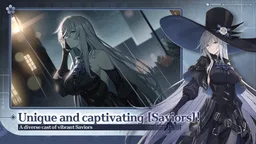
- Distinct character designs give the cast a memorable look.
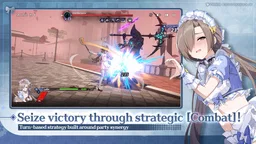
- Turn-based battles allow time to consider each move.
- Team building offers room to experiment with different characters.
- The sci-fi setting gives the story a distinctive atmosphere.
- Character progression provides goals beyond individual battles.
What could be better
- Progression can require repeated battles and resource farming.
- Gacha pulls make access to specific characters uncertain.
- Some encounters may be difficult without a well-developed team.
- Frequent play may be needed to keep pace with events.
- Online features require a stable internet connection.







