


Plants on Fire: Clash & Defend review
 Analysis by Appsdrops
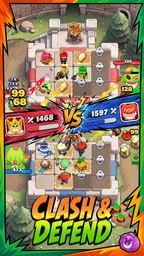
Fast strategy games are at their best when the rules are easy to grasp and every decision still matters. Plants on Fire: Clash & Defend sets up that kind of quick contest: merge plants, build up combinations, and try to outthink another player in a tower-defense match designed to last about three minutes. I like the promise of a compact match, especially when I want a tactical challenge without committing to a long session. The key is to approach each round with a plan rather than treating every merge as an automatic upgrade.
Quick matches, close decisions
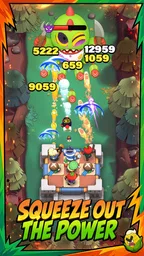
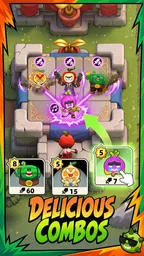
The central idea is easy to explain: bring plants together, create stronger possibilities, and use them to defend while competing against a rival. That combination gives the game its strategic hook. You are not just watching a defense unfold; you are making choices intended to create useful combos and keep pace with an opponent. The short match format puts pressure on those choices, so even a simple action can feel important when time is limited.
As a strategy game, Plants on Fire: Clash & Defend is aimed at players who enjoy making quick decisions and adjusting as a match develops. Its store description highlights merging plants, unleashing combos, and outsmarting rivals in PvP tower defense. That is a focused pitch, and it gives newcomers a clear idea of the kind of experience to expect: brief competitive rounds built around combining units and responding to a live contest.
I would not go into a first match expecting to understand every tactical possibility immediately. A compact game can still have a learning curve, especially when several decisions compete for attention. Take a moment to notice what happens after each merge and how your choices affect the defense. If a round goes badly, that is useful feedback: try changing the order of your decisions next time instead of repeating the same approach and hoping for a different result.
Where players can get stuck
The most likely early stumbling block is deciding what to prioritize. Merging plants sounds straightforward, but the real question is when to do it and how each choice fits the current match. A player focused only on making the next combination may overlook the broader defensive situation. On the other hand, hesitating over every possible move can waste the limited time a quick PvP round gives you. I find it helpful to keep the goal simple: make purposeful combinations while staying attentive to the contest as a whole.
Another adjustment is getting comfortable with the pace. A match designed to take around three minutes can move quickly enough that there is little room to stop and reconsider every action. That can feel demanding during the first few attempts, but it also keeps the experience approachable for short play sessions. Rather than aiming for a perfect opening, use early rounds to learn the basic rhythm. Once the flow feels familiar, you can spend more attention on anticipating your rival.
Competitive play also means that a loss is not automatically evidence that something has gone wrong with the game. Your opponent may simply have made more effective choices in that round. If you find yourself losing repeatedly, look for a pattern: are you merging too quickly, leaving your defense under pressure, or reacting late? A small change in decision-making is a more useful first experiment than assuming the game has stopped responding correctly.
Setup checks before a match
For a smoother start, make sure the game has finished installing and that your device is ready to run it. Plants on Fire: Clash & Defend is free to download, and its listed minimum operating-system requirement is version 7.0. Checking compatibility before you begin is a sensible first step if the game will not install or open. Also make sure your device has enough available space for the installation and that the app store has completed any pending download work.
If you are planning to play a PvP match, a stable internet connection is a practical precaution. Competitive play depends on communication between players, so a weak or interrupted connection can make an online session feel unreliable. If a match does not start as expected, check that your connection is working, then try again once it has settled. When possible, switching between available network connections can help identify whether the issue is tied to one connection rather than the game itself.
It is also worth closing other apps that are actively using your device or network if performance feels unusually poor. This is a general troubleshooting step, not a special requirement of the game. Restarting the device can sometimes clear a temporary slowdown, while checking for an available game update can help ensure you are launching the current version. These simple checks are especially useful before changing settings or reinstalling anything.
A steadier way to learn the workflow
When a round feels confusing, slow down between matches rather than trying to solve everything in the middle of one. Think back to the choice that seemed least effective, then alter just one part of your next attempt. This makes it easier to see whether a different merge decision or a more attentive response to the rival improves your results. Changing one thing at a time is a practical way to build understanding in a game where the action itself moves quickly.
Keep your attention on the match instead of trying to perform actions by habit. The game’s core appeal is the mix of plant merging, combo opportunities, and PvP defense, so the strongest routine is likely to be one that considers all three together. If you focus exclusively on combinations, you may miss what the opponent is doing; if you focus only on the opponent, you may neglect your own setup. Balancing those priorities is the basic skill the game asks you to develop.
If a session seems to have stalled, avoid tapping repeatedly while waiting for a response. Give the game a moment, check the connection, and then decide whether to return to the match or restart the app. Repeated inputs can make it harder to tell what happened, particularly when the interface is already slow. A calm, step-by-step recovery makes it easier to distinguish a temporary delay from a problem that continues after relaunching.
For persistent trouble, close and reopen the game, then check whether the device and app are up to date. If the problem remains, restarting the device is a reasonable next step. Reinstalling should be a later option rather than the first thing to try, since it takes more effort and may require setting things up again. Before taking that step, consider whether the issue happens every time or only during one particular session; a one-off interruption may not need a larger fix.
When the game may not be the cause
Not every slow or interrupted match points to a fault in Plants on Fire: Clash & Defend. Network instability, a device running low on resources, or other apps competing for attention can all affect the experience. If the game behaves normally after you reconnect or close background apps, that suggests the trouble may have been temporary. Checking whether other online activities work can also help narrow down whether the connection is the source of the problem.
Be patient when a store download or update takes longer than expected. The app store, your connection, and your device all play a part in installing an app, so a delayed download does not necessarily mean the game is broken. Confirm that the download has not paused and that the device can continue installing apps. If an update is available, letting it finish before launching can avoid confusion about whether you are using the current build.
It is equally useful to separate a difficult match from a technical failure. Losing a PvP round, needing more time to understand a combo, or finding the pace demanding are ordinary parts of learning a strategy game. A genuine technical concern is more likely when the app repeatedly fails to open, freezes across multiple attempts, or cannot get through a match despite a stable connection. Identifying which kind of problem you are facing makes your next step much clearer.
What to know before downloading
The game is free to download and is rated for Everyone. It includes in-app purchases, with listed items ranging from $0.99 to $199.99 per item. I recommend checking the purchase prompts carefully and using the device’s purchase controls if you share it with someone else. Knowing that optional purchases are present helps set expectations before you start, while the free download gives curious players a way to try the core idea first.
There is a sizeable audience for the game, with over 50 thousand installs and a 4.7 average rating from around 2.8 thousand ratings. It has also received 487 written reviews. These figures offer a useful snapshot of player interest, but they cannot tell you whether the match style will suit your personal taste. If quick tactical decisions and competitive tower defense sound appealing, the game’s basic premise is easy to assess for yourself.
The developer is Shimmer Dream, and the current version is 3.0.1030.0. The game was released on July 14, 2026. Those details are useful when checking that you have the right app and understanding whether your device meets the stated system requirement. More importantly, they sit alongside a clear gameplay premise: merge plants, pursue combos, and make defensive decisions against a rival.
My practical verdict
Plants on Fire: Clash & Defend has an appealing format for anyone who wants strategy in short bursts. The combination of plant merging and PvP tower defense gives each match a clear purpose, while the roughly three-minute length makes it easier to fit a round into a spare moment. I especially like that its main idea is understandable before playing, even though learning when to merge and how to respond to a rival still takes practice.
The game will be a better fit if you enjoy adapting under time pressure than if you want a slow, hands-off experience. New players should give themselves a few rounds to understand the pace, make deliberate choices, and learn from losses rather than expecting an instant winning strategy. If a match fails to load or feels unstable, check the connection and device first, then work through basic recovery steps before assuming the game is at fault.
Overall, this is a promising free strategy game for players drawn to quick PvP contests and combo-focused decisions. Its short-round concept gives it a practical pick-up-and-play appeal, and the challenge comes from using limited time well. Approach each match with a simple plan, stay attentive to your opponent, and treat early mistakes as part of learning the flow. If that style sounds fun, Plants on Fire: Clash & Defend is worth trying.
What we like
- Quick matches make it easy to play in short sessions.
- Distinct plant abilities add variety to defensive strategies.
- Unlockable content gives players goals beyond individual battles.
- Bright visuals make the action easy to follow.
- The clash format offers a fresh twist on tower defense.
What could be better
- Later stages may require repeated play to overcome difficulty spikes.
- Some upgrades can take time to unlock through regular play.
- Battlefield effects may become visually busy during intense fights.
- Strategic options can feel limited before more plants are unlocked.
- Progress may feel slow for players who prefer instant access to content.







