


Frontier City review
 Analysis by Appsdrops
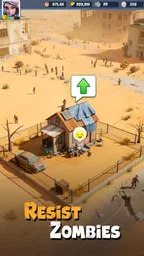
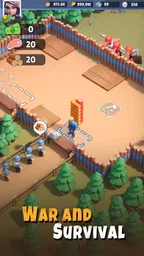
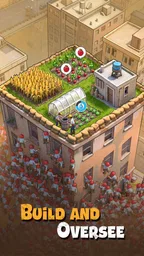
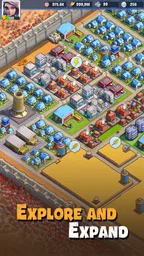
My first impression of Frontier City is that it asks a more interesting question than “How long can I last against zombies?” Its premise is about making a city work while danger presses in. That puts it in the strategy-game lane: the appeal is not just surviving a threat, but deciding how to build and manage amid one. If you enjoy thinking ahead rather than tapping through a purely action-focused game, that premise is a good reason to give it a look.
What to expect from a city under pressure
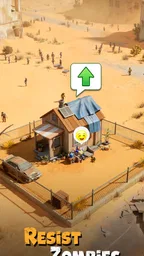
The central idea is easy to understand, even if the decisions behind it take more thought: create a place that can endure in a zombie-filled world. The setting gives ordinary city-building choices a sharper edge. A decision that might feel like routine expansion in a peaceful builder carries a different mood when the city is surrounded by danger. That tension is the game’s most distinctive promise.
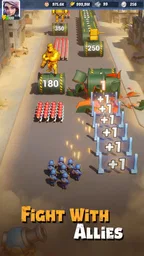
I would approach it as a strategy game first and a zombie game second. If you are hoping for a constant stream of direct combat, this may not be the best match. The title and premise point toward planning and building, where satisfaction comes from shaping a settlement rather than simply reacting to enemies. That distinction matters: players who enjoy methodical progress are more likely to settle in than those seeking an action game with a city backdrop.
The game is developed by CamelStudio, and its audience has given it an average rating of 3.8 from 390 ratings, with 54 written reviews. That is a mixed-to-positive signal rather than a guarantee that every player will click with it. I would treat the reception as a reason to try it with realistic expectations, not as proof that the game is either a must-play or a disappointment.
It is free to install, which makes a first look relatively easy to justify, but optional purchases range from $0.99 to $99.99 per item. I recommend deciding early whether you want to play without spending. Seeing a purchase option does not mean you need it to enjoy a strategy game, and a clear personal limit makes it easier to judge the actual play experience rather than letting a tempting offer set your pace.
It has reached over 50,000 installs, and its age rating is Teen. That gives a new player some useful context about its audience and visibility, but neither figure tells you how well its particular approach will suit your habits. If you like the idea of a dangerous frontier and a settlement that needs deliberate attention, the premise is worth testing for yourself.
Start with the decisions, not the urge to expand
When you first open a city-builder, it is tempting to treat every new space or option as an invitation to grow immediately. I would resist that instinct here. In a survival-themed strategy game, expansion is most satisfying when it serves a purpose. Before committing to a new direction, look at what the game is asking you to manage and consider whether your next action supports a stable city or merely makes it larger.
This is a practical habit, not a claim about a hidden mechanic. I find that pausing to read the available choices helps prevent the familiar city-builder mistake of acting quickly and only later realizing that a decision did not fit the plan. The zombie setting makes that mindset especially appropriate: the fantasy is about creating a foothold under pressure, so a measured start feels more in tune with the premise than an indiscriminate rush.
For a first session, keep the goal modest. Try to understand the basic rhythm of building and responding before deciding whether to optimize everything. A small, understandable plan gives you a useful reference point: if the city starts to feel strained, you can look back at the choices you made instead of blaming a system you have not yet learned.
A calm first setup makes the game easier to read
Frontier City is listed for Android devices running version 8.0 or later. Before installing, check that your device meets that requirement and that you have enough room for another game. Those simple steps spare you the frustration of beginning with a compatibility issue, and they are especially helpful if you are trying it on an older phone or a device you do not use for games every day.
Once it is installed, I would give the opening session a little attention instead of trying to squeeze it into a few distracted seconds. Strategy games are easier to understand when you can follow why one action leads to another. Start by reading the early guidance carefully, note the choices the game presents, and avoid tapping through explanations just to reach the first building screen. What seems slow at the beginning can save confusion later.
The current version is 0.10.607. That is useful to know if you are discussing the game with another player or checking that you have the same release, but it is not a reason to assume that every part of the experience is finished or polished to your preference. I would judge the game by how clearly its current opening teaches you to play and whether its central loop holds your attention.
A sensible setup also includes a small spending decision. Because the game is free but offers in-app purchases, think about whether you are comfortable with optional spending before you begin. If you prefer not to buy anything, make that your plan from the outset. It is much easier to enjoy the early challenge when you are not wondering whether every obstacle is a prompt to pay.
Make the first meaningful success about understanding
Your first satisfying milestone does not need to be a vast city. It can simply be reaching a point where you understand why your settlement is developing as it is. For example, if you play after dinner and have only a short break, choose one clear objective: make a deliberate improvement, observe what changes, and stop once you can explain the result to yourself. That is a more useful first session than tapping through a long chain of actions without noticing what they do.
This approach also helps you separate a genuine strategy choice from a moment of uncertainty. If the game presents several possible actions, ask which one seems most relevant to keeping the city functional and moving forward. You do not need to guess the perfect answer immediately. The point is to make a reasoned choice, watch its effect, and use what you learn on the next decision.
One non-obvious benefit of taking this slower route is that it gives you a personal baseline. Later, when the city feels harder to manage, you can compare the situation with the opening phase and identify what changed. That is a practical way to learn a strategy game without relying on outside guides or assuming that an advanced tactic is necessary from the start.
It is also a good test of whether the game suits you. If you enjoy interpreting the consequences of your decisions, the builder-survival blend may keep you engaged. If you find yourself wishing that every choice immediately led to combat or spectacle, that is useful information too. The game’s appeal rests on managing a threatened city, so a preference for direct action is a fair reason to move on.
Where first-time players can get confused
The biggest likely point of confusion is the balance between building and survival. The premise can make a newcomer expect a straightforward sequence of zombie encounters, while the strategy framing suggests that the more important task is planning a settlement. Keep those expectations separate. If the game feels quieter than an action title, that does not necessarily mean it is failing to deliver; you may be looking for the wrong kind of payoff.
Another common trap is to assume that a larger city is automatically a better city. Growth can feel rewarding, but in a strategy game the quality of a decision matters more than its size. I suggest asking what a new action contributes before taking it. This small pause is useful in any city builder, yet it is particularly fitting here because the setting makes careful development more compelling than expansion for its own sake.
Players can also mistake a free download for a promise that every part of the game is free of spending prompts. The purchase range is broad, so it is reasonable to want clarity about your own boundaries. If you do not want to spend, treat purchases as optional choices you can ignore and judge your enjoyment on the play you can access without them. If you are comfortable paying, decide what feels reasonable to you rather than buying simply because a moment feels difficult.
Finally, avoid using the average rating as a substitute for your own preferences. A 3.8 average is one quick snapshot of player opinion, not a description of the exact experience you will have. Reviews can reflect different expectations: some players want fast combat, while others welcome a slower city-management challenge. The more useful question is whether you like making careful decisions in a zombie-threatened setting.
Who should make room for it?
I would recommend giving Frontier City a try if you like city-building games but want a setting with more pressure than a peaceful town simulator. It may also suit strategy fans who enjoy a clear theme and prefer to think through their next move instead of chasing constant action. The free entry makes it practical to test the premise before deciding whether it belongs in your regular rotation.
It is less likely to satisfy you if your ideal zombie game is built around reflexes, continuous fighting, or a strongly story-led campaign. It may also be a poor fit if you dislike management decisions or find it irritating to consider optional purchases in free games. In those situations, a direct action game or a builder with a calmer setting may better match what you want from a short gaming break.
Compared with the usual alternatives in strategy, the key difference to weigh is tone. A conventional city builder often makes progress feel peaceful and orderly; Frontier City frames the task around a settlement in a zombie-infested world. An action strategy game, by contrast, may put more attention on moment-to-moment confrontation. This game’s premise points toward the middle ground of planning under threat, which is appealing if that blend is what you have been missing.
Take the next step at your own pace
After the first session, the best next step is not automatically to spend more time or money. Think about which part you enjoyed: shaping the city, weighing choices, or the tension created by its setting. If you can name a particular decision you want to handle better next time, that is a strong sign that the strategy side has caught your interest. Return with one small goal and see whether the game gives you enough clarity to pursue it.
If you are still unsure, give it a brief, focused trial rather than judging it after a few hurried taps. Read the early instructions, make a deliberate choice, and notice whether the outcome makes sense to you. That process answers the practical question most new players have: not whether the premise sounds appealing, but whether the actual decision-making feels enjoyable on your own device.
My recommendation is to try it for the city-management challenge, not for nonstop zombie action. Frontier City has a distinctive setup and a low-friction way to get started, while its purchase range and mixed reception are good reasons to keep your expectations measured. If building a settlement under pressure sounds satisfying, it is worth a careful first session. If you want immediate combat or a relaxed builder without danger in the background, another strategy game will probably suit you better.
What we like
- Build and expand a frontier town at your own pace.
- A variety of buildings gives town planning room to grow.
- The Western setting gives the game a distinctive look.
- Managing resources adds goals beyond decorating.
- Short play sessions make progress easy to check in on.
What could be better
- Progress may depend on waiting for buildings to finish.
- Resource shortages can slow town expansion.
- Frequent tasks may feel repetitive over time.
- A small screen can make detailed town management fiddly.
- Some features may require an internet connection.







