

Forge Master review
 Analysis by Appsdrops
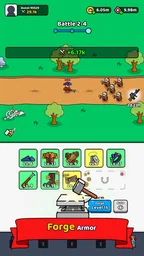
Forge Master is a strategy game built around a satisfying, focused idea: work with weapons from different civilizations, then forge and equip them. I like that this gives the game a tangible theme rather than dressing up a familiar battle or base-building formula. The appeal is less about managing a sprawling kingdom and more about learning to make useful choices around the weapons in front of you.
That premise also makes it approachable for someone opening a strategy game for the first time. You do not need to arrive with a plan for a giant campaign; the natural starting point is understanding how forging and equipping fit together. My advice is to treat the opening as a short learning exercise: pay attention to what each action changes, and resist the urge to rush through menus before you know what your current weapon is for.
What to expect from a blacksmith strategy game
Developed by Lessmore GmbH, Forge Master sits in the strategy category but has a hands-on blacksmith theme. Its central distinction is the relationship between making a weapon and deciding how to use it. That loop gives each choice a practical question: is this item worth improving or equipping now, or should I hold back and learn more about the options first?
It is free to download, with optional in-app purchases ranging from $1.99 to $99.99 per item. That spread is worth noticing before you begin, especially if you prefer games with no spending decisions. You can approach the game without treating a purchase as part of the first-session plan: learn the basic forge-and-equip rhythm first, then decide whether anything offered later would genuinely improve your experience.
The game has an average rating of 4.4 from around 24,000 ratings, and it has been installed over a million times. Those figures suggest that plenty of players have given it a try, but they do not tell you whether its particular pace suits you. The more useful question is whether the blacksmithing theme and equipment choices sound more appealing than the usual strategy-game focus on armies, maps, or long-term construction.
Its civilization-spanning weapon theme gives you a reason to care about what you are crafting beyond simply seeing a number go up. I find that especially appealing if you enjoy games where equipment has an identity and the decision to use one item over another is part of the fun. If you mainly want a fast action game where tapping through battles is the whole point, this more deliberate emphasis may feel indirect.
A good fit for short, attentive sessions
For a first-time player, the most comfortable way to approach Forge Master is in small sessions where you can follow one decision at a time. Make an item, check what equipping it does, and notice how the game connects those actions. That approach is more useful than trying to tap through every available option quickly, because the central pleasure is understanding the crafting and equipment loop rather than merely clearing screens.
It can suit a spare moment at home or a quiet break when you want a game with a clear theme and choices to think over. A realistic first session might be a few minutes after dinner: open the game, learn the basic forging interaction, equip a weapon, and stop once you understand what changed. That gives you a meaningful first success without requiring a long stretch of uninterrupted attention.
There is a trade-off here. The theme may attract players expecting a detailed historical simulator, but the core promise is a strategy game about forging and equipping, not a guarantee of a deep workshop simulation. Likewise, players looking for the broad map control and alliance planning common in large strategy games may find this more focused. I would choose it for its specific weapon-making premise, not as a substitute for every kind of strategy game.
Getting through the first setup
The game is free, so the first practical step is simply installing it from your device’s app store and opening it. It requires Android 8.0 or later, which makes that the key compatibility check for Android players. The age rating is Everyone 10+, so it is presented for a broad audience, though parents should still make their own decision about whether its play and purchase options suit a particular child.
The release date is October 17, 2025, and the current version is 2.12.1. If the game behaves differently from what you remember, checking that you have the current version is a sensible first troubleshooting step. I would also check the device’s available storage and connection before starting any new game, as basic preparation avoids mistaking an installation or loading snag for a problem with the forging itself.
When you first open it, take a moment to read the on-screen prompts instead of tapping through them. I recommend looking for the action that begins forging, then identifying where the game shows the resulting weapon and how you equip it. This simple sequence gives you a mental map: creation happens in one part of the loop, while putting the item to use is a separate decision.
One useful habit is to pause before spending any in-game or real-world resources on an unfamiliar choice. First establish what the game considers a successful craft and what the equipment action changes. That may sound cautious, but it prevents a common first-session mistake: treating every prominent button as an upgrade without knowing whether it advances the goal you actually care about.
Your first meaningful success
I would define the first success as more than making a weapon appear on screen. Forge an item, then follow through by equipping it and checking what that choice means in the game’s current context. Doing both parts helps you understand the basic promise immediately: you are not only collecting weapon designs, you are making decisions about which forged item to put to work.
A practical workflow is to handle one weapon at a time. Notice the civilization or style associated with it, complete the forging action, and then inspect the equipment choice before moving on. This keeps the cause and effect clear. If you create several items in a hurry, it becomes harder to remember which choice led to which result, particularly when you are still learning the interface.
My second tip is to treat early choices as experiments rather than as a test you must ace. Try the most obvious route once, observe what changes after equipping the item, and use that knowledge to make the next decision more deliberately. This is a small but useful way to learn a strategy game: compare outcomes in your own play instead of assuming that a more elaborate weapon is automatically the right one.
A third helpful habit is to separate curiosity from commitment. It is reasonable to explore the game’s civilization-based weapon variety because that is a large part of its identity, but you do not need to make every available choice immediately. If you are unsure about an option, finish understanding the current craft-and-equip cycle first. That leaves you with a dependable baseline for judging what later choices add.
Where new players can get confused
The most likely early confusion is mixing up forging with equipping. They sound closely connected, but they are distinct steps in the experience: making a weapon does not by itself answer which one you should use. If you finish a craft and wonder what to do next, look for the point where the game lets you put that weapon into use, then confirm that the selection has taken effect.
Another easy trap is assuming that every weapon from a different civilization should be judged by appearance alone. The theme makes those distinctions interesting, but visual or historical flavor is not a reliable guide to which item is best for your present goal. I suggest comparing the choices in the context the game provides and making one change at a time. That way, you can tell whether a new selection actually helps rather than simply feeling different.
Purchases are a separate source of hesitation. Since optional items can cost from $1.99 up to $99.99, it is wise to keep the first session focused on learning rather than shopping. A large range does not mean a new player needs to buy anything to understand the basic premise. I would wait until you have played enough to know what kind of friction you want to solve, if any, and use your device’s purchase controls thoughtfully.
If a menu feels unclear, return to the simplest question: am I making a weapon, reviewing one, or equipping it? Reframing the screen around those actions can make a strategy interface easier to follow. It also helps prevent random tapping, which is especially valuable when you want to understand a choice rather than just get past the current screen.
How it compares with other strategy games
Many strategy games ask you to think about territory, units, resource chains, or a large sequence of upgrades. Forge Master instead puts the blacksmith’s work and the weapon you equip closer to the center of attention. That narrower focus can be a strength: there is a clear theme to return to, and the crafting decision gives the game a hands-on identity.
The trade-off is that it may not scratch the same itch as a broad empire builder or a competitive tactics game. If you want to plan across a large battlefield, coordinate multiple units, or make a long chain of economic decisions, a more expansive strategy title will likely be a better fit. If you enjoy equipment choices and want a game that makes forging the hook, this offers a more specific angle than a standard war-themed strategy game.
It also differs from a straightforward action game. The satisfying moment is tied to crafting and choosing equipment, rather than relying only on quick reflexes. I would recommend it to someone who likes pausing to consider an item and trying a different choice, but not to someone who wants every session to deliver constant action with minimal menus or decisions.
Who should try it, and what to do next
Forge Master is a sensible pick if you are curious about a strategy game with a blacksmith’s perspective, enjoy weapon variety, and like learning a small system by testing choices. It can also work for players who want a manageable entry point into strategy rather than starting with a huge map and a dozen competing responsibilities. Its 4.4 average and 1.1 thousand written reviews offer some context, but your own preference for this focused loop matters more.
I would steer away if you strongly dislike optional purchase prompts, prefer games with no in-app spending at all, or need a deep tactical campaign as the main attraction. The free starting point makes it easy to see whether the central idea appeals, but the purchase range is a real consideration for anyone who wants a tightly controlled budget or a completely purchase-free environment.
Once you have forged and equipped your first weapon, the best next step is to keep a simple mental note of what you changed and why. Try another choice only after you understand the first one. That approach turns the early game into a useful comparison rather than a blur of taps, and it makes the civilization-based variety more meaningful as you explore it.
Overall, I see Forge Master as a focused alternative to the usual strategy formula, with its appeal rooted in the connection between crafting and equipment. It is free to start, rated for Everyone 10+, and updated to version 2.12.1, but the real reason to try it is simpler: the blacksmith theme gives strategy a practical, item-by-item feel. If you enjoy learning through small decisions, begin with one weapon and see whether that loop keeps you interested.
What we like
- Quick sessions make it easy to play in short bursts.
- The forging theme gives crafting a clear sense of purpose.
- Progression provides goals beyond individual crafting tasks.
- Simple touch controls are approachable for new players.
- Unlockable content can add variety as you advance.
What could be better
- Repeated crafting tasks may feel monotonous over time.
- Progress can slow down as upgrade costs increase.
- Some features may rely on in-game purchases.
- The experience may offer limited variety between stages.
- Frequent play can require substantial time to advance.







