





Call of Duty®: Mobile review
 Analysis by Appsdrops
I enjoy Call of Duty®: Mobile most when I treat it as a pick-up-and-play shooter with a little preparation, rather than a game that will always be ready the instant I open it. It offers familiar first-person gunplay in a mobile format, with competitive multiplayer and a separate battle royale option. That range is its biggest draw, but it also means new players can face a lot of menus, choices, and online-game friction before a match feels comfortable.
Getting past the first hurdles
Developed by Activision Publishing, Inc., this free action game has an average rating of 4.3 from around 17 million ratings and more than 100 million installs. Those figures point to a huge audience, but they do not guarantee that every player will enjoy its pace or feel at home with touch controls. The game is rated Mature 17+, so it is worth checking that rating before handing a device to a younger player.
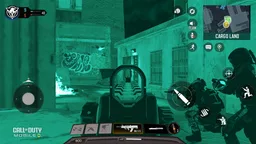
The first adjustment is usually not the shooting itself; it is learning how the screen is arranged. A mobile FPS asks your thumbs to aim, move, and trigger actions on the same small surface. I recommend taking a few practice rounds to settle on a control layout and sensitivity before judging your aim in a competitive match. Changing several settings at once makes it hard to tell which adjustment actually helped.
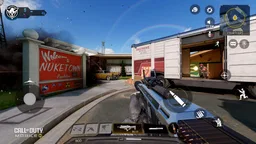
There is also a choice between different ways to play. Multiplayer matches suit short sessions and players who want frequent action. Battle royale is a better fit when you want a broader match with more emphasis on positioning and survival. If you are unsure which mode feels right, try each in a low-pressure session rather than assuming the most familiar shooter format will be your favorite here.
Small setup choices that make a difference
Before a serious match, check that the game has finished any required loading or content preparation and that your connection is stable. If a screen appears to stall, give it a moment before repeatedly tapping buttons or restarting. Online games can take time to move between menus and match states, and hurried input can make it unclear whether the game registered your choice.
I would also test your controls in the same kind of mode you intend to play. A setup that feels fine in a brief multiplayer round may feel awkward when a battle royale match asks you to scan a wider area and make slower decisions. Keep one change at a time: adjust aim sensitivity, play a few rounds, then decide whether to keep it. This is more useful than copying a setup from someone whose device, grip, and habits may differ from yours.
Version 1.0.60 supports devices running Android 7.0 or later. If the game behaves poorly, first make sure the operating system meets that minimum and that the app is up to date through the store you use. That is a sensible baseline check, not a promise that every compatible device will perform identically. Older or less capable hardware can still make a demanding shooter feel less responsive than expected.
Recovering when a session goes wrong
When a match fails to start or a menu stops responding, I use a simple recovery order: wait briefly, return to the previous screen if possible, and then close and reopen the game only if it remains stuck. If the problem happens repeatedly, check the internet connection and restart the device before changing a collection of settings. A tidy sequence helps separate a temporary hiccup from a persistent issue.
It is tempting to alter control settings after every bad round, but that can create a second problem while you are trying to solve the first. If your character moves normally but aiming feels off, revisit sensitivity or layout. If menus and matchmaking are also slow, focus on connection and device conditions instead. Change one thing, test it, and keep a note of what improved; that small habit prevents a confusing cycle of resets.
For a more useful test, compare how the game behaves in a short multiplayer session and a longer battle royale session. If only one type of match feels troublesome, the issue may be tied to the demands of that mode or the length of the session rather than a universal control problem. If both feel equally unresponsive, look at the broader setup before blaming a particular weapon or match.
When the game is not the problem
Not every missed shot is a technical fault. Mobile aiming takes practice, and a player who is used to a controller or mouse may need time to build steadier thumb movement. I would avoid judging the game from a handful of early losses. Instead, focus on one skill at a time, such as keeping the crosshair near likely targets or learning when to move rather than stand still.
Connection quality can also affect an online match even when the app opens normally. If opponents seem to react inconsistently or actions feel delayed, try a more reliable connection and avoid competing with other heavy network use at home. That does not diagnose every lag problem, but it is a practical first check. If other online activities are also struggling, the game may simply be revealing a wider connection issue.
Finally, consider whether your device is comfortable for extended play. A small screen, warm hands, or an awkward grip can make precise movement tiring. Short breaks and a comfortable hold are more useful than endlessly raising sensitivity. If you prefer slower, less demanding play, this fast-paced shooter may not be the right match, even if it runs correctly.
Choosing modes, spending, and alternatives
The game’s two main styles give it more flexibility than a shooter focused on a single match format. I reach for multiplayer when I have a short break and want a direct contest; battle royale makes more sense when I can give a match more attention. Players who want a tactical pace or a quieter single-player experience may be better served by a different kind of game. This one is built around online competition, so it is not the choice I would make for offline play or relaxed solo progression.
There are in-app purchases ranging from $0.99 to $99.99 per item. The game is free to start, but that broad range is a good reason to set a spending limit before browsing optional purchases. I would first play enough to learn whether the controls and modes suit you, then decide whether anything offered is worth paying for. You do not need to spend immediately to find out whether the core experience is enjoyable.
Compared with a typical mobile shooter that keeps its focus on one kind of match, Call of Duty: Mobile asks you to choose between compact multiplayer action and a larger survival-style contest. That variety is useful if your mood changes, though it also means the menus and learning curve can feel busier than in a narrowly focused alternative. If quick rounds matter most, start with multiplayer; if you want a longer tactical session, try battle royale and see whether its pace works for you.
Who I would recommend it to
I would recommend it to someone who likes competitive shooters, is willing to tune touch controls, and has a reliable enough connection for online matches. It is particularly handy for a short gaming break because multiplayer can deliver action without asking you to commit to a long session. A friend group can also use the different modes to suit different moods, provided everyone is happy with an online FPS.
I would steer younger players and anyone seeking a calm, offline game elsewhere, and I would be cautious about recommending it to someone who dislikes touch aiming or frequent online competition. The 17+ content rating deserves attention, and the optional purchases make a spending boundary sensible. People who prefer the precision of a controller-based shooter may find the mobile format frustrating rather than convenient.
My practical verdict
Call of Duty®: Mobile is a substantial mobile shooter with enough variety to serve both quick multiplayer sessions and longer battle royale play. Its biggest practical strengths are that choice of pace and the familiar, direct feel of its gunplay. Its main friction points are adapting the controls, navigating an online game’s setup, and depending on a suitable device and connection.
My advice is to begin with a few low-pressure matches, adjust only one control setting at a time, and check your connection before treating lag as a gameplay flaw. If the game still feels uncomfortable after that, it may simply not suit your preferred way to play. For mobile FPS fans who enjoy online competition and are comfortable with a learning curve, it is an easy game to try; for everyone else, the free entry makes a test possible, but not an obligation to stick with it.
What we like
- Touchscreen controls can be customized to suit different play styles.
- Optional controller support offers an alternative way to play.
- Frequent seasonal updates introduce fresh events and rewards.
- Voice chat makes it easier to coordinate with teammates.
- A wide range of weapons and attachments encourages loadout experimentation.
What could be better
- Large downloads can take up substantial storage space.
- Online matches require a stable internet connection.
- Some limited-time rewards are difficult to earn before events end.
- Competitive matches can feel uneven when player skill levels differ.
- In-app purchases can speed up access to cosmetic items.







