



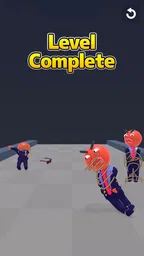
Bola Capture review
 Analysis by Appsdrops
I like action games that explain their appeal in a single gesture, and Bola Capture has a particularly clear one: line up a throw, send a bola across the screen, and try to leave the ragdoll targets tangled. That simple interaction gives the game its identity. It is easy to understand at a glance, but aiming still asks you to judge direction and timing rather than merely tap repeatedly. My first impression is of a compact, playful challenge suited to short bursts, not a sprawling action game that demands a long session.
One throw, with room for judgment
The central idea is dragging to aim before flinging the bola. That distinction matters: you are not just firing at whatever happens to be under your finger. You make a small plan, commit to a trajectory, and then see whether the throw catches the figures you intended. The pleasure comes from the gap between a confident line and the result on screen. When the attempt works, it feels earned; when it misses, the mistake is easy to understand in broad terms, which makes another try tempting.
Because the whole premise is built around capturing ragdolls, the action has a light, mischievous feel rather than the intensity I associate with combat-heavy games. That makes it easier to recommend to someone who wants an active game without a serious tone. The Teen content rating is also useful context for choosing an audience, though I would still judge suitability based on the individual player rather than treating an age label as a complete description.
In the action category, many alternatives lean on constant movement, rapid tapping, or a stream of attacks. Bola Capture instead puts its emphasis on a deliberate physical gesture: aim, release, and watch the outcome. I find that a welcome change of pace. It gives each attempt a readable beginning and end, making the game easier to pick up when I have only a minute or two and easier to put down when I am ready to move on.
What the aiming gesture changes
The drag-to-aim control makes the player’s finger part of the decision. Rather than relying on a cluster of buttons, I can focus on where I want the throw to travel. This is a good fit for touchscreens because the input is direct and familiar. It also means the quality of a run depends on how carefully I line up a shot, not just on how quickly I can react. For players who enjoy judging angles, that small bit of control can make a very simple premise feel more involving.
A useful way to approach each throw is to pause for a moment before dragging. Look at the figures as a group, decide which one matters most, and make a deliberate line rather than sweeping your finger in a hurry. That habit helps separate an aiming error from a decision error: perhaps the target was right but the direction was off, or perhaps the throw was aimed cleanly at the wrong person. Even without a complicated control scheme, that distinction gives the player something concrete to improve.
There is a trade-off, though. A gesture-based game can feel less satisfying if you want a deep control system or precision that comes from mastering several tools. Here, the appeal is the throw itself, and the same simplicity that makes the game approachable also sets a ceiling on how much mechanical variety I would expect from the core idea. If you want a large action game built around character upgrades, elaborate combat, or a long campaign, this is not the kind of experience I would choose in its place.
How a quick session can play out
Imagine having a short break between errands. You open the game, make a few throws, and use each result to adjust your aim. That is where the design makes sense to me: the basic action needs little explanation, and the immediate visual outcome gives each attempt a natural stopping point. It is also a good candidate for passing a phone to a friend and letting them understand the objective for themselves, without first explaining a list of controls.
For a more thoughtful session, I would treat the screen like a small puzzle rather than trying to rush through it. Start by spotting whether the targets are clustered or spread apart. If they are close together, a throw aimed through the group may be worth considering; if they are separated, choosing a clear first target is a more sensible plan. Those are practical ways to think about the geometry of the scene, not promises that a particular shot will catch everyone. The game’s premise invites experimentation, and trying a different line after a miss is more useful than repeating the same hurried motion.
That approach also helps when playing one-handed or while waiting somewhere, provided the player can comfortably drag across the screen. I would avoid playing while walking or in a situation where attention needs to stay elsewhere: even a simple aiming game asks you to look at the screen and make a deliberate gesture. Its best everyday use is a small pocket of downtime, not something to keep open during a task that needs concentration.
Where the simplicity helps—and where it may not
The clearest strength is that the game’s central action is immediately legible. I do not need to memorize a sequence before I can make a meaningful attempt. That is valuable for casual players, younger players who meet the age guidance, or anyone who gets frustrated when an action game hides its fun behind a lengthy tutorial. The drag-and-fling loop puts the decision up front, which is exactly where a small mobile game benefits from placing it.
The same focus can become a limitation for people who want more than aiming and throwing. If you usually choose action games for complex movement, varied weapons, team play, or a story to follow, the central mechanic here may not provide enough range for your tastes. I would also be cautious about recommending it to someone who dislikes touch aiming: the gesture is not incidental to the concept, so it is unlikely to feel like a minor control preference that can simply be ignored.
Another practical consideration is how much patience you bring to trial and error. A throw-and-see format rewards small adjustments, but players who expect every attempt to succeed immediately may find misses irritating rather than funny. I would recommend approaching it with a light mindset: make a shot, notice what happened, and try a different angle. If that kind of short feedback loop sounds satisfying, the basic premise has a good chance of landing. If you would rather have the game make aiming decisions for you, a more automated casual title may be a better fit.
Who is likely to enjoy the throws
I think Bola Capture is best for players who enjoy tactile controls and simple goals that still leave room for judgment. It works especially well for people who like to improve through small changes instead of learning a large control scheme. The idea is also easy to share: someone can watch a throw, understand why it looked promising, and suggest a different line. That makes it a pleasant option for informal play with a friend, although I would not assume it has a dedicated multiplayer mode or any particular social feature.
KAYAC Inc. developed the game, and its focused concept gives it a clear place among mobile action options. It is free to play, so trying the central mechanic does not require buying it first. The current version is 017, and it runs on Android 7.0 or later. Those details matter if you are deciding whether an older device is suitable; the operating-system requirement is a more useful check than assuming every phone will handle every game in the same way.
The game has a 4.4 average from around 760 ratings, alongside over 500,000 installs. I would take that as a sign that the simple hook has found an audience, not as a guarantee that every player will enjoy it. Ratings cannot tell you whether you personally like touch aiming, and that preference is central here. The most helpful test is to ask whether you enjoy making a shot, reading the result, and adjusting your next attempt.
My recommendation
I would recommend Bola Capture to someone looking for a free, easy-to-grasp action game whose main pleasure comes from lining up a throw. Its best quality is the way one direct gesture turns a simple objective into a small decision: where to aim, when to commit, and what to change after a miss. For a brief break or a casual hand-off to a friend, that focus is appealing.
I would skip it if you need a deep progression system, a broad set of mechanics, or action that depends more on fast movement than careful aiming. The concept is deliberately narrow, and whether that feels refreshing or repetitive will depend on how much you enjoy refining a single kind of action. For me, the straightforward controls are the point, not a substitute for a larger game. If you want a playful mobile challenge built around making and improving throws, this is an easy one to try; if you want a more expansive action experience, I would look elsewhere.
At its best, Bola Capture makes a tiny moment of judgment feel satisfying without asking for a big time commitment. I would pick it up when I want a quick, hands-on challenge, take a second to aim rather than fling blindly, and stop when the simple loop has had its turn. That is a modest promise, but it is a clear one—and for the right player, clear is exactly what makes it enjoyable.
What we like
- Simple controls make it easy to start playing.
- Short rounds suit quick breaks.
- Capturing territory gives each match a clear goal.
- The basic gameplay is easy to understand.
- It offers a casual challenge for players of different skill levels.
What could be better
- Repeated rounds may feel predictable over time.
- Mistimed moves can quickly cost you territory.
- The simple mechanics may lack long-term variety.
- Some levels may feel tougher than earlier ones.
- It may not appeal to players seeking a complex strategy game.







