


Zip review
 Analysis by Appsdrops
I think of Zip as a way to add a pay-over-time option to everyday shopping, rather than as a store or a general budgeting app. That distinction matters: the useful question is not just whether you can install it, but whether splitting a purchase fits your spending habits and whether the payment details are clear before you commit. I’d consider it when I already know what I want to buy and need a different way to manage the timing of the cost—not as a reason to shop for more.
Where shopping can get stuck
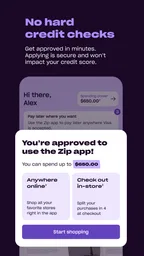
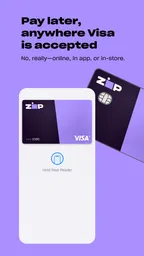
Zip is a free shopping app from Zip, Co. Its central idea is to let you pay later at many retailers, so it can sit alongside the store’s normal checkout choices. The experience is most relevant when a purchase is planned but paying the full amount at once is inconvenient. It is less compelling if you prefer to pay immediately, use a credit card you already manage comfortably, or avoid installment arrangements altogether.
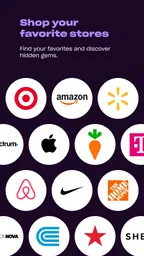
The first point of friction is that “available nearly anywhere” should not be read as “guaranteed to work at every checkout.” Retailers and payment flows can differ, and a purchase still has to go through the steps shown in the app and at the merchant. I’d check that Zip is actually offered for the transaction before building a shopping plan around it. If the option is missing or the checkout declines to proceed, switching repeatedly between screens may not solve a merchant-side limitation.
Another common sticking point is treating approval or a displayed payment plan as a simple promise that every future purchase will work the same way. A pay-later service involves a decision at the time of a transaction, and the details presented for that particular purchase deserve a careful read. I would review the amount, payment timing, and any applicable terms before confirming rather than relying on what I remember from an earlier checkout.
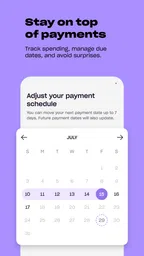
The app’s broad reach can also create a false sense that it replaces a normal payment method. It doesn’t remove the need to keep track of what is owed. In practice, an installment can feel small when viewed alone, while several separate purchases can become harder to monitor together. My rule would be to consider the total of all commitments, not just the next scheduled payment.
Start with the purchase, not the payment option
A useful way to avoid impulse spending is to decide on the item and its full cost first, then open Zip only if paying over time is genuinely helpful. That reverses the tempting pattern of browsing for things because a payment option makes them seem easier to afford. I’d also compare the total cost and timing with the retailer’s regular checkout choices. If paying now is comfortable and simpler, there may be little benefit in adding another payment schedule.
For an everyday example, imagine replacing a necessary household item after the old one stops working. I’d check the final basket total, confirm the merchant supports the payment route, and look at the schedule before placing the order. If the displayed terms fit my budget, Zip could help spread the impact. If the checkout is unclear or the plan would leave too little room for other bills, I’d use a different method or postpone the purchase.
Setup checks that prevent avoidable frustration
Zip is available at no charge to install, and its content rating is Everyone. The app first appeared on May 24, 2019, and the current version is 1.258.3; the stated minimum operating-system requirement is 8.1. Before troubleshooting, I’d make sure the device meets that requirement and that the app is up to date. An older device or outdated installation can make a smooth sign-in or checkout harder, even when the shopping plan itself is sound.
During setup, I’d enter information carefully and check for small mistakes before retrying. A mistyped contact detail, an incomplete form, or an overlooked confirmation step can look like an app failure when it is really a setup issue. If something does not advance, I’d pause, reread the screen, and make one careful correction rather than repeatedly submitting the same information. That is a safer and more useful first response than guessing at hidden settings.
It’s also worth thinking about the device and account you use. If you start a purchase on one device and later try to continue elsewhere, make sure you are using the same account and can access the relevant confirmation information. I would avoid starting a second checkout just because the first screen seems slow; first check whether the original attempt completed or is still waiting. Duplicate attempts can make it harder to tell which transaction needs attention.
Zip has a 4.7 average from around 109,000 ratings, with more than 5 million installs. Those figures suggest it is a widely used shopping option, but they do not tell me whether a particular purchase will be accepted or suit an individual budget. I treat ratings as background context, not as a substitute for checking the terms shown for my own transaction.
Recovering a workflow without making it messier
If the app stalls during a purchase, I’d first identify exactly where it stopped: opening the app, signing in, selecting Zip, or returning from the retailer’s checkout. That simple distinction helps avoid random troubleshooting. If the problem happens before the merchant appears, I’d focus on the app and device. If it happens only after moving to the retailer, I’d check the merchant’s checkout and whether the chosen payment option is still available there.
For a basic recovery attempt, I’d close and reopen the app, check the internet connection, and try again once the connection is stable. If the app is already current and the same step still fails, I’d avoid repeatedly placing the order. Instead, I’d check the retailer’s order status and any confirmation messages so I can tell whether the purchase went through. This is especially important when a screen closes unexpectedly: a missing confirmation page does not by itself prove that no transaction occurred.
When a payment or purchase status is unclear, keeping the details together helps. I’d note the merchant, approximate time, basket total, and the exact stage where the flow stopped, then use the support route available in the app or through the retailer as appropriate. I would not share account credentials or sensitive information in an unrelated message or public post. Clear, limited details make it easier to explain the issue without turning a small glitch into a second transaction.
A practical tip is to separate shopping problems from payment-plan questions. If the retailer cannot find an order, the merchant may be the right place to ask about the order itself. If the order exists but the payment schedule or account status is confusing, the issue belongs with the payment provider. Knowing which side holds the missing information saves time and reduces the temptation to cancel or retry before understanding what happened.
When Zip may not be the cause
Not every failed checkout is an app defect. A retailer’s own site can time out, a product can become unavailable, or a checkout can reject a payment method for reasons outside Zip’s interface. If other parts of the retailer’s site are also behaving strangely, I’d wait and retry later or contact the merchant. If only the Zip step fails across otherwise working checkout screens, then it makes more sense to focus on the app or account flow.
Connection quality is another easy factor to overlook. A weak or switching network can interrupt the handoff between a shopping app and a retailer, leaving the user unsure whether the last step registered. I’d use a stable connection and avoid rapidly switching networks mid-purchase. If I’ve already tapped to confirm, I’d check for an order or payment status before tapping again.
There is also a budgeting issue that no troubleshooting can fix. If the purchase only seems manageable because the first payment looks small, the plan may be a poor fit even if the app works perfectly. I would count the future installments alongside rent, bills, and other scheduled spending. Someone who tends to forget payment dates or wants one clean monthly statement may be better served by a familiar payment method or by saving up before buying.
How it compares with familiar ways to pay
Compared with paying directly by debit card, Zip’s appeal is flexibility in timing; the trade-off is having another payment arrangement to understand and follow. Compared with a credit card, it may feel more tied to a specific purchase flow, while a card can be simpler for someone who already tracks its balance and pays it reliably. Neither approach is automatically better. I’d choose the one whose schedule and recordkeeping I can manage without effort.
Compared with a retailer’s own installment option, Zip can be useful when I want a payment route that is not limited to one shop. But a store-specific offer may be more straightforward for a purchase at that store, so I would compare the terms rather than assume a separate app is always preferable. For small routine purchases, the extra step may not be worth it. For a planned expense where spreading payments matters, the convenience may justify the additional tracking.
The app is best for shoppers who are comfortable reading checkout terms, keeping an eye on future payments, and using a pay-later option selectively. It is a weaker fit for people who want every purchase settled immediately, find multiple due dates stressful, or are already juggling payment commitments. I’d also skip it when the purchase is optional and the installment plan is the only reason it feels affordable.
My practical verdict
With 58,000 reviews and an average rating of 4.7, Zip has clearly found an audience, but its value depends less on popularity than on the way you use it. I see it as a convenient tool for a deliberate purchase, not a shortcut around budgeting. The strongest habit is to decide on the item first, inspect the full payment schedule, and check the order status before repeating a failed checkout.
My recommendation is to use Zip selectively and treat every installment as money already committed. If that kind of tracking feels manageable, the app may be a practical addition to your shopping routine. If you prefer immediate payment or want fewer financial moving parts, a standard card or waiting until you can pay in full is likely the calmer choice. That distinction is more important than whether the app can be used for a particular checkout.
Overall, Zip is worth considering for people who genuinely need payment flexibility and are willing to stay organized. Its broad shopping focus is convenient, while the extra responsibility of monitoring future payments is real. I’d install it for occasional, planned use—not as permission to stretch a budget—and I’d let the terms of each purchase decide whether it is the right option that day.
What we like
- Compresses files into ZIP archives for easier sharing.
- Extracts files from common archive formats.
- Lets you browse archive contents before extracting.
- Supports password-protected ZIP files.
- Works offline for local file management.
What could be better
- Some archive formats may not be supported.
- Large archives can take time to process.
- Password recovery is not available.
- Advanced compression settings may be limited.
- Handling archives with many files can feel cumbersome.





