






Widgetable: Besties & Couples review
 Analysis by Appsdrops
Some friendships stay warm through frequent messages; others go quiet simply because everyone is busy. Widgetable: Besties & Couples takes a different route from a standard chat app: it gives people small, shared signals to keep a connection present between conversations. I find that idea appealing when a long exchange feels like too much but a quick check-in still matters. The key is to treat it as a light social ritual, not a replacement for talking honestly when something important is going on.
Keeping a connection alive between chats
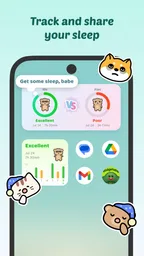
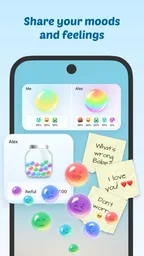
Widgetable is a free social app from Happeny Technology Pte. Ltd., built around shared, glanceable updates. Its store summary points to co-parenting pets and sharing sleep, bathroom, and mood information on screens. That makes its purpose unusually specific: instead of opening a chat to ask how someone is doing, friends or partners can use small pieces of shared context to feel more present in each other’s day.
That can be useful for people whose routines rarely line up. Imagine a couple on different schedules: one person checks in before bed while the other is already at work. A visible mood or sleep update can provide a gentle opening for a later conversation, without requiring an immediate reply. It can also suit close friends who like playful, low-effort ways to stay connected when neither has time for a long catch-up.
I’d recommend it most to people who enjoy making ordinary habits feel shared. The virtual-pet idea gives that connection a playful focus, while the screen-based updates make the relationship feel present outside the app itself. If you and a friend already enjoy sending small reactions or asking about each other’s day, Widgetable can turn that habit into something more visual and recurring.
It is less compelling if what you want is a full-featured messaging service. The central appeal here is not a deep conversation thread or an all-purpose social feed; it is a lightweight layer around everyday life. I would keep a familiar messaging app for plans, serious topics, and anything that needs a clear answer. Widgetable works best alongside those tools rather than in place of them.
How its shared updates shape conversation
The practical change is a shift in timing. A typical chat begins when one person sends a message and waits for a response. A shared update can give the other person a bit of context first, so a later message feels less like starting from scratch. Seeing that someone had a tiring night, for instance, may lead to a more considerate check-in than a generic “How are you?”
There is a trade-off: a mood or routine signal is only a snapshot. It can suggest a conversation, but it cannot explain what happened or what kind of support someone wants. I would use these updates as an invitation, not a diagnosis. If a friend appears low, a kind question is more useful than assuming you already know the reason.
The pet element can also create a shared focus that does not demand constant conversation. Rather than needing a fresh topic every time, two people have a small ongoing thing to care about together. That can be a surprisingly comfortable way to maintain closeness for friends who dislike the pressure to keep a chat active. It is most effective when both people find the playful framing charming; if one person sees it as a chore, the shared ritual can lose its appeal quickly.
One useful approach is to agree on what the updates mean before relying on them. A sleep entry, mood choice, or other shared signal should not be treated as a promise to respond, a request for help, or proof that someone is available. Keeping those meanings modest protects the ease that makes the app attractive in the first place.
Glanceable contact has an attention cost
Putting social information on a screen can make connection feel effortless, but it also brings that connection into moments when you may be trying to focus. A visible update can prompt a pleasant thought, or it can become one more reason to check your phone. If you are easily pulled into notifications and status-checking, the same always-nearby quality that helps you feel close may also make it harder to switch off.
I would start with a narrow routine rather than making the app part of every pause in the day. Check it at a natural moment, such as when you are already looking at your home screen, then leave it alone when you need uninterrupted time. That keeps the shared activity from turning into an obligation to monitor someone else’s mood or habits.
There is also a clarity cost to indirect communication. A glanceable update may tell you something, but it cannot replace a direct message when you need to coordinate a plan or confirm an important detail. If a friend is relying on an update to communicate something urgent, the format is a poor fit. For anything time-sensitive, I would use a direct conversation and make the request explicit.
Compared with ordinary messaging apps, Widgetable favors ambient contact over back-and-forth dialogue. Compared with a private journal or personal habit tracker, its social value comes from sharing selected daily details with someone else. That distinction matters: people who want to reflect privately may prefer a personal tool, while those who want a playful shared routine may find this more engaging than another chat thread.
Boundaries make the shared routine work
Sharing sleep, bathroom, and mood details is more personal than exchanging a casual greeting, even when the presentation is playful. Before using those elements together, I would make sure both people are comfortable with the level of visibility and understand that participation can be casual. A shared feature should not become a test of affection or a way to demand explanations about someone’s day.
It helps to say plainly that updates are optional and that a quiet day does not automatically signal a problem. This is especially important for couples, where a small status change can be misread when one person is already worried. If you notice yourself checking for updates to measure how much someone cares, the app may be feeding anxiety rather than closeness; stepping back or returning to direct conversation is the healthier choice.
Another sensible boundary is to keep sensitive conversations out of the app’s lightweight signals. A mood indicator can open the door to “Want to talk?” but it should not carry the entire conversation about conflict, health, or a major decision. I like the app’s concept most when it lowers the barrier to reaching out without pretending that a small update can do the work of listening.
For families or friends with different comfort levels, begin with the least personal parts of the experience and see whether everyone enjoys the routine. The point is to create a shared moment, not to collect a record of one another. If the activity starts feeling like reporting, it is worth changing how you use it—or choosing another way to stay in touch.
Who will enjoy it, and who may not
Widgetable is a natural fit for close friends, couples, and people who enjoy playful digital rituals. It can be especially appealing when distance or conflicting schedules make spontaneous contact difficult, but both people still want small reminders of the relationship. The co-parenting-pet framing gives the pair something to share, while the routine updates add conversational context without requiring a long exchange every time.
I would skip it if you prefer communication to stay private and direct, dislike screen-based social prompts, or feel burdened by tracking daily routines. It may also frustrate someone who expects a full chat platform or a reliable way to coordinate urgent plans. In those cases, a regular messaging app is clearer; for personal reflection, a private tracker is a better match. Widgetable’s value depends on enjoying the shared, visible quality rather than merely wanting another place to send messages.
The app is rated for Everyone, has a 4.7 average from around 584,000 ratings, and has passed 50 million installs. Those figures suggest broad interest, but they do not determine whether its style will suit your relationship. It is free to install, with in-app purchases ranging from $0.99 to $99.99 per item, so I would pay attention to purchase prompts and decide for yourself whether any optional extras are worth it.
It was released on December 14, 2022, and its current version is 4.2.040, with Android 9 as the minimum operating system. I see that as useful compatibility context rather than a reason to choose it: the more important question is whether the people you want to share with enjoy this kind of low-pressure connection. The app’s large audience and roughly 13,000 written reviews give it a substantial user base, but personal fit still matters more than popularity.
A low-pressure companion, not a conversation substitute
My overall view is that Widgetable offers a distinct way to make closeness visible in the gaps between conversations. The shared pet and everyday updates can give friends or partners a gentle reason to check in, especially when schedules make long chats rare. Its strongest feature is also its main limitation: it is deliberately lightweight, so it can encourage contact but cannot provide the nuance of a real conversation.
I would try it with one person who already enjoys playful check-ins, agree that updates are optional, and see whether the routine feels warm rather than demanding. If it becomes a source of pressure or distraction, there is no need to keep it in your daily rhythm. For the right pair, though, it can add a small, personal signal of attention without asking either person to turn every moment into a message.
What we like
- Create shared widgets with a friend or partner.
- Use countdowns to remember special dates.
- Choose from several cute widget designs.
- Track a shared pet's growth together.
- Personalize widgets with photos and messages.
What could be better
- Many features require an in-app purchase.
- Some widgets need frequent app updates to stay current.
- Both people may need to install the app for shared features.
- Widget updates can depend on background app activity.
- The interface may feel cluttered for simple widget needs.





