






The Home Depot review
 Analysis by Appsdrops
I find The Home Depot app most useful when a home project is already taking shape and I need to turn a vague shopping list into a practical plan. It is a free shopping app from The Home Depot, Inc, built around browsing and buying the retailer’s products. That makes it a focused companion to a project, rather than a general guide to repairs or a substitute for deciding what materials a job needs.
My main reason to recommend it is simple: it can bring product research and shopping together in one place. I can look up supplies before leaving home, compare options, and keep the store’s catalogue close at hand while planning. The tradeoff is just as important: the app is most valuable to people who expect to shop at The Home Depot. If you mainly want neutral advice, or prefer to choose among several retailers, another resource may suit you better.
Free access, with value tied to your shopping habits
The app costs nothing to download, so trying it does not require a purchase. That is a useful starting point for a shopper who wants to check the catalogue or prepare for a project without paying for a separate shopping tool. The app itself is free; the value of what you buy through it is a separate matter, and depends on the products you choose.
I would not treat “free” as a promise that every part of a home project becomes cheaper or easier. It gives you a convenient route into The Home Depot’s shopping experience, but it does not remove the need to check whether a product fits your project, budget, and preferences. For me, the strongest value is reducing avoidable shopping uncertainty: I can do some browsing before a trip instead of arriving with only a rough idea of what I need.
The Home Depot has an average rating of 4.5 from around a million ratings, and it has been installed over 10 million times. Those figures suggest that it has a large audience, but they do not tell me whether it is right for a particular project. A renter picking up a few household basics and a homeowner planning a multi-step renovation will use a shopping app very differently.
What the app is good at delivering
Its core strength is the breadth of the shopping task it supports: the store catalogue covers over a million products. That scale matters when a project involves more than one obvious item. A weekend repair might require a replacement part, fasteners, and a finishing material; being able to browse a broad range in one retailer’s app can make it easier to build a more complete list.
I also like the difference between browsing casually and shopping with a specific job in mind. If I only search for a product name, I may miss alternatives that use different wording. A better approach is to search by the job as well as the item: for instance, think through what the repair needs to accomplish, then explore the relevant product categories. That does not guarantee the first result is suitable, but it gives me a more useful starting point than relying on a half-remembered brand or part name.
A practical workflow is to use the app before a store visit, not just at the moment of checkout. I would make a short project list, research the main items, and note any details that need checking before buying. This is especially helpful for a task with several components, where forgetting one small supply can mean another trip. The app can support that preparation, while the final decision still depends on matching products to the actual job.
For example, imagine a loose cabinet handle that needs replacing before guests arrive. I would first identify what kind of replacement I need, browse the available options, and make a note of the other supplies the repair might require. If I am uncertain about fit, I would check the relevant measurements and product information rather than choosing based only on a thumbnail or a familiar-looking name. The app helps organize the shopping part; it cannot inspect the cabinet or decide whether a particular item will fit.
Where convenience has limits
The most meaningful limitation is that shopping convenience can be mistaken for project guidance. A large catalogue gives me options, but more options do not automatically mean a better answer. For unfamiliar work, I would use trusted instructions or professional advice to understand the repair first, then use the app to research supplies. That order matters: buying the wrong item quickly is still buying the wrong item.
There is also a retailer tradeoff. The app is designed around The Home Depot, so it is a natural fit if I have already decided to shop there. It is less useful as a neutral comparison tool across multiple shops. If my priority is finding the lowest available price across retailers, checking several sources may be a better use of time. If I need a specific item from another store, this app is unlikely to be the most direct route.
Product browsing can take patience when I do not know the exact name of what I need. Home-improvement terms are easy to confuse, and a search can return options that look similar but serve different purposes. I would narrow the task before searching and read product details carefully. For parts where compatibility matters, I would not rely on an image alone. This cautious approach takes longer than tapping the first plausible result, but it can prevent a frustrating purchase.
Another tradeoff is screen-based research versus checking an item in person. Some choices are straightforward to compare online; others are easier to judge by seeing the finish, feel, or scale directly. I would use the app to shortlist options and prepare, then make an in-person check when appearance or physical fit is central to the decision. That hybrid approach is more sensible than expecting an app to settle every question.
Who is likely to get the most from it
I would recommend it to regular The Home Depot shoppers, people maintaining a home, and anyone who likes to plan a project before heading out to shop. It can also be useful for a one-off task if the retailer’s catalogue is a good match for what you need. Since access is free, occasional shoppers can try it without committing to a paid app, then decide whether the convenience suits their habits.
It is less compelling for someone who wants broad, retailer-independent product research or who rarely buys from The Home Depot. A person who only needs general repair instructions may be better served by a dedicated instructional resource. Likewise, if a project depends on specialist advice or exact compatibility, I would not make a retail catalogue the sole source for deciding what to do.
The app is rated for Everyone, and its current version is 8.2.7. It was released on March 15, 2011, and the minimum operating-system requirement is version 9. These details make it easier to judge basic fit: the age rating is broad, while the OS requirement is worth checking before installing on an older device. The Home Depot has been around as an app for years, but I would still keep the software updated when using it for current shopping tasks.
A better way to use it for a real project
For a larger job, I would avoid building a shopping list by browsing endlessly. First, I would divide the work into stages and identify what must be bought for each one. Then I would use the app to investigate products for the immediate stage, rather than trying to select everything before I understand how the work will proceed. This keeps the list manageable and lowers the chance of buying supplies that turn out not to be needed.
I would also separate “confirmed” items from “check before buying” items. A familiar consumable may be easy to add to the list, while a replacement component may need a measurement or a second opinion. That simple distinction is one of the most useful ways to shop through a large catalogue: it stops convenience from encouraging premature decisions. The app can help me explore choices, but I remain responsible for verifying that each one suits the task.
Compared with shopping in a store without preparation, the app’s advantage is having a chance to browse before the trip. Compared with general online marketplaces, its advantage is its direct focus on The Home Depot’s own range. Neither comparison makes it universally better: a physical visit can answer questions about an item’s appearance, while a multi-retailer search can be preferable for broad price comparison. I would choose the method based on what is uncertain in the project.
My verdict: useful when the retailer fits the job
Overall, I see The Home Depot as a practical, free shopping companion rather than an all-purpose home-improvement coach. It earns its place for me when I have a defined shopping task, want to explore a wide range of products from one retailer, or need to prepare before making a store trip. Its value comes from making those steps more convenient, not from guaranteeing the best product or solving the technical side of a repair.
I would install it if I already shop at The Home Depot or have a project that fits its catalogue. I would skip it if my main goal is neutral advice, cross-store comparison, or expert help choosing a technically sensitive part. In short, The Home Depot is worth trying when its retailer-specific focus matches the way you shop; it is not a replacement for careful product checks or a broader search when those matter more.
For someone who uses it regularly, the app can become a useful first stop for planning purchases. For an occasional shopper, it is still easy to test because access is free, but there is no reason to force it into a routine if another shopping method works better. My recommendation is to use it to shortlist, organize, and research, then pause before buying anything whose fit or purpose is uncertain.
That balance is why I would recommend The Home Depot to a friend with a concrete project and a likely trip to the retailer, while advising them to keep their own judgment in the loop. It makes the shopping side more approachable, especially when a job calls for several products, but the best results still come from knowing what the work requires and checking each choice with care.
What we like
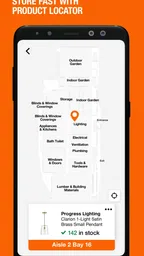
- Product pages show local store availability.
- Order tracking keeps delivery updates in one place.
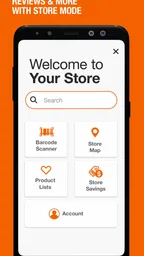
- Barcode scanning helps identify items in store.
- Saved lists make repeat shopping easier.
- The store map can help locate products on site.
What could be better
- Some items may be unavailable for local pickup.
- Product details can vary in depth across listings.
- Store maps may be less useful in crowded locations.
- Delivery dates can change after an order is placed.
- The app experience depends on a stable internet connection.





