


Target: Shop. Style. Save. review
 Analysis by Appsdrops
I would judge a shopping app less by the thrill of its first browse than by whether it remains useful after the novelty wears off. Target’s app has a clear advantage: it connects everyday shopping with the retailer’s familiar mix of household basics, clothing, beauty, accessories, and home goods. In my view, it is most worthwhile when Target is already part of your routine—not when you expect one app to be the best place for every purchase.
What feels useful in the first week
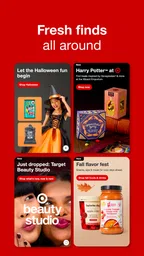
Target: Shop. Style. Save. is a free shopping app from Target Corporation, and it is rated for everyone. Its broad assortment makes a first visit easy to understand: you can browse for a specific household need, look around a department, or move between practical essentials and more personal purchases. That range is appealing if you would rather start in one familiar place than open several retailer apps just to compare categories.
The initial experience is strongest when you arrive with a purpose. Searching for something you already need gives the app a straightforward job, while browsing can help you notice related categories without turning the whole experience into a giant general marketplace. I find that distinction important: a large catalog is useful, but it can also become a distraction if you open a shopping app with no idea what you came for.
A realistic first-week use might be planning a household restock while also looking for a small home item. Instead of treating those as separate shopping trips, you can use the same app to explore both. The practical benefit is less about a dramatic discovery and more about having one familiar starting point for different kinds of Target purchases.
The app has an average rating of 4.9 from around 461,000 ratings, with roughly 105,000 written reviews and more than 10 million installs. Those figures suggest that it has found a substantial audience, though popularity alone cannot tell you whether its shopping approach suits your habits. I would treat them as reassurance that this is an established option, not as a promise that every product or shopping experience will be ideal.
Make the first browse more deliberate
My advice is to use the first session to test a real task rather than browse every department. Search for one item you genuinely need, then see whether the app makes it easy to move from that product to the rest of your shopping plan. This reveals more than a long, unfocused tour: you learn whether the app fits your decision-making style and whether its broad selection feels convenient or overwhelming.
It also helps to separate browsing from buying. If you are comparing styles or considering a nonessential home purchase, take note of what caught your eye and return when you have a clear reason to choose. That small habit matters in a retailer app with many categories, because a pleasant browsing session can otherwise turn into an expanding list of things you had not planned to buy.
Why it can keep earning a place month to month
The lasting case for this app is repetition. Household essentials and everyday shopping needs come around again, so a retailer you already use can be more convenient than repeatedly starting from scratch elsewhere. Target’s mix of practical and style-focused departments also gives it more recurring relevance than a specialist app that is useful only for one type of purchase.
That breadth is not the same as being the best choice for every item. For a product where technical specifications, a highly specialized selection, or extensive comparison is the main concern, a dedicated retailer or comparison-focused service may be a better fit. I would use Target as a convenient place to check for familiar, everyday purchases, while keeping specialist options in mind when the decision depends on detailed research.
Over time, the app is most helpful when it becomes part of a simple routine: identify what you need, check Target’s selection, and decide whether it makes sense to buy there. That approach gives the app a recurring role without requiring you to browse it constantly. It also makes it easier to notice when its breadth is genuinely saving effort rather than simply offering more things to look at.
A useful role alongside other shopping options
Compared with a general online marketplace, Target’s appeal is its recognizable retail identity and a range that brings together home, beauty, fashion, accessories, and essentials. Compared with a specialist store, its advantage is convenience across categories, while its trade-off is that it may not be the strongest destination for every niche need. I would not expect one retailer app to replace all others; I would expect this one to earn a regular place for the kinds of purchases I already associate with Target.
If you are deciding whether to keep it installed, ask yourself how often you actually shop across those departments. Someone who regularly buys household goods and occasionally wants clothing or home decor has a clearer reason to return than someone who visits Target only once in a long while. The app’s value follows your real shopping pattern, not the size of its catalog.
It is also worth setting a personal boundary around browsing. I find broad retail apps more useful when I open them with a short list or a specific question, such as whether Target carries the kind of item I need. That keeps the convenience while reducing the chance that repeated casual browsing becomes a habit with little practical payoff.
Keeping it useful without letting it become work
The maintenance burden is fairly ordinary for a shopping app: keep it available when you have a reason to shop, update it when your device prompts you, and return when a real need comes up. The current version is 2026.44.0, and the stated minimum operating-system requirement is version 9. I would check compatibility before installing on an older device, but for a supported phone the more important question is whether the app’s place in your routine is clear.
There is no need to treat the app as a daily destination. A shopping tool should reduce effort at the moment you need it; it should not create a new chore of checking in. If you only use it occasionally, keeping your expectations modest is sensible. Open it for a planned purchase, decide whether the selection suits you, and close it when the task is done.
One useful trade-off is that a single app can make a mixed shopping task feel more manageable, but a broad assortment also asks you to provide your own focus. I would group needs before browsing—for example, note the essentials first and leave optional decor or fashion browsing for another time. This is a simple workflow, but it helps preserve the app’s practical value instead of letting unrelated categories pull attention away from the original task.
Another good habit is to make the purchase decision outside the excitement of browsing. If you are considering an optional item, pause and ask whether you would still look for it if you had opened the app only to buy necessities. That question is especially useful in a store app that puts practical and discretionary categories under the same roof. It helps distinguish convenience from impulse without making shopping feel like a strict exercise.
Where the routine can start to feel tiring
The same variety that makes the app useful can also create fatigue. If you open it without a shopping goal, the number of possible directions may make it harder to decide what matters. For me, that is not a reason to reject the app; it is a reason to use it with a purpose. People who enjoy spontaneous browsing may find the range entertaining, while people who prefer a narrow, task-focused tool may find a specialist retailer less distracting.
A second source of fatigue is expecting a retailer app to be a neutral comparison service. Target is there to help you shop its assortment, not to make every competing option equally easy to evaluate. When price, technical detail, or a very specific product requirement is central, I would compare with other retailers before deciding. That extra step is worthwhile when the purchase is important, even if it makes the process less convenient.
It may also be the wrong app for someone who rarely shops at Target or who wants to manage all purchases through one cross-retailer service. In that case, an app tied to a retailer you use more often—or a broader shopping tool—could fit better. Installing an app simply because it offers many categories is not enough; the categories need to match the way you actually shop.
For anyone concerned about age suitability, the app’s content rating is Everyone. That makes its general audience clear, but I would still guide younger shoppers toward purposeful use and sensible buying decisions. A wide selection can be engaging at any age, and the same basic habit applies: decide what you need before browsing, especially when optional purchases are easy to explore.
Does it deserve lasting space?
My answer is yes, with a condition: it earns lasting space if Target is already one of the places you shop. The app is free, belongs to the shopping category, and has had a long presence since its release on August 31, 2010. Those details support its role as an established retailer companion, but the reason to keep it is practical repetition—not the fact that it has been around for a long time.
The best reason to keep Target installed is recurring usefulness, not endless browsing. If you often need everyday items and sometimes shop for clothing, beauty, accessories, or home decor at Target, the app gives those errands a shared starting point. If your shopping is infrequent, highly specialized, or spread across retailers you prefer to compare in depth, you may be better served by another option or by installing it only when you have a specific task.
I would recommend giving it a fair test through one ordinary shopping need and then judging it by the effort it saves. Does it help you find a relevant part of Target’s assortment without sending you down unnecessary browsing paths? Does its range match purchases you make repeatedly? If the answer is yes, it can become a dependable, low-maintenance part of your routine. If not, there is little reason to keep a retailer app out of habit.
After the first-week appeal fades, this app’s value comes down to fit. It is strongest as a convenient way to shop a familiar retailer across several everyday categories, and weaker as a universal answer to every comparison or niche purchase. I would keep it for regular Target shoppers who value that mix, use it with a short plan, and turn elsewhere when specialized research matters more than convenience.
What we like
- The app makes it easy to browse Target’s product catalog.
- Product pages include ratings and customer reviews.
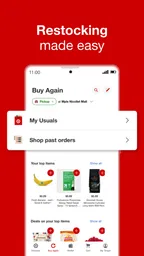
- Saved items make it simple to revisit products later.
- Order tracking keeps delivery updates in one place.
- Store pickup offers a convenient alternative to home delivery.
What could be better
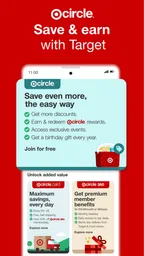
- Some deals require a Target Circle account.
- Product availability can vary by store and change quickly.
- The app may request location access for nearby store features.
- Large catalogs can make finding a specific item time-consuming.
- Returns and exchanges may require visiting a store.





