


Skool review
 Analysis by Appsdrops
I’d choose Skool when I already belong to a community there and want a more convenient way to keep up from my phone. It is a social app built around those communities, rather than a general-purpose place to find friends or broadcast updates to a wide audience. That narrower purpose is useful: the conversations and activity I care about can stay in one place instead of getting mixed in with unrelated social feeds.
My main reservation is that a community app is only as useful as the groups you have access to and the way their members use them. Skool can make it easier to check in, but it cannot make a quiet group lively or organize a confusing one for you. If you are considering it, the key question is not just whether the app works on mobile; it is whether the communities you want to follow are active and suited to the way you like to learn or connect.
Where mobile use can feel confusing
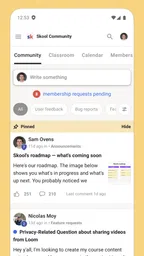
Skool is the official mobile app from skool.com, and its role is to help members stay connected to their communities while away from a computer. That sounds straightforward, but there are two separate things to keep in mind: the app itself and the particular community you are trying to use. If you cannot find a discussion or do not see much activity, the cause may be the group’s organization or posting habits rather than a problem with the app.
When I open a community app, I want to know quickly whether there is something worth my attention. With Skool, I would treat a quick check-in as a way to catch up, not assume that every visit will surface a new, important post. Community spaces can have different rhythms: one may have frequent conversation, while another may be used mainly for occasional updates. Giving a group a few visits before deciding it is useful is more sensible than judging it from a single quiet session.
A common point of friction is knowing where to continue a conversation. If a group has several ongoing topics, it is worth returning to the relevant discussion rather than starting a new one just because it is easier to post from the phone. That small habit makes replies easier for other members to follow and helps keep useful information from becoming scattered. It is especially helpful when you use a community for a course, professional interest, or recurring hobby.
There is also a difference between staying informed and being constantly available. A phone makes it tempting to check every update as it appears, but I find community apps work better when I use them with a purpose: read a thread, ask a question, or see what has changed, then leave. Skool is a better fit for that focused routine than for someone who wants a broad, endlessly refreshing social feed.
Before deciding the app is broken
If a community does not appear as expected, first make sure you are using the right account and that you have joined or been given access to the group you want. This is a practical check, not a special Skool trick: membership and the app are distinct parts of the experience. If the group is missing, confirming the account and access is a better first step than repeatedly reinstalling the app.
Next, check whether the community itself has new activity. A lack of fresh posts can feel like an app problem when you are expecting a stream of updates, but it may simply mean members have not posted recently. Try opening a discussion you already know about and see whether its existing conversation is available. That helps separate a quiet group from a loading or account issue.
Skool is free, which makes it easy to try if a community you care about uses it. Still, free access does not mean the app can substitute for the community’s own value. Before building a daily routine around it, I would look at the group’s recent discussions, the kind of questions members ask, and whether the replies are useful. That quick assessment tells you more than installing an app and waiting for it to become engaging on its own.
A simple setup routine that saves time
After installing, I would begin by checking that I am signed into the account connected to my community membership. Then I would open the specific group I want to follow and identify one or two discussions that matter to me. This creates a reliable starting point for later visits and avoids the vague feeling of opening a social app without knowing what to do next.
For a community used for learning, I would also decide how I plan to use it before posting. For example, I might save my questions until I have enough context to explain what I tried and where I got stuck. A clear question is easier for other members to answer than a series of disconnected, hurried messages. This is particularly useful on a phone, where typing a detailed explanation can take more effort.
If something seems out of date, close and reopen the app, check your connection, and try again before assuming that your membership has changed. If the issue is limited to one community or one discussion, ask a community administrator or another member whether they can see the same thing. That comparison can help identify whether the problem is local to your session or related to the group itself, without making unsupported assumptions about how the app handles updates.
Skool’s current version is 1.0.57, and it requires Android 9 or later. The app is rated for teens. Those details matter when checking whether a device can run it or whether it is appropriate for a younger user, but they do not tell you how active a particular community will be. I would treat compatibility and community fit as two separate decisions.
Recovering your place after a missed visit
One of the most useful ways to return after a few days away is to start with the topic you were already following instead of trying to read everything in order. Community discussions are not always a single chronological story; different questions may matter to different members. I would scan for the thread connected to my goal, read the latest context, and then decide whether I have something useful to add.
If you posted a question and have not received a reply, avoid immediately reposting it in several places. First, check that it is in the relevant community and that the question includes enough detail for someone to help. Then give members a reasonable chance to see it. Repeating the post can make the group harder to follow, while a concise follow-up that adds new information is more constructive.
For a practical everyday example, imagine you are taking an online course whose discussion happens in a Skool community. You check the app during a commute, notice that a member has raised a problem related to the lesson, and read the thread. Later, when you have time to type properly, you can add your own question or describe what you tried. The mobile app is valuable in that routine because it lets you stay oriented between longer study sessions; it does not need to replace focused work on a larger screen.
Another useful habit is to make each visit purposeful. I might check a group before a scheduled study session, read the latest relevant discussion, and leave with one question to bring back. That is more manageable than trying to monitor every conversation. It also makes the app feel like a tool for participation rather than another source of notifications and distraction.
When the problem belongs to the community
Not every frustrating experience can be solved by changing how you use the app. If posts are hard to follow because members start overlapping discussions, or if questions repeatedly go unanswered, those are community-level issues. A mobile interface can make conversations accessible, but it cannot set expectations, provide subject expertise, or ensure that members respond.
If a group’s purpose is unclear, look at the conversations already taking place and ask a focused question about how members use it. If it remains inactive or poorly organized, a dedicated forum, class platform, or smaller group chat may suit your needs better. The best alternative depends on what you are trying to do: a forum can be easier for searchable, long-lived answers, while a chat app may be more natural for quick coordination among people who already know one another.
That comparison is also why I would not install Skool expecting it to replace every social app. It is aimed at community participation, not at the broad mix of personal updates, public discovery, and casual entertainment that people associate with large social networks. If you want a place to follow creators or friends across many unrelated topics, a conventional social feed is likely a better match. If your main goal is to take part in a specific group, Skool’s focused approach makes more sense.
The app has an average rating of 4.3 from around 7,100 ratings, alongside roughly 699 written reviews and over 5 million installs. That suggests it has reached a substantial audience, but popularity alone is not a guarantee that your own group will be a good fit. I would put more weight on whether the community is active, welcoming, and relevant to what I need than on the overall rating.
Who I’d recommend it to
I’d recommend Skool to someone who already has a reason to join a community there: a course cohort, a professional group, or a shared-interest community with conversations worth returning to. The app is most useful when members use it to exchange knowledge or support one another, and when you have a clear reason to check in. It can also suit people who prefer participating in a defined group over posting to a broad public audience.
I would be more cautious if you are looking for a standalone social network to fill quiet moments. The app’s value depends on communities, so installing it without a group in mind may leave you wondering what to do next. It may also be the wrong choice if you need a polished archive of reference material or a highly structured project workspace; in those cases, a purpose-built knowledge base or collaboration tool can be easier to navigate.
Skool is a social app from skool.com, released on June 1, 2023, and it is free to use. For me, the clearest reason to try it is simple: a community I care about is already there, and I want a convenient way to keep participating from my phone. The clearest reason to skip it is just as practical: if the group is inactive, poorly suited to your needs, or absent altogether, the app cannot fix that mismatch.
Overall, I see Skool as a useful companion to a good community rather than a destination that creates one by itself. Start with the group, confirm you have the right account and access, and use the app for focused check-ins instead of expecting it to replace every other social or learning tool. If those conditions fit your situation, it is an approachable way to stay involved; if they do not, choosing a more active community or a tool designed for your specific task will probably serve you better.
What we like
- Clear course layouts make lessons easy to browse.
- Built-in discussions keep learning and community in one place.
- Notifications help members stay aware of new posts and events.
- The mobile app makes communities accessible away from a computer.
- Members can connect with creators and peers in focused groups.
What could be better
- Access to many communities requires a paid membership.
- The experience depends on each community's level of activity.
- Frequent notifications may feel distracting without careful settings.
- Some features may be easier to manage on the desktop site.
- Community quality and moderation can vary between groups.





