

Shop review
 Analysis by Appsdrops
Keeping track of online shopping can get messy fast: orders arrive from different stores, updates come through different channels, and finding a past purchase may mean digging through old messages. Shop aims to make that routine easier by bringing stores, deals, and order tracking together in one shopping app. I find its appeal clearest when I use it as a place to follow a purchase from discovery through delivery, rather than as a replacement for every retailer’s own service.
A simpler starting point for online shopping
Shop is a free shopping app from Shopify Inc., designed for people who want to discover stores, find deals, and keep an eye on orders. Its core idea is straightforward: instead of treating every purchase as an isolated transaction, the app gives shopping activity a shared home. That can make a difference when I have bought from several stores and want a less scattered way to check what is happening.
The first step is deciding what I want from the app. If I’m browsing, Shop can help me explore stores and offers. If I have already placed an order, tracking is the more practical reason to open it. Those two uses fit together naturally: I can discover something, make a purchase, and then return to the app to follow the order. The experience is most compelling when that complete path feels connected.
Shop is built around convenience across the shopping journey, not just a single checkout. That framing is useful, though it also sets an expectation: the app is most valuable when the stores and purchases I care about fit into its flow. As with any shopping organizer, its usefulness depends on how smoothly it can connect the steps that otherwise live in separate places.
From browsing to choosing a store
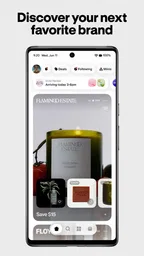
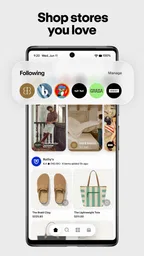
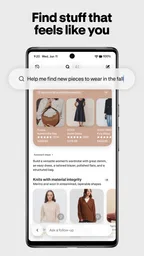
When I’m in discovery mode, I want to find a shop or offer without feeling pushed through an endless catalogue. Shop’s store-discovery and deal focus gives me a reason to browse even when I have not started with one specific retailer. The experience suits casual exploration: I can look around, notice a store that catches my eye, and decide whether its products are relevant to what I need.
Deals can make that browsing feel more purposeful, especially if I’m comparing where to buy rather than searching for one exact item. Still, I treat an offer as a starting point, not the whole decision. I want to judge the product and the store on their own merits too. That keeps the app’s deal-led appeal in perspective and makes the discovery stage feel like shopping rather than simply chasing promotions.
There is a small but important handoff here. Discovery may begin inside Shop, but choosing a product and completing a purchase depends on the shopping experience around that store. I find it helpful to think of the app as a guide into a broader retail journey. It can make the next step easier to reach, but the retailer remains part of the experience.
Following an order after checkout
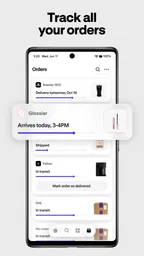
After placing an order, the practical question changes from “What should I buy?” to “Where is my purchase?” That is where Shop’s order-tracking purpose becomes central. Rather than mentally keeping each purchase separate, I can use the app as a place to check on orders and revisit the shopping journey after checkout. For people who buy from multiple stores, that sense of continuity is the main everyday benefit.
In a good tracking flow, I should be able to move from an order update to a clear understanding of what happens next. Shop’s promise is that tracking belongs alongside store discovery and deals, so I don’t have to think of shopping as finished the moment I pay. The app’s role is to help me keep the purchase visible while it makes its way through the retailer’s process.
The handoff matters because an order involves more than one participant. I choose a store, the retailer handles the sale, and the delivery process moves the purchase toward me. Shop can act as a convenient point of reference across that journey, but the actual fulfilment belongs to the store and its delivery arrangements. I see the app as a useful companion for staying oriented, rather than the party responsible for every part of an order.
When the journey feels connected
The best outcome is a shopping routine that asks less of my memory. I discover a store or deal, make a purchase, and return to one familiar app to check the order. That is a simple workflow, but it addresses a familiar annoyance: shopping information can become spread across different stores and conversations. Bringing discovery and tracking under one roof gives the journey a clearer shape.
Shop’s scale also suggests that plenty of people are interested in this kind of experience. It has more than fifty million installs, an average rating of 4.4, and over eight hundred thousand ratings. Those figures give useful context for its reach, although they don’t tell me whether every store or purchase will feel equally seamless. The day-to-day value still comes down to whether the app fits the way I shop.
For me, the strongest case is convenience rather than novelty. Shop makes sense when I want one place to move between discovering stores, spotting deals, and checking on purchases. It is not necessary to make every shopping decision inside the app to get something from it. Even using it mainly as a tracking companion can make the overall process feel more organized.
Where the flow can lose momentum
The workflow depends on handoffs, and handoffs are where any joined-up shopping experience can feel less smooth. Discovery, checkout, and fulfilment involve different parts of the retail process. If I need to move between Shop and a retailer’s own experience, the sense of having everything in one place may weaken. That does not make the app pointless, but it does mean I should see it as a helpful layer around shopping rather than assume it replaces every store interaction.
There is also a difference between finding an offer and deciding that it is the right purchase. A deal can draw my attention, but I still need to make a considered choice about the product and store. I prefer apps that support that decision without making the promotional side feel like the only reason to browse. Shop’s appeal is broader when I use deals as one part of the experience and order tracking as another.
Order tracking is most satisfying when the information I need is easy to find and the next step is clear. If I end up having to revisit a retailer’s own process to understand an order, the convenience becomes less complete. That is a general friction point in a shopping journey involving several parties: the app can organize the view, while the underlying order remains connected to the retailer and delivery process.
These limitations are worth keeping in mind, particularly if I expect a single app to manage every detail of every purchase. Shop is better understood as a central companion for shopping activity. It can make the journey easier to follow, but a smooth result still relies on the pieces around it working together. That distinction helps set a fair expectation and makes the app’s useful parts easier to appreciate.
Who will get the most from Shop?
I’d recommend Shop to people who shop online from different stores and want a more organized way to follow purchases. It also suits anyone who enjoys browsing retailers and looking for deals in the same app. If the main frustration is remembering where an order came from or finding a convenient place to check on it, Shop’s focus is easy to understand.
It may be less essential for someone who makes very few online purchases or already has a routine that keeps every order easy to follow. The app’s value is practical: it brings together store discovery, offers, and tracking in a way that can reduce the feeling of juggling separate shopping journeys. I would judge it by whether it makes my own routine clearer, not by expecting it to take over every retailer’s role.
Shop is free, rated for Everyone, and available on Android and iOS. It was released on September 26, 2019, and its current version is 3.18.0, with Android 10 as the minimum operating system. Those basics make it straightforward to consider as a general-purpose shopping companion, while the app’s real appeal remains its effort to connect browsing with what happens after checkout.
My final take
Shop works best when I treat it as a practical hub for the shopping journey: explore stores, notice an offer, make a purchase, and return to check on the order. Its strongest idea is the connection between discovery and tracking, because those are often separated in everyday online shopping. The experience can still involve handoffs to retailers and delivery processes, so I wouldn’t expect the app to erase every point of friction.
Overall, I find Shop worth considering if you want a more convenient way to browse stores and keep purchases in view. It has a clear purpose, a broad audience, and a straightforward place in a regular shopping routine. If your goal is to make online shopping feel less scattered, Shop offers a useful starting point and a handy place to follow the journey after checkout.
What we like
- Quick product search helps shoppers find items with less effort.
- Clear product photos make it easier to compare styles.
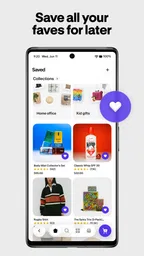
- Personalized recommendations can surface relevant products.
- Saved payment details help speed up checkout.
- Order tracking makes delivery progress easy to follow.
What could be better
- Product availability can vary by location.
- Some listings may have limited size or color options.
- Delivery dates can change after an order is placed.
- Returns may require extra steps depending on the seller.
- Deals and prices can change without notice.





