







rednote review
 Analysis by Appsdrops
I think the best way to judge rednote is not by asking whether it replaces every social app, but by noticing what kind of sharing it encourages. It is a social app for people who like discovering and exchanging ideas through posts, and it can make an ordinary moment feel worth saving or discussing. I would recommend it to someone who enjoys browsing other people’s interests as much as keeping up with friends. I would be more cautious if what you want is a quiet, strictly private messaging tool or a feed that never asks for your attention.
When sharing is the point
Some social apps are built around quick replies and constant conversation. rednote feels more suited to a slower kind of connection: sharing something you found, explaining why it matters to you, and letting other people respond when they have something to add. That difference can be useful if you want social interaction to have a little more context than a string of short messages.
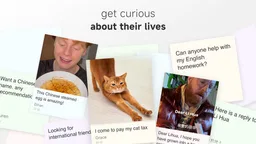
In everyday use, that might mean saving a thought about a meal, a place, or something you are learning, then sharing it with people who have similar interests. The post becomes a starting point rather than a demand for an immediate reply. I like that rhythm in principle because it gives people room to communicate without treating every pause as a missed message.
The app is aimed at a broad social audience, but it will make the most sense if you enjoy looking around as well as posting. If you only want to coordinate plans with a few close contacts, a conventional messenger is simpler. rednote is more appealing when you are willing to let your interests shape what you see and the conversations you have.
What kind of social rhythm it supports
rednote’s appeal is in the space between a private chat and a public broadcast. You can share something with a social audience and see whether it sparks a response, without making every interaction feel like a one-to-one conversation that needs an immediate answer. That can make it easier to participate on your own schedule.
There is a trade-off: a post can be visible to people beyond the small circle you had in mind, depending on how you share it and the app’s available controls. I would pause before posting anything that is personal or that you would not want circulating outside a close conversation. For sensitive details, a direct conversation in a service designed around private messaging is the safer fit.
The experience also depends on what you choose to follow and engage with. A social feed can become more useful when you respond to subjects you genuinely care about, but that takes a little curation. I would treat the first few sessions as a chance to teach the app what interests you rather than as a representative sample of what it will feel like later.
How conversations develop
Compared with a fast-moving chat app, rednote gives shared material more room to carry the conversation. A post can provide a common reference point, which is helpful when you want to discuss an idea or ask for reactions rather than simply exchange status updates. The benefit is clarity: people can respond to the same thing instead of trying to reconstruct what a short message meant.
A practical workflow is to use the app for discovery and ongoing interests, then move a time-sensitive plan to a direct channel you already trust. If friends are deciding where to meet tonight, relying on a social feed may add delay. If you are collecting opinions about a place to visit later, a post can invite several people to contribute without requiring a group chat to stay active all day.
That distinction matters because social tools can blur discovery and coordination. rednote is more compelling when the conversation can unfold at a comfortable pace. It is less convincing as the sole place for urgent communication, especially if you need to know that a particular person has seen and answered a message.
Attention, browsing, and the cost of checking in
The main attention cost is not a complicated feature; it is the temptation to keep browsing once you have opened a social feed. I find it helpful to arrive with a reason: check a topic, share something, or catch up briefly. Without that intention, discovery can turn a quick visit into a longer session than planned.
One useful habit is to separate posting from browsing. Decide what you want to share first, publish it, and then leave rather than waiting for reactions. That small boundary helps keep the app from turning every post into a reason to check again. It also makes the conversation feel less like a live performance and more like an exchange that can continue naturally.
If you are trying to reduce screen time, the question is not simply whether to install another social app. It is whether this kind of browsing serves a purpose for you. Someone who enjoys finding ideas and connecting around interests may find the time worthwhile. Someone who already feels pulled between several feeds may prefer to keep their social life in one familiar place.
Privacy and personal boundaries
I would be deliberate about what I share and who I expect to see it. Before posting a personal story, consider whether you would be comfortable with a wider audience interpreting it without the context your close friends have. Social posts can travel farther in people’s attention than intended, even when the original thought felt casual.
It is also reasonable to participate mainly as a reader. You do not need to turn every discovery into a public post to get value from a social platform. Browsing, following interests, and contributing only when you have something useful to add can make the experience feel less demanding. That approach is especially suitable for people who want inspiration and conversation without making their daily life an ongoing broadcast.
For parents considering the app, the content rating is Teen, so I would treat it as a social space that needs age-appropriate judgment rather than assuming it is designed only for adults. A teenager should understand what they are sharing and how to handle interactions with people they do not know well. The same basic care applies to any social network, but it is worth discussing before regular use.
Who is likely to enjoy it
I see rednote working best for people who like following interests, collecting ideas, and sharing discoveries in a social setting. It can suit a student looking for conversations around things they are exploring, a hobbyist who enjoys seeing how others approach the same subject, or a friend group that likes exchanging recommendations without expecting instant replies.
It may be a poor match if you want a minimal interface devoted only to private messages, if you dislike browsing feeds, or if social comparison tends to affect your mood. In those situations, a messenger or a more tightly controlled private group may give you the connection you want with fewer distractions. The right choice depends less on how many people are using an app and more on whether its communication style fits your habits.
The app is free to download, while in-app purchases range from about fifty cents to around three hundred sixty-five dollars per item. I would check any purchase details carefully before confirming them, particularly if a device is shared. You can begin without paying, so there is no need to spend money just to find out whether the social format suits you.
What the app’s scale does—and doesn’t—tell me
rednote is developed by 行吟信息科技(上海)有限公司. Its average rating is about 3.9 from roughly 223,000 ratings, with around 12,000 written reviews and more than 10 million installs. Those figures suggest that it has a substantial audience, but they do not tell me whether the feed will match your interests or whether you will enjoy its pace. I would judge it by the quality of the conversations you actually find.
The app was released in December 2014, and version 9.54.0 is listed for devices running Android 5.0 or later. That gives Android users a straightforward compatibility check before installing. The age rating is Teen, which is another reason to think about who will use it and what boundaries make sense in your household.
Against familiar social networks, the practical distinction is the kind of attention each one asks for. A chat-first service is better for quick coordination; a tightly private group is better when audience control matters most. rednote is worth considering when you want a broader space for sharing and discovering, and you are comfortable managing how much time and personal context you put into it.
My verdict on living with rednote
I would describe rednote as a social app for people who want their online interactions to grow from shared interests rather than constant rapid-fire messages. Its strongest potential is giving a post enough context to invite a real response, while its main drawback is the familiar one: browsing can compete for attention, and a social audience is not always the same as a private circle.
If you install it, I suggest starting with a narrow purpose. Follow a few subjects you genuinely care about, decide what you are comfortable sharing, and notice whether the app helps you have better conversations or simply adds another feed to check. That is a more useful test than judging it by popularity alone.
For me, rednote makes sense when I want to explore ideas and share them at an unhurried pace. I would keep a separate channel for urgent plans and private matters, and I would step away if checking the feed began to feel compulsory. Used with those boundaries, it can be a worthwhile addition for an interest-led social life; without them, a simpler alternative may leave you more present.
What we like
- Interest-based recommendations make it easy to discover relevant posts.
- Photo and video posts give creators flexible ways to share ideas.
- Search helps users find product reviews and practical tips.
- Saving posts makes useful inspiration easy to revisit.
- Creator profiles help users explore more content from people they like.
What could be better
- Much of the content is in Chinese which can limit accessibility.
- Recommendations may take time to match your interests.
- Some posts may contain promotional content that is hard to identify.
- Creating an account may be required for some features.
- The volume of posts can make reliable information harder to assess.





