




NGL: ask me anything review
 Analysis by Appsdrops
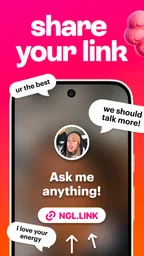
NGL: ask me anything is a social app built around a simple invitation: share a link and let people send you questions. I see its appeal in the small moments when friends are already chatting elsewhere and want a more playful way to ask something. The experience depends on being able to share and receive messages, so a steady connection matters more than it would in an app meant mainly for offline tasks.
Sharing a link works best when the conversation is already moving
NGL is developed by NGL App and sits in the social category. Its basic idea is easy to understand: get a personal NGL link, share it with people, and invite questions. That low barrier is useful when I want to prompt a conversation without asking everyone to install the same messaging app or join a group first. The link gives the exchange a clear starting point, while the answers can become a reason to keep talking elsewhere.
The app’s simplicity also means that the quality of the experience depends heavily on context. A link posted to a story or sent to a group with active friends is more likely to get attention than one dropped into a quiet feed. NGL does not create an audience on its own; it gives an existing social circle a prompt. I would treat it as a conversation accessory rather than a replacement for direct messaging or a place to build friendships from scratch.
In everyday use, the network is part of the interaction at each important step: getting the link, sharing it through another service, and checking for incoming questions. If a friend asks why the link is not opening or a reply seems delayed, the first thing I would check is whether both of us have a working connection and are using the intended link. That is not a special trick, but it prevents blaming the app for a problem that may be happening in the handoff between apps.
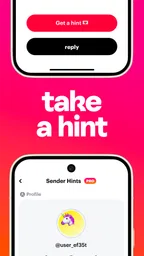
The app is free to download, with in-app purchases listed from $0.99 to $29.99 per item. I would start with the free experience and decide whether any paid option is worthwhile only after using the core link-and-question format. Paying does not solve the main social challenge: people still need to see the link and feel like responding.
What a connection changes from one moment to the next
The most important network-dependent moment is the transition from NGL to the place where I share the link. That handoff can feel effortless when the social app is already open and the connection is stable. It can feel less smooth when the phone is switching between Wi-Fi and mobile data, a page is loading slowly, or I am moving between apps in a hurry. In those moments, I find it useful to copy or reopen the link deliberately rather than assuming a tap went through.
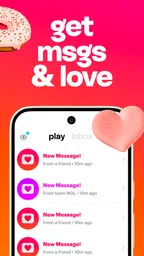
Receiving questions has a different rhythm from sending a message in a live chat. A question may arrive while I am away, and checking the app becomes a separate action. If I am expecting a reply for a time-sensitive conversation, NGL is the wrong channel; a direct message is clearer because both people can see the exchange in the same conversation. NGL works better when the point is anticipation, casual curiosity, or a prompt that can wait.
A practical example is sharing a link with classmates after a group project. I might ask for anonymous feedback on which part of the presentation was confusing, then review responses when I have time. For anything that needs a quick clarification, I would move the discussion to the group chat. That split keeps the link useful for gathering reactions without pretending it is a dependable live coordination tool.
Using it on the move without losing the thread
NGL is naturally suited to short phone sessions: share a link during a break, check for questions later, and decide whether to respond. That makes it convenient on a commute or between classes, but those are also situations where connectivity can change. A link that loads on a strong connection at home may take longer in a crowded public space or during a handoff between networks. I would avoid treating a brief loading pause as proof that a question or share failed.
For a smoother routine, I would share the link while I have a moment to confirm the post or message appeared in the other app. Then I would check responses when I have enough time to read them carefully rather than opening NGL repeatedly while distracted. This is especially sensible if I expect several people to respond: a quick glance between errands can make the experience feel fragmented, while a deliberate check gives me room to decide what deserves an answer.
The app is rated for Teen users, which is a reminder that its social setting can involve people who are still learning how to handle personal questions and public feedback. I would be thoughtful about where I share a link and what kind of response I invite. A light prompt among trusted friends is a very different use from asking a broad audience to judge something personal. If I would not be comfortable seeing a response shared beyond its intended context, I would keep the prompt less sensitive.
For users who mainly want a private conversation with one person, ordinary messaging apps are usually a better fit. They make the recipient and context explicit and keep the exchange in one place. NGL’s strength is the open invitation: it can collect questions from people who might not otherwise start a direct chat. Its trade-off is that the user has less control over the timing and tone of incoming messages.
When something stalls, recover calmly
Because the experience crosses between NGL and other apps, a failure can be hard to diagnose at first. A link may not open, a shared post may not appear immediately, or a response may seem absent. I would work through the simplest checks: confirm that the phone is connected, reopen the app, return to the place where the link was shared, and make sure I am looking at the right account or conversation. If the link itself was copied into a message, checking that message is more useful than repeatedly tapping around inside NGL.
There is a useful distinction between a network delay and a lack of engagement. If the app opens and the link is visible but no questions arrive, that does not necessarily mean anything is broken; people may simply not have responded yet. Reposting the same invitation several times can make it feel pushy, so I would give friends time before trying again. If a connection issue is temporary, waiting and checking once more is often less frustrating than restarting the whole sharing process.
Recovery also means deciding what to do with an uncomfortable interaction. I would not feel obliged to answer every question, especially if it crosses a personal boundary. The simplest response may be to leave it unanswered and adjust the prompt or audience next time. NGL is most enjoyable when I use it with expectations that match its casual format, not when I rely on it to manage sensitive conversations or resolve conflict.
At the time of this review, the current version is 2.11.0, and the app requires Android 8.0 or later. It has an average rating of 4.6 from around 2.1 million ratings, with about 3,300 written reviews and over 100 million installs. Those figures suggest a widely used app, but popularity cannot tell me whether a particular group of friends will participate. The social context matters more than the headline numbers.
Keeping use light and data-conscious
Since NGL relies on sharing and checking for responses, I would use it in short, intentional visits rather than leave it as a constant distraction. That approach is practical when I am on a limited mobile plan, but I would not assume that the app offers a special data-saving mode or works without a connection. The safer habit is to use a reliable network when sharing and to avoid repeatedly refreshing or reopening the app just to see whether anything has changed.
Another small but useful habit is to think about the audience before sharing. A link placed in a private group has a different reach from one posted where a much larger circle can see it. If the goal is feedback on a hobby, outfit, or low-stakes choice, a broad invitation may be fun. If the question is about a personal decision, I would ask a few trusted people directly instead. This keeps the app’s open-ended format from encouraging more exposure than I actually want.
NGL App has built a recognizable, narrow tool rather than a full social network. That focus is an advantage when I want a quick prompt, but it also means there is little reason to open it if nobody has the link or the group is not interested. Users who prefer structured communities, long conversations, or carefully managed one-to-one exchanges will probably get more from a messaging or forum app. Here, participation is the whole point, and connectivity only helps when people are ready to take part.
Who will enjoy the format—and who should pass
I would recommend NGL: ask me anything to someone who already shares updates with friends and wants an easy way to invite questions. It suits people who enjoy low-pressure prompts, do not mind checking responses later, and can keep the exchange light. It may also work for a creator or club member who wants a simple question prompt for an audience they already reach, provided they are comfortable with the unpredictability of open responses.
I would skip it if I needed reliable, immediate replies, wanted a private channel with a clearly chosen recipient, or found anonymous-style social feedback stressful. I would also avoid treating it as a dependable way to collect serious advice. In those cases, a direct conversation is easier to follow and gives both sides more context. NGL’s format can be fun precisely because it is casual; expecting it to behave like a moderated support space or a group chat sets it up to disappoint.
The app was released on May 18, 2022, and its large audience gives the link-based idea plenty of potential reach. Still, a broad install base does not guarantee that the people I know will respond. I would judge it by whether my own circle enjoys the prompt, not by how many others use it. The Teen age rating is also worth keeping in mind when deciding whether to share it with younger users or invite questions about topics that need more care.
My connectivity verdict
For me, the best way to use NGL is as a lightweight social bridge: share the link when I have a stable connection, let people respond in their own time, and move important conversations to a direct channel. Its convenience comes from making the invitation easy, not from eliminating the need for friends, patience, or a working network. When the connection is poor, I would pause and retry rather than repeatedly reposting; when replies are slow, I would remember that attention and interest are not the same thing as connectivity.
Overall, I find the concept appealing for casual interaction, with a clear limitation: it depends on an audience that wants to participate and on a phone connection that can carry the link between apps. If that matches how you already socialize, the free entry point makes it easy to try, while optional purchases are best considered only after you know what you want from it. If you value privacy, immediate back-and-forth, or dependable responses more than playful questions, a regular messaging app is likely the better choice.
What we like
- Anonymous questions can make it easier for friends to share candid thoughts.
- The inbox keeps submitted questions together for convenient browsing.
- Custom links are easy to share through social media profiles.
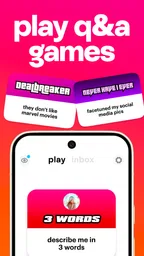
- Question prompts can help start conversations when friends are unsure what to ask.
- The basic question-and-answer experience is simple to learn.
What could be better
- Anonymous messages can invite teasing or unwanted attention.
- Paid features may be promoted within the app.
- Some answers may be vague because senders remain anonymous.
- Using social links can expose users to messages from people they do not know.
- The app offers limited value when friends do not participate.





