





Lowe's review
 Analysis by Appsdrops
I find a home-improvement shopping app most useful when it helps me make a better decision before I’m standing in an aisle with a half-remembered measurement. Lowe’s is built around that kind of errand: it gives the retailer’s customers a place to look up products and handle shopping tasks from a phone. I’d recommend it most to people who already shop at Lowe’s, especially when several people in a household are planning or tackling the same project.
One household project, fewer crossed wires
A realistic use for Lowe’s is coordinating a quick repair: one person notices a loose cabinet handle, another checks what style would match, and someone else makes the store run. Keeping the product search and shopping task on a phone can make that handoff easier than sending vague messages such as “get a small screw” or relying on a handwritten list left at home.
That convenience depends on how the household uses the app. If one person is doing the browsing and purchasing, a single device and account may be enough. If several people use the same phone, it’s worth being deliberate about who is signed in and who is placing an order. A shared shopping app can simplify a project, but it does not magically make every household member’s plans, preferences, or account activity separate.
I would treat it as a practical retailer app rather than a household project-management tool. Use it to help with the shopping side, then agree on important details outside the app: the exact finish, dimensions, quantity, and who is responsible for buying. That small bit of coordination is especially helpful when one person is comparing items while another is already on the way to the store.
Setting sensible boundaries on a shared device
For a shared family tablet or phone, I’d decide up front whether the app is for browsing together or for purchases by a designated adult. That distinction matters more than the download itself. A child can help look at options for a bedroom project, for example, without being the person who makes the final purchase or handles an account.
I also wouldn’t assume that installing a shopping app creates separate household profiles or controls for different users. The safer, simpler approach is to keep account access with the person who manages the shopping and to review any purchase details before placing an order. If the device is passed around, signing out when appropriate and avoiding saved access that other users shouldn’t have are sensible habits.
This is not a criticism unique to Lowe’s; it is a basic boundary to consider with any retailer app. The benefit of keeping the app on a shared device is that everyone can contribute to planning. The trade-off is that account activity and purchasing responsibility still need to be managed by the people using it.
Making project coordination more concrete
The app is most useful when a household turns an idea into a specific shopping task. Instead of asking someone to pick up “paint stuff,” I’d first settle the room, finish, and amount needed, then use the app as part of checking and organizing the intended purchase. A clear request makes it less likely that the person making the trip comes back with a product that is close, but not actually right.
One practical tip is to keep the shopping decision tied to the project’s constraints. For a repair, note the existing part’s size or take a photo before browsing. For a coordinated room update, agree on the color or finish before different people look at alternatives. The app can support the product-shopping part, but it cannot resolve conflicting household preferences on its own.
Another useful trade-off is deciding when to browse on a phone and when to inspect an item in person. Digital searching is convenient for comparing possibilities and preparing for an errand. For anything where texture, exact color, fit, or compatibility is decisive, I’d use the app as preparation rather than treating a screen view as the final word. That’s a more reliable approach than making a rushed choice based only on a product image.
What it is like as a shopping app
Lowe’s is a free shopping app from Lowe’s Companies, Inc., and its focus is naturally narrower than that of a broad marketplace. That is a strength if I’m already planning to shop with Lowe’s: the retailer-specific experience is more relevant to that errand than opening a general shopping app and sorting through unrelated sellers. If I’m comparing across many retailers, though, I’d still use other sources as well.
The app has a 4.7 average from around 354,000 ratings, and it has been installed over 10 million times. Those figures suggest it has a substantial audience, but they don’t guarantee that every shopping trip will be smooth. My judgment is to evaluate it by whether Lowe’s is where you expect to buy the project supplies, not by popularity alone.
It is intended for everyone, which makes it suitable for ordinary household browsing. That age label should not be confused with permission for a child to make purchases or use an adult’s account. I’d be comfortable letting a younger family member help compare options with an adult present, while keeping account decisions and spending with the responsible adult.
Where it fits—and where another option is better
If your project is centered on Lowe’s, this is a sensible companion for preparing a shopping trip and keeping the retailer’s shopping experience close at hand. It makes less sense if you rarely shop there, want one app to compare a wide range of stores, or need a dedicated shared task list where every person can manage assignments independently. In those cases, a general shopping or household-organizing tool may suit the coordination problem better, while the retailer app remains useful only for the actual Lowe’s purchase.
I would also avoid expecting it to replace careful measuring, product research, or a conversation about what the household wants. A phone makes it easier to browse, but it cannot tell you whether a replacement part will fit an old fixture unless you check the relevant details. For purchases where a mismatch would mean another trip, take the time to verify the item against the project before committing.
The current version is 26.10.7, and the app supports devices running version 11 or later of its operating system. It was released on May 3, 2012, so it is an established product rather than a newly launched experiment. For a household deciding whether to install it, the more useful question is still whether Lowe’s is a regular part of your home-improvement routine.
My household verdict
I’d install Lowe’s if I were planning regular repairs, renovations, or home projects that lead to shopping at Lowe’s. It can make the shopping stage easier to coordinate, particularly when one person researches and another handles the errand. I’d keep expectations focused: it supports retailer shopping, not every part of a shared project or family account arrangement.
For shared use, decide who controls the account and purchases, and use a separate conversation to settle measurements, finishes, and responsibilities. That combination makes the app more helpful and reduces avoidable mix-ups. If Lowe’s is not your usual retailer, or your main need is managing household tasks across several stores, I’d choose a broader tool instead. For the right household, though, it is a straightforward, free way to keep Lowe’s shopping close to the project at hand.
What we like
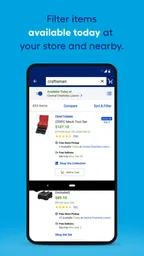
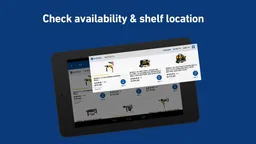
- The app lets you check whether items are available at nearby Lowe's stores.
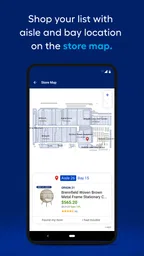
- Saved shopping lists make it easier to keep track of planned purchases.
- Order tracking helps you follow deliveries and pickup orders.
- Product reviews can help you compare options before buying.
- The store locator provides directions to nearby locations.
What could be better
- Some features may require a Lowe's account.
- Product availability can change before you reach the store.
- The app may request location access for nearby store features.
- Large product catalogs can take time to browse on a phone.
- Some purchases may require in-store assistance or extra steps.





