


Kroger review
 Analysis by Appsdrops
I find a grocery app most useful when it reduces the small decisions that make shopping take longer: remembering what ran out, checking which offers apply, and finding a nearby store. Kroger brings those jobs together in a free shopping app from The Kroger Co. Its focus is practical rather than flashy, and that suits the way I’d use it: prepare at home, check savings before heading out, then keep a list handy while shopping.
A routine that starts before you leave home
The easiest way to get value from the app is to treat it as the beginning of a shopping routine, not just a place to look for coupons at the last minute. Add items as you notice you need them, then review the list before a trip. That simple habit can prevent the familiar problem of reaching the store and trying to reconstruct a week’s worth of groceries from memory.
The shopping list is particularly helpful when you divide the mental work into two passes. First, capture essentials as they come up—milk, ingredients for dinner, or household supplies. Before shopping, look through the list alongside current ads and coupons. That gives you a chance to notice an offer that might influence what you buy, rather than adding items simply because a discount caught your eye.
I’d also use the app to check store information before setting out. Store-finding is useful when you’re away from your usual neighborhood or deciding where to make an unplanned stop. It is a modest feature, but it can save a separate search and help keep the grocery errand organized in one place.
For a realistic weeknight example, imagine you’re planning dinner on the way home and realize you’re short on a few ingredients. You can check the list you’ve been building, review relevant offers, and confirm a store before you go. That workflow is more dependable than relying on memory or browsing deals without a meal plan. The key is to let the list guide the trip, with savings as a useful second check.
Make savings part of the plan, not the whole plan
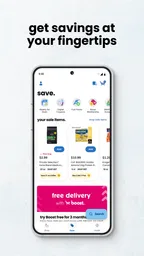
Coupons, ads, and rewards give the app its strongest reason to stay on your phone. I’d check offers while planning a regular shop, then decide whether they fit what you already intended to buy. A coupon only saves money when it applies to something you genuinely need; otherwise, it can turn a straightforward trip into extra spending.
This approach also helps when comparing the app with general-purpose grocery or coupon tools. A broad shopping-list app may be a better fit if you want a retailer-neutral place to organize purchases across several stores. Kroger is more compelling when you shop with Kroger and want its savings and store details close to your list. Its advantage is that retailer-specific planning in one app, not a promise that it will replace every shopping tool.
The app is listed in the Shopping category, and its broad set of everyday functions reflects that purpose. It is free, rated for Everyone, and developed by The Kroger Co. Those details make it straightforward to try if you already shop there, while the retailer focus is the important consideration for anyone who splits grocery trips among different chains.
Check the practical details before relying on it
Before building a routine around any shopping app, I recommend checking that it runs on your device and taking a moment to get comfortable with the parts you expect to use. Kroger’s current version is 100.1, and the stated minimum operating-system requirement is 8.0. The app first appeared on November 29, 2010, so it is an established product rather than a new experiment, though that alone cannot guarantee that every screen will feel equally smooth on every device.
It is also worth making a quick distinction between information that helps plan and information that settles a purchase. Ads and coupons can guide what you check before shopping, but I would still read the offer terms in the app and confirm that an item matches what you intend to buy. Product sizes, varieties, and the details of an offer matter; a familiar product name by itself is not enough to assume a coupon will apply.
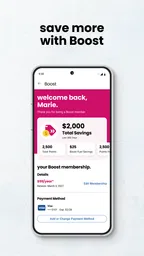
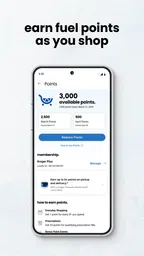
Rewards are another reason to keep the app in your routine, but they work best when you remember to review them as part of preparation. I would not wait until I’m already in a checkout line to figure out which offers or rewards I meant to use. A brief check beforehand is less stressful and makes it easier to keep the trip focused.
Small habits that make repeat shopping quicker
The most useful shortcut is consistency. Add items when you notice them, rather than trying to create the entire list just before leaving. Then use a short pre-trip review: remove anything you no longer need, check relevant coupons and ads, and make sure you are looking at the store information that fits your trip. This turns several separate chores into a repeatable sequence without relying on complicated setup.
A second helpful habit is to keep the list grounded in meals and essentials. If a deal suggests a substitute or an extra purchase, compare it with the plan rather than treating every offer as a task. For households, that also makes a shared conversation easier: the list can serve as a concrete reminder of what the trip is meant to cover, instead of a vague request to “pick up groceries.”
For an occasional shopper, the reverse routine may work better. Open the app when you know you are going to Kroger, check the store details, and scan the available savings before making a list. There is little reason to maintain a detailed running list if you shop there only rarely. The app’s value depends on matching its tools to your habits, not using every feature on every visit.
The store locator can also be useful as a planning aid rather than an emergency tool. If you are running errands in an unfamiliar area, checking the store option before you leave can help you decide whether a Kroger stop belongs in the route. I would still use a general maps app when the main need is navigation or comparing many kinds of businesses; the Kroger app is most relevant when the store itself is the destination.
Where the retailer focus becomes a limitation
Kroger’s clearest limitation is also what makes it useful: it is built around one retailer. If you regularly shop at several chains and want a single list or savings view that covers all of them, a neutral organizer may fit better. Keeping separate retailer apps can also mean switching between them, so the convenience of Kroger’s combined tools matters most when Kroger is already a regular part of your shopping.
There is a related trade-off with deal-led shopping. Seeing coupons and ads alongside planning tools can make it tempting to chase an offer rather than stick to a budget or a meal plan. My advice is to make the list first and use savings to refine it. That way, the app supports a deliberate shop instead of deciding what goes into the basket.
Nor would I choose it solely as a general grocery reference. Its strengths are shopping preparation, retailer-specific savings, rewards, and store finding. If you need an organizer that is equally useful at any supermarket, or your shopping trips rarely involve Kroger, another app may save you from maintaining a tool you seldom open.
There is enough public interest to suggest the app has broad reach: it has more than 10 million installs, an average rating of 4.5, and hundreds of thousands of ratings. Those figures are reassuring context, not a guarantee that the experience will match every shopper’s preferences. What matters more is whether its Kroger-centered tools line up with where you shop and how you plan.
Who I’d recommend it to
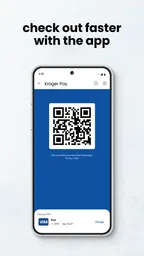
I’d recommend Kroger to regular Kroger shoppers who want one place to prepare a list, look over savings, keep rewards in view, and find stores. It is particularly suited to people who plan a weekly shop in advance and can make a small habit of checking offers before they go. The combination is more useful than a coupon-only app when you want the list and store-planning steps in the same routine.
I’d suggest skipping it if you rarely visit Kroger, prefer one retailer-independent list for every supermarket, or don’t want to check retailer-specific offers. In those cases, a general shopping organizer or the app for the store you use most may be a better match. There is no benefit in keeping multiple grocery apps if the extra choice makes your shopping harder to manage.
Overall, Kroger is at its best as a practical companion to a repeatable shopping habit. Start with a list, check the offers that genuinely fit it, and use the store information when planning the trip. It won’t replace a broad comparison tool or suit every grocery routine, but for someone who shops at Kroger regularly, it brings several useful parts of the errand together without asking for a complicated system.
What we like
- Digital coupons are easy to load to your shopper card.
- The app can help track fuel points and available rewards.
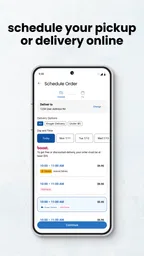
- Store pickup lets you shop without browsing the aisles.
- Shopping lists make it easier to plan grocery trips.
- Weekly ads help shoppers spot current offers.
What could be better
- Some deals require a digital coupon to be clipped first.
- Pickup availability can vary by store and time slot.
- Product substitutions may not match your preferences.
- The app experience depends on a reliable internet connection.
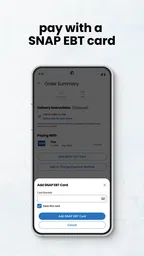
- Some features require a Kroger account and shopper card.





