





Kohl's - Shopping & More review
 Analysis by Appsdrops
I find Kohl’s most useful when I already have a shopping errand in mind and want to check the retailer’s selection or look for a deal before heading out. It is a free shopping app from Kohls, covering clothing, beauty products, home goods, and other merchandise. The experience is closely tied to an internet connection: browsing and shopping are most practical when the app can load current product and offer information. That makes it a handy companion for planned purchases, though less appealing if you want a retailer-neutral tool or need to shop in places with unreliable service.
Browsing and offers depend on a live connection
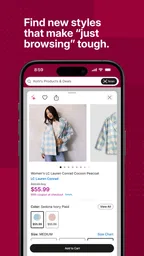
The main appeal of Kohl’s is having the retailer’s shopping experience on a phone. I can use it to explore items across several departments rather than opening separate apps for clothes, beauty, and home shopping. That breadth is convenient when I am comparing a few household needs with something to wear, but the app remains focused on Kohl’s; it is not a general marketplace that brings competing stores together.
Connection quality matters because the useful parts of shopping are not just opening the app. Product discovery, checking what is currently being offered, and moving through a purchase all depend on timely information. On a solid connection, the app is better suited to browsing with a purpose: search for the type of item I need, compare relevant choices, and then decide whether to buy. If pages take a while to load, the same sequence can feel stop-start, especially when I am comparing several products.
Deals are part of the draw, but I would treat them as a reason to check the app rather than assume every purchase will be a bargain. A discount only helps if the item suits the need and the final terms work for the shopper. My practical approach is to decide what I am shopping for first, then see whether an available offer changes the decision. That keeps a stream of promotions from turning a simple errand into unnecessary browsing.
A useful habit is to do the research before reaching a busy checkout or a weak-signal location. If I am choosing between a few options, I would open their details while I have a dependable connection, rather than waiting until I am standing in a store aisle and trying to load everything at once. This is not a special feature; it is simply the workflow that makes a connection-dependent shopping app less frustrating.
Use it for a specific shopping decision
For example, if I need a new household item and also want to replace a clothing basic, I can use one retailer’s app to explore both categories in the same session. I would first narrow the search to the items I actually need, then compare the available choices and check the current deal before committing. That is more efficient than browsing every department without a plan, and it gives the app’s range a clear everyday purpose.
The trade-off is that a broad catalog can still take effort to navigate. When I know the exact kind of product I want, focused searching is likely more useful than scrolling through unrelated merchandise. When I am only casually browsing, the number of possible categories can make it easy to lose track of why I opened the app in the first place.
What it is like to shop from a phone
Shopping on a phone is convenient when I have a short gap in the day: I can check a product or look at current shopping options without sitting down at a computer. The app is especially suited to quick research before an errand, or to comparing a few choices when I already know the department I want. I would be less enthusiastic about using it for a long, open-ended shopping session on a small screen, where inspecting many products and keeping comparisons straight can become tiring.
Connectivity also shapes where I would use it. At home, on a reliable Wi-Fi connection, I can take time to browse and revisit a decision. On mobile data, I would be more selective, focusing on a particular item or category instead of repeatedly loading pages out of curiosity. In a store or while travelling, the experience depends on whether the phone has a steady connection; I would not plan a purchase workflow around being able to retrieve information in a dead zone.
A sensible mobile routine is to settle the broad choice before the last minute. If I am shopping for a specific occasion, I would browse ahead, identify suitable options, and leave the final check for when I have a connection. This reduces the chance of making a rushed choice while distracted. It also helps separate useful comparison from impulse shopping: I can keep the original need in view instead of reacting to every tempting item I encounter.
The app’s focus on one retailer is both a convenience and a limitation. It is convenient if I already shop at Kohl’s or want to see what the retailer carries in several departments. It is less useful if my priority is finding the lowest price across multiple retailers, comparing independent sellers, or checking a wide range of specialist products. In those situations, a general shopping search or another retailer’s app may be a better starting point, with Kohl’s used as one option rather than the whole comparison.
Keep comparisons manageable
On a phone, I find it helps to compare only a small shortlist at a time. Before opening more product pages, I would decide what matters most—such as the item’s purpose, style, or suitability for the room or wardrobe—and use those criteria consistently. This avoids a common mobile-shopping trap: looking at many alternatives without a clear way to choose. It is particularly helpful when the connection is slow, because fewer page loads mean less waiting and less temptation to abandon the decision.
I would also distinguish between browsing and buying. A quick look at what is available can be useful even when I am not ready to place an order, but a purchase deserves a more deliberate check of the item and the current offer. That small pause matters in any shopping app, and it is a good way to avoid treating a discount as a substitute for deciding whether the product is right.
Slow loading, interruptions, and getting back on track
Any app that relies on current shopping information can feel fragile when connectivity drops. If a page stalls, I would first check whether the phone has a stable internet connection, then return to the task once service is available rather than repeatedly tapping through the same step. That is a simple recovery approach, but it is often better than assuming a slow response means a product or offer has disappeared.
For a purchase in progress, I would take particular care after an interruption. Before trying again, I would check what the app is showing so I do not accidentally repeat a step or lose track of the item I meant to buy. I would avoid relying on memory for details gathered during a session that has been interrupted; reopening the relevant page when the connection is stable is a safer way to confirm the choice.
This is why I recommend using the app for preparation as well as browsing. If I expect to shop somewhere with uncertain reception, I would do as much comparison as possible beforehand and avoid leaving every decision until I arrive. The app is more comfortable as a connected shopping tool than as something I would count on to carry me through a complicated errand without service.
When a session becomes frustrating, it can also help to simplify the task. Instead of trying to compare several departments at once, I would focus on one item, finish that decision, and then move on. That makes it easier to recover after a loading delay and keeps the shopping trip from turning into a long chain of half-finished searches.
Use mobile data deliberately
If I am watching data use, I would reserve app browsing for moments when I have Wi-Fi or a strong mobile connection, especially when I plan to explore multiple categories. Rather than repeatedly opening pages without a goal, I would note the item I need and search for that directly. This is a practical way to make a mobile session more efficient, without assuming any particular offline capability or data-saving setting.
There is also a difference between a quick check and an extended browse. A targeted session is likely to involve less unnecessary loading than jumping between clothing, beauty, and home pages without a plan. If I only want to see whether Kohl’s has a relevant option, a focused search is enough; if I want to compare a range, I would choose a time and connection that make the extra browsing comfortable.
For people who shop primarily from a desktop or prefer to compare many retailers side by side, the phone app may be a supplement rather than a replacement. A larger screen can make it easier to keep alternatives visible and weigh details, while the app’s advantage is convenience when I want to check Kohl’s selection on the move. I would choose the device based on the decision, not assume one format is best for every purchase.
A useful retailer companion, with clear limits
Kohl’s has a substantial audience: it has an average rating of 4.8 from around 351,000 ratings, and it has been installed over 10 million times. Those figures suggest that many shoppers find a retailer-specific app worthwhile, but they do not change the basic decision for me: it is most useful when Kohl’s is already part of my shopping plan. It is free, rated for Everyone, and the current version is 26.11.2; it is available for devices running Android 9 or later.
The app was released on October 17, 2013, and its developer is Kohls. I see its strongest use as a convenient way to browse the retailer’s different departments and check shopping opportunities from a phone. The main trade-off is the same one that comes with most store-specific apps: the experience is valuable when you want that store, but it cannot replace a broad comparison across retailers.
I would recommend it to someone who shops at Kohl’s, likes to check deals before buying, or wants one mobile place to explore clothing, beauty, and home items from the retailer. I would be more cautious about recommending it to someone who needs dependable shopping in areas with poor reception, wants the widest possible market comparison, or dislikes browsing on a phone. In those cases, a desktop session or a broader shopping service may suit the task better.
My overall view is straightforward: Kohl’s works best when a clear shopping need meets a reliable connection. Use it to research a particular item, check the retailer’s current options, and make a considered choice rather than opening it with no plan and chasing every offer. As a connected, retailer-focused shopping companion, it can make everyday errands easier; as an all-purpose solution for every kind of shopping, it has limits worth keeping in mind.
What we like
- Rewards and coupons are easy to access in the app.
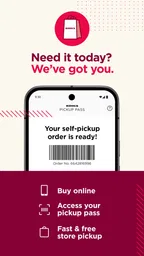
- Store pickup can save time on eligible orders.
- Saved payment details can make checkout quicker.
- Order tracking helps you follow deliveries.
- The app can display deals tailored to your shopping activity.
What could be better
- Some offers require a minimum purchase to qualify.
- Prices and promotions may vary by store or location.
- Frequent notifications can become distracting.
- Product availability can change before checkout.
- Some app features may require location access.





