


Instants, an Instagram app review
 Analysis by Appsdrops
I tend to judge a social app by what happens between opening it and sharing something: does it feel straightforward, can I use it without turning a small moment into a project, and does it fit the way I actually keep in touch? Instants is Instagram’s social app for sharing in the moment. Its concise identity is appealing, though the best reason to consider it is the particular kind of casual sharing you want—not the promise that every interaction will feel instant.
Quick sharing, with expectations kept realistic
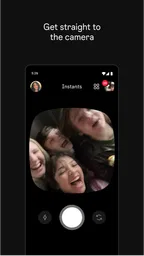
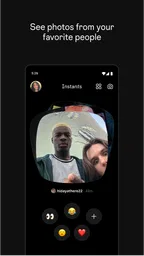
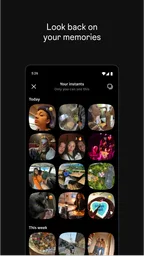
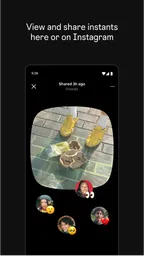
Instants is an Instagram app in the social category, developed by Instagram. It is free, and its store summary points to immediate, in-the-moment sharing. That gives the app a clear role: it is aimed at people who want social communication to feel lighter than composing a polished post or maintaining a carefully arranged feed.
That distinction matters when thinking about speed. A simple purpose can make an app feel quick to understand, because I do not have to decide how to present every update. But a brief description of the app’s purpose is not a guarantee about how quickly it opens, uploads, or responds on every phone and network. I would treat “instant” as an aspiration for the style of sharing, not a promise that technical delays can never happen.
The app has an average rating of 4.7 from around 33,000 ratings, alongside 167 written reviews. It has more than five million installs, which suggests that many people have tried it. Those figures are useful context, but they do not tell me whether it will suit my own habits. Someone who wants a quick channel for everyday social moments may find the idea compelling; someone who wants a full-featured publishing toolkit may want to stick with a broader social app.
Make the moment the point
The most useful way to approach Instants is to decide what belongs there before opening it. I would use it for a fleeting detail—a funny sign on a walk, a quick glimpse of lunch, or a small update meant for people already in my social orbit—rather than treating every photo as something that needs editing, a clever caption, and a permanent place in a personal showcase.
That mindset is a practical advantage, but it also defines the trade-off. If I want to create something polished or present information to a broad audience, a conventional Instagram post or another established social platform may be a better fit. A lightweight sharing habit works best when I do not expect it to replace every other way I communicate.
What heavier use changes
A quick share is only one part of real use. I might open the app several times during a busy day, move between checking and sending, or try to share while reception is weak. Those situations are where convenience matters most, but they are also where an app’s dependence on a working connection and the phone’s available resources becomes more noticeable. I would not assume that a social app can deliver a smooth upload in poor coverage simply because its purpose is casual sharing.
One useful habit is to capture the moment first and avoid adding unnecessary steps while I am out and about. If a share is taking longer than expected, I would check the connection before repeatedly tapping controls or recreating the same update. Repeated attempts can create confusion about what has gone through. This is a general, sensible way to handle a network-dependent social workflow, not a claim that Instants has a particular retry or upload-queue feature.
For people who use social apps heavily, the key question is whether another place to share makes life simpler or just adds another inbox to check. I would try it with a small group of ordinary updates before making it part of a daily routine. If the people I care about are not using it, the convenience of a focused sharing app can disappear; I may end up sending the same thing elsewhere anyway.
Reliability is more than a fast first launch
I think of reliability as consistency across a whole interaction: opening the app, choosing what to share, completing the action, and knowing what happened afterward. A social app can feel responsive at first and still be frustrating if the final step is unclear. Instants’ focused purpose makes a simple experience an understandable expectation, but I would judge its reliability by how it behaves on my own device and connection over several ordinary sessions.
If something appears to stall, I would first give the current action a moment and check whether the connection is available. Then I would reopen the app only if the screen remains unresponsive, rather than repeatedly initiating the same share. That approach helps avoid accidental duplicates in many social workflows and gives me a clearer sense of whether the issue is temporary. I would also keep the app updated through the app store, particularly if I rely on it for regular communication.
The current version is 455.0.0.55.95. That identifies the release a reader can look for, but a version number alone cannot establish how stable it will be on every model of phone. My practical recommendation is to test the actions that matter to you—especially sharing over your usual connection—before depending on the app for an important update.
Fit it to your phone and routine
Instants is listed for a minimum OS version of 9, which gives a straightforward compatibility check before installing. If a phone runs an older system, I would not count on being able to use it. Even on a compatible device, performance can vary with storage, background activity, network conditions, and the age of the hardware. Those are ordinary factors for social apps, not evidence that this particular app is unusually demanding.
I would also pay attention to how many social apps I keep active. If I already use Instagram regularly, adding another app from the same developer may feel convenient only if its distinct sharing role is clear. If I am trying to reduce notifications, screen time, or the number of places where conversations happen, a separate app may work against that goal. In that case, sending updates through the social service I already check—or using a direct messaging app—may be the more practical choice.
Instants is rated Teen. That makes it a better fit for a teen audience than an app intended specifically for young children, but an age label is not a substitute for a family’s own decisions about social media, contact, and screen habits. I would consider who will see a share and whether the app’s social setting suits the person using it, rather than assuming the rating answers every household question.
Who will enjoy it—and who should skip it
I would recommend trying Instants if you like sharing small, current moments and want that activity to feel separate from making a more considered post. It is especially appealing to someone who can name a few people they would actually share with and has a clear reason to add a focused social app to their phone.
I would skip it if I am looking for a complete replacement for Instagram, a tool for carefully edited public content, or a way to communicate with people who are not already part of the relevant social circle. In those cases, a familiar social feed, a direct messaging app, or a photo-sharing service with the audience and controls I need may be a better choice. The right alternative depends on whether my priority is conversation, public discovery, or presentation.
That comparison is more useful than asking whether Instants is universally better or worse than other social apps. Its apparent strength is focus: it puts casual, timely sharing at the center. Its likely limitation is the same focus, since a narrow purpose will not satisfy someone who wants one app to handle messaging, discovery, polished publishing, and a broad social profile all at once.
A measured performance verdict
With a free price and a Teen rating, Instants is easy to consider if its social role matches what I want. Its popularity—more than five million installs—shows that it has reached a substantial audience, while the 4.7 average offers a favorable broad signal. Neither tells me how quickly it will feel on my phone, so I would base that decision on a short, real-world trial rather than an expectation of perfect speed or stability.
My overall view is cautiously positive. Instants makes most sense as a focused place for low-pressure, everyday sharing, not as a universal social hub. I would start with a few ordinary updates, notice whether the app fits the people I want to reach, and see whether it behaves reliably on my usual connection. If it removes friction from those small moments, it earns its place; if it gives me another app to check without adding a distinct benefit, I would keep using the alternatives I already rely on.
What we like
- Quickly shares photos and videos with Instagram followers.
- Simple camera tools make capturing moments straightforward.
- Familiar Instagram interface is easy for existing users to navigate.
- Built-in effects help give posts a consistent look.
- Instagram integration makes it easy to reach an existing audience.
What could be better
- Requires an Instagram account to share content.
- Some features may depend on the main Instagram app.
- Sharing personal moments may raise privacy concerns.
- Limited editing options compared with dedicated photo editors.
- The experience depends on Instagram's service availability.





