

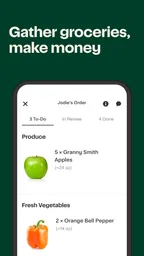
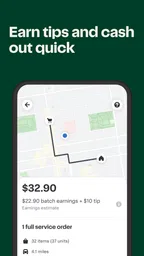
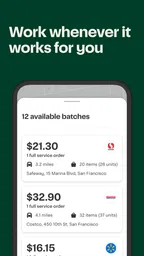
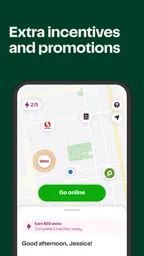
Instacart Shopper: Earn money review
 Analysis by Appsdrops
I look at Instacart Shopper less like a household shopping list and more like a work tool that one person in a home might use while everyone else helps keep the day running smoothly. Its purpose is to let people earn money by shopping for groceries and other items, so it serves a different need from an app used to order a family’s weekly shop. That distinction matters: it can fit into a household routine, but it is designed around the shopper’s work rather than shared family planning.
For example, imagine one adult heading out to shop while a partner is home with the children. The partner may need to handle dinner plans, but the shopper is focused on completing work. The app belongs to the person doing that work; household coordination happens around it. If you expect a shared pantry, family list, or joint ordering space, you are looking at the wrong kind of app.
Using a work app in a shared household
The practical value of the app depends on whether someone wants to shop as a way to earn, not simply whether groceries need buying. I would treat it as a separate work activity, much as I would a job-related calendar or delivery tool. That framing helps avoid confusion when a household shares a phone, tablet, or schedule: the shopper’s account and work decisions should remain tied to the person actually doing the shopping.
Instacart is the developer, and this is a free shopping app in the sense that it helps people take on shopping work rather than sell a household subscription. It has a 4.2 average from around 183,000 ratings, with more than 10 million installs. Those figures suggest it has reached a broad audience, but they do not tell me whether a particular person’s local opportunities or routine will make it worthwhile. The useful question is whether the work fits your schedule and whether you are comfortable doing in-store shopping as a job.
A realistic household use case is a person who already knows local grocery stores and wants to fit shopping work around other responsibilities. They can keep work activity on their own device while another household member manages ordinary errands and meal decisions. This separation is especially useful when the same store trip could otherwise be mistaken for a family grocery run. Before leaving, it helps to tell others that the trip is work, not an opportunity to add personal items or change the household’s dinner plan.
Keep the work account and personal errands distinct
With a shared device, I would be careful about who handles the shopper account. Work tools can involve personal account details and active tasks, so casual handoffs create avoidable confusion. A household member should not assume they can pick up where the shopper left off, and the shopper should avoid leaving an active work session open for someone else to use. That is sensible account hygiene, not a claim that the app offers a particular family or multi-user control.
The same boundary applies to personal shopping. If the shopper needs milk for home, it is clearer to plan that separately rather than mixing a household errand into a work trip. Keeping receipts, items, and plans distinct can prevent misunderstandings about what was bought for the job and what was intended for home. This is a small habit, but it matters when several people share a budget or rely on one person to bring home dinner ingredients.
People often ask whether they can use the app just to order groceries for their own household. That is not the role its description presents: it is for people who want to earn by shopping. For a household looking to browse groceries and arrange an order, a customer-facing grocery app or a store’s own ordering service is the more natural choice. The two kinds of service may involve similar stores and products, but the user’s task is different.
Coordinate schedules before the shopping trip
Coordination is less about shared app controls and more about making the work fit around home life. If another adult is counting on the shopper to collect ingredients, agree on a separate plan before the shopper begins working. A quick household check-in can clarify who is handling dinner, who is responsible for school pickup, and whether the shopper is available for an unrelated errand. That keeps the app from becoming an accidental source of schedule confusion.
One useful approach is to set a clear boundary around availability: decide when the shopper is working and when they are available for household requests. I would not assume that an active shopping task can be paused simply because someone at home sends a message. Treating the work session as a commitment is fairer to the shopper and to the people depending on them. If plans change, the household can adjust dinner or errands rather than expecting the shopper to blend work and personal shopping on the fly.
There is also a trade-off for households sharing one device. A single device may be convenient, but it makes it easier to interrupt the person using it or lose track of whose account is active. A dedicated phone is not necessary for every household, yet having the shopper keep the device with them and sign in only for their own work can reduce mix-ups. If that arrangement is impractical, agree on a simple rule: no one else changes account information or handles an active task.
Who should use it, and who should choose another option
I can see this app suiting someone who wants shopping work and is prepared to make trips to stores as part of that work. It may also suit a household where one person has flexibility while others can cover home responsibilities. The app is less compelling for someone who only wants cheaper or faster grocery ordering for themselves, or for someone who dislikes store visits, customer-facing service, or the uncertainty of fitting work around a changing personal schedule.
Compared with ordinary grocery delivery apps, the key difference is the direction of the task. A customer app helps a household choose items and receive them; this app is for the person doing the shopping. Compared with a store’s own employee or ordering system, it is specifically associated with Instacart’s shopper work rather than a household’s usual in-store checkout. That makes it worth considering only if you want the shopper role, not merely because you already use grocery delivery as a customer.
A practical decision before installing is to think through the non-app parts of the work: whether local stores are convenient, whether you can set aside time for trips, and whether household duties can be covered while you are out. I would also talk through how personal errands will be handled. These questions do more to predict whether the app will fit than its presence on a phone alone.
Age, trust, and device responsibility
The app is rated Everyone, and its minimum operating-system requirement is Android 8.0. An Everyone content rating is not the same as a recommendation that a child take on shopper work. The account is best treated as belonging to the adult who is responsible for the work and the device. In a family, explain that distinction plainly, especially if children regularly borrow the phone for games or videos.
Trust also matters when the device is shared. Avoid passing the phone around while the shopper is working, and make sure the account holder remains the person making work-related decisions. That keeps household members from accidentally changing a task or seeing information meant for the account holder. I would not infer special parental controls or household profiles from the age label; the practical safeguard is adult supervision and clear account boundaries.
For a person choosing whether to install it, the release date is April 30, 2019, and the current version is 4.505.6-p. The app is free to download. Those details can help with basic device and compatibility decisions, but they do not settle whether the work makes sense for you. I would focus first on your schedule, willingness to shop for others, and ability to keep work separate from family errands.
My household verdict
My view is that Instacart Shopper can fit neatly into a household when one person is genuinely interested in shopping work and everyone understands that the app is not a shared grocery planner. Its strongest household contribution is indirect: one member can use it for work while the rest of the home coordinates meals, errands, and care responsibilities outside the app. Clear routines make that arrangement much easier than trying to treat a work account as a family tool.
I would recommend considering it to adults who want to explore shopping as paid work and can keep the role separate from their personal grocery routine. I would skip it if the main goal is to order groceries for home, if you need a shared family list, or if the household cannot reliably make space for shopping trips. In those cases, a customer-facing grocery service or a store’s own shopping option is a better match.
Overall, the app is most useful when expectations are specific: one account holder, one work purpose, and a household plan that does not depend on interrupting the shopper. With that setup, it can be a practical addition to someone’s work routine. Without those boundaries, sharing devices and mixing personal errands with shopper tasks can make a simple household arrangement feel unnecessarily messy.
What we like
- Choose available orders that fit your schedule.
- See estimated earnings before accepting an order.
- Keep tips in addition to eligible order pay.
- Use in-app navigation to find stores and customers.
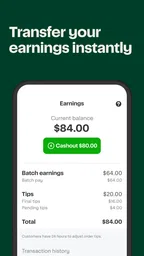
- Track completed batches and earnings in one place.
What could be better
- Order availability can vary by location and time.
- Shopping and delivery costs may reduce take-home pay.
- Heavy or bulky orders can be physically demanding.
- Customer ratings may affect access to future batches.
- Some orders require waiting for pickup or checkout.





