



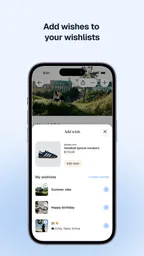




GoWish - Your Digital Wishlist review
 Analysis by Appsdrops
I find wishlist apps most useful when they solve a small, recurring problem: remembering what I want and making it easy for other people to choose something I’ll actually enjoy. GoWish is built around that shared purpose. It is a free shopping app from Ønskeskyen ApS, aimed at collecting wishes and helping people browse for ideas. Its appeal is immediate, especially when a birthday or holiday is approaching; whether it earns a lasting place on your phone depends on how often you revisit your list and how much you enjoy keeping it tidy.
Why the first week feels useful
Starting a wishlist gives you a practical place to put ideas before they disappear into browser tabs, messages, or passing conversations. Instead of trying to remember which book, kitchen item, or accessory caught your eye, you can use GoWish as a central reference. That makes it easier to share what you would genuinely like, rather than leaving friends and family to guess.
The best early use is not necessarily building a perfect list. I’d begin with a few clear, specific wishes: an exact title, a recognizable product, or a particular color or size when that matters. A vague entry can create as much uncertainty for the person shopping as no entry at all. Treating the list as a helpful guide, rather than a complete catalogue of everything you might buy, keeps it approachable.
GoWish is especially relevant when several occasions are coming up. You can collect ideas as they occur to you instead of scrambling to assemble suggestions when someone asks what you want. For a household, a couple, or a group of relatives who exchange gifts, that shared reference can reduce duplicated questions and make planning feel less awkward.
There is also a useful distinction between inspiration and intention. Something that looks appealing while browsing is not automatically a lasting wish. I’d add an item when I can imagine still wanting it after a few days, and use the list to hold genuine possibilities rather than every passing impulse. That simple habit makes the list more useful to a giver and less likely to become a pile of stale ideas.
Making a list that helps the giver
Think about the person who will use your list. A wish should be identifiable, and any detail that changes the choice should be clear. If the item is only one option among several, a short note about the kind of thing you want can be more helpful than a bare name. The aim is to give people room to choose while avoiding preventable mismatches.
This is where a digital wishlist differs from a note in a private shopping app. A personal note is convenient for tracking what you plan to buy yourself, but GoWish is more compelling when the list is meant to communicate with other people. If you only want a private reminder of products to purchase later, a general notes app or saved-items feature may already do the job with less reason to maintain a separate service.
What changes after the novelty
During the first week, adding wishes can feel satisfying because the list quickly takes shape. The more important test comes later: do you remember to update it, and does it still reflect what you want? A wishlist is not a set-and-forget document. Tastes change, items become less relevant, and a once-useful suggestion can become misleading if you have already bought it or moved on.
I’d make small edits whenever I naturally revisit the list, rather than setting myself a chore to review every entry at once. Before a gift-giving occasion, a quick check for outdated wishes is particularly worthwhile. Removing an old idea can be more valuable than adding several new ones, because it helps the people relying on your list spend their attention on current choices.
That maintenance is the main trade-off. A shared list can save repeated conversations, but only if you keep it accurate enough to trust. If you rarely use wishlists or dislike revisiting them, the app’s usefulness may cluster around birthdays and seasonal celebrations rather than becoming a daily routine. That is not necessarily a flaw; it simply means the value is occasional and tied to real-life events.
Month-to-month value, friction, and fit
Over time, I’d judge GoWish less by how many items I can collect and more by whether it makes gift planning easier. A useful test is whether someone can consult your list and make a confident choice without needing several follow-up messages. If that happens repeatedly, the app is doing something worthwhile. If people still ask what you meant or whether you want a particular item, clearer entries may matter more than adding more wishes.
The app sits in the shopping category, but its strongest role is not replacing a retailer or managing every purchase. It is a layer between inspiration and gift-giving. Compared with retailer-specific saved lists, a dedicated wishlist can be more suitable when your ideas come from different places or when the audience is a group of gift-givers. Compared with a shared document or chat thread, it gives the activity a clearer purpose, though a simple message may be easier for a one-off occasion.
There is a practical trade-off in choosing a separate app: the people you share wishes with need to be comfortable using a digital list. Some will appreciate having a clear place to look; others may prefer asking you directly or buying from a familiar store’s own list. I would not make GoWish the only way to communicate gift preferences with someone who rarely uses apps. A quick conversation can still be the friendlier choice.
The audience is broad enough for older teens and adults, with a Teen content rating. It has an average rating of 3.3 from around 9,200 ratings, alongside around 3,600 written reviews. Those figures suggest a mixed reception rather than universal satisfaction, so I would approach it as a useful tool to try, not as an essential app that will suit every gift-giving style. Its 1M+ installs show that many people have taken an interest, but popularity alone does not determine whether it fits your habits.
Keeping the list from becoming a chore
One source of fatigue is accumulation. A long list can look productive while becoming harder to use: older wishes sit beside current ones, and the recipient may not know which suggestions still matter. I’d keep the list intentionally selective. A handful of well-chosen options is often more useful than a sprawling collection, particularly when the occasion is close and someone wants to make a decision quickly.
Another source is the expectation that every wish must be a precise product. That can make the process feel like research. For some categories, exact details are essential; for others, a broader preference is enough. I’d be specific about items where a wrong choice would be disappointing, while leaving flexible ideas flexible. This balances helpful guidance with the pleasure of letting someone choose.
GoWish also works best when you remember why an item is on the list. If you add something simply because it was suggested or looked popular, it may not represent a real desire. Pausing before adding it helps keep the list personal. That small filter is a more sustainable habit than constantly refreshing the list with new discoveries.
Who should keep it, and who can skip it
I’d recommend trying GoWish if you regularly receive questions about what you want, exchange gifts with several people, or like collecting ideas well ahead of an occasion. It can be particularly handy for someone whose wishes are scattered across conversations and shopping sessions. The free price also makes it easy to test whether a dedicated wishlist suits your routine without treating it as a major commitment.
I’d skip it if you already manage gift ideas comfortably in a shared note, rarely exchange gifts, or prefer to choose and buy everything yourself. It may also be a poor fit if maintaining a list feels like another obligation. In those cases, a retailer’s own saved items, a message to the people involved, or no list at all may be simpler. A separate app is only worthwhile when its shared purpose saves more effort than it adds.
For a realistic example, imagine a family preparing for several birthdays over the year. You can add a few considered wishes when they come to mind, then refresh them before relatives begin shopping. That avoids the last-minute round of messages and gives people a choice. The routine need not be elaborate: add useful ideas, remove ones that no longer fit, and make the important details clear.
My long-term verdict
The lasting value of GoWish comes from a modest but recurring job: keeping gift ideas in one place where other people can use them. It does not need to become a daily habit to earn space on your phone. If you revisit it around birthdays, holidays, or other occasions and keep your wishes current, that seasonal usefulness can be enough.
The app is currently at version 9.2.10 and requires Android 7.0 or later. It was released on March 30, 2023, and is developed by Ønskeskyen ApS. Those details make it a straightforward option to consider for compatible Android users, while its broader appeal still depends on whether the people you share with will actually consult a digital wishlist.
My advice is to start small rather than trying to transfer every product you have ever considered. Add a few specific, genuinely wanted ideas and see whether the list helps someone choose. If it reduces back-and-forth and you find yourself keeping it current without much effort, it has earned its place. If it becomes another neglected collection, a simple note or direct conversation is likely the better fit.
What we like
- Create separate wishlists for different occasions.
- Share lists with friends and family through a link.
- Add items from a wide range of online stores.
- See which gifts have already been reserved.
- Use the app to keep gift ideas organized year-round.
What could be better
- Some products may not import correctly from every store.
- Prices and availability can become outdated.
- Shared lists may reveal gift plans to their owner.
- You may need an account to access key features.
- The app depends on an internet connection for shopping links.





