

GovAuctions.com - Shop Surplus review
 Analysis by Appsdrops
I find the most useful way to think about GovAuctions.com - Shop Surplus is as a discovery tool for a kind of shopping that can otherwise take a lot of patient searching: browsing surplus items from government and retail sources. It is not the same experience as opening a general marketplace and typing in something you need today. The appeal is the chance to spot an unusual or practical item at a saving, provided you are willing to inspect the listing and make a considered decision.
That distinction shapes my recommendation. If you enjoy looking through varied lots and can compare an item’s condition, location, and total cost before acting, this shopping app may be worth keeping around. If you need a predictable product, an easy return, or delivery on a tight schedule, a conventional retailer is usually the safer choice.
Surplus shopping is the point, not just a bargain label
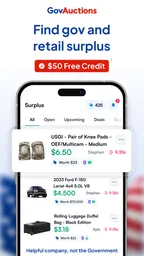
The app is developed by Auctions LLC and focuses on government and retail surplus. That focus gives it a different purpose from a standard shopping app: rather than presenting only familiar, new products from a single retailer, it helps you explore goods that have entered a surplus or auction-style market. The variety can be part of the fun, but it also means that an attractive price is only one part of the decision.
I’d approach each find as a small piece of research. Read the listing carefully, work out whether the item suits your needs, and consider any practical details involved in collecting or receiving it. A low displayed amount is not automatically the best deal if the item is inconvenient to obtain or its condition does not match what you want. The real advantage is access to a different pool of goods; the real skill is judging the whole purchase.
That makes the app most interesting to people who are curious about secondhand and surplus markets, not only people hunting for a particular bargain. You might open it with a broad idea—useful equipment, household goods, or simply something worth a closer look—and discover an option you had not considered. The trade-off is that this kind of browsing asks more of you than buying a familiar item from a retailer with standardized product pages.
A browsing habit that rewards careful comparison
In my view, the best way to use the app is to browse with a short list of needs rather than treating every tempting listing as a deal. If you are looking for a particular type of item, compare multiple candidates and note what matters most: condition, usefulness, convenience, and the overall expense of obtaining it. If you are browsing for inspiration, set a personal ceiling before you get attached to an item. That simple pause helps keep “interesting” from turning into “unnecessary.”
Surplus shopping can also suit people who are comfortable with variation. Two listings in the same broad category may not be equivalent in condition, completeness, or suitability. I would not assume that a product category alone tells the full story. Read the individual description and make sure the item fits the job you have in mind. For a purchase where exact specifications matter, a new product from a retailer may be easier to compare and less open to interpretation.
What the everyday workflow is good for
A realistic use case is planning a practical purchase before you urgently need it. Imagine you are outfitting a workspace or replacing a piece of equipment. Instead of waiting until the last minute and choosing the first available option, you can browse surplus listings over time, save the promising possibilities, and return to compare them. That approach gives you room to decide whether a listing is genuinely useful rather than merely unusual.
Saving items is especially helpful when you are comparing options, but I would treat a saved listing as a reminder, not a reservation or guarantee. Recheck the details before taking action, since an item’s availability and suitability are tied to its individual listing. A small note for yourself—why you saved it and what you still need to check—can make a later comparison more useful than relying on memory alone.
For a household purchase, I would also calculate the real-world cost before committing. Consider whether you can use the item as listed, whether you can conveniently obtain it, and whether any extra effort makes the saving worthwhile. This is a practical distinction between surplus browsing and ordinary online shopping: the best decision may depend on logistics as much as the item’s apparent price. If those details are a hassle, a nearby store or a retailer with straightforward delivery may be a better fit.
Why this differs from a usual shopping app
Compared with a large general marketplace, this app has a narrower identity and a more specific reason to browse: surplus from government and retail sources. A general marketplace may be more familiar when you want to compare standard versions of a common product across many sellers. A conventional retailer is often better when consistency, a new item, and a simple buying process matter most. GovAuctions.com is more compelling when you are open to a less routine route and willing to assess each opportunity on its own merits.
That difference changes how I would search. I would not use it as my only option for a time-sensitive essential. I would check an ordinary retailer first if I needed a precise model or a dependable replacement immediately. But if the purchase is flexible, and I can wait while I look for a suitable surplus listing, the app offers a reason to explore outside the usual shopping routine.
It also suits a different mindset from coupon hunting. A coupon usually reduces the price of a known product; surplus browsing asks you to decide whether a specific available item is worth pursuing. The first is mostly about getting a better deal on a planned purchase. The second combines discovery, comparison, and practical judgment. Knowing which kind of shopping you want makes it easier to decide whether this app belongs in your rotation.
Where the friction shows up
The main limitation is not a flaw unique to the app so much as a consequence of shopping for surplus: listings can demand more attention than polished, standardized retail pages. You may need to think carefully about what the description means for your particular use. If you dislike inspecting details or want every option to arrive in an identical, predictable condition, this style of shopping can feel like work rather than a shortcut.
I would also be cautious about browsing without a clear purpose. A stream of unusual finds can make it easy to focus on how much an item seems to save instead of whether you would actually use it. Before pursuing a listing, ask yourself what problem it solves and whether you would still want it if the apparent saving were less impressive. That question is especially useful for bulky, specialized, or infrequently used goods, where the effort of obtaining them may outweigh the appeal.
Another sensible boundary is to avoid relying on a surplus listing when a failure would cause immediate trouble. For an urgent replacement, a clearly specified product from a familiar seller is often the more practical choice. For an exploratory purchase, a backup item, or a project that can wait, the trade-off is easier to accept. I see the app as an additional place to search, not a universal replacement for ordinary shopping.
Who is likely to get the most from it?
I would recommend trying it if you like bargain hunting, can judge whether an individual item suits your needs, and have enough flexibility to compare before buying. It may also appeal to practical shoppers who enjoy checking less obvious sources instead of defaulting to the same retail options. The strongest use case is a planned, non-urgent purchase where a suitable surplus find could be valuable and a little extra investigation is acceptable.
I would steer away from it if you want a frictionless catalogue of identical products, need a specific item immediately, or would rather avoid evaluating individual listings. In those situations, a regular retailer or a broad marketplace may offer a more direct path. That is not a knock on the app; it is simply a different kind of shopping with different expectations.
For a sense of its scale, it has a 4.8 average from around 32,000 ratings, with more than a million installs. Those figures suggest that plenty of people have found a reason to use it, though they do not replace checking whether its surplus-focused approach matches your own shopping habits. It is free to download, rated for Everyone, and the current version is 7.36.5; it was released on October 3, 2025, and requires Android 7.0 or later.
My take after weighing the trade-offs
I see GovAuctions.com - Shop Surplus as a useful specialist option rather than the first app I would reach for every time I shop. Its value comes from giving surplus listings a place in your search, where patient browsing and careful comparison can lead to a worthwhile find. I would use it when I have time, a flexible need, and a clear idea of what would make a listing genuinely useful.
If you install it, I’d start with one real need, save only a few plausible options, and compare the complete practical picture before pursuing one. That keeps the experience focused and helps you distinguish a true opportunity from an eye-catching listing. For shoppers who enjoy that kind of deliberate search, it can be a worthwhile addition; for anyone who values certainty and speed above discovery, the usual retail route will probably feel better.
What we like
- Browse surplus listings from a dedicated mobile app
- Find government and public-sector auction items
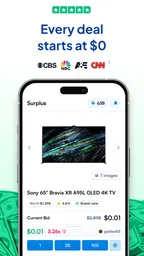
- Review auction details before placing a bid
- Search for a range of surplus goods
- Access listings while away from a computer
What could be better
- Listing availability depends on current auctions
- Winning bids may require prompt payment
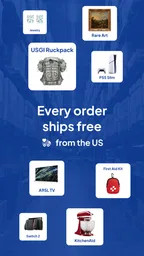
- Pickup or shipping terms vary by listing
- Some items may be sold as-is
- Bidding can require careful attention to deadlines





