





Giftful - Gift List & Wishlist review
 Analysis by Appsdrops
Gift planning sounds simple until several people start asking what someone wants, relatives buy the same thing, and useful ideas get buried in old messages. Giftful is a shopping app built around shared gift lists and registries, and I see its strongest appeal in making those plans easier to keep in one place. It is less about browsing a shop for inspiration and more about giving a group a clear place to collect and coordinate gift ideas.
What it feels like to use
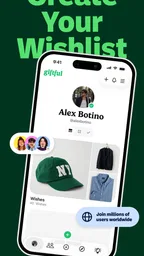
Giftful is made by Giftful, and its focus is easy to understand: create a list for a birthday, a baby celebration, or another gift-giving occasion, then share it with the people who need it. That straightforward purpose matters. A wishlist only helps if it is simple enough to update when an idea comes to mind and clear enough for someone else to use without a long explanation.
I would treat it as a shared planning space rather than a shopping destination. Instead of sending a fresh batch of suggestions every time somebody asks, you can point them toward a list that represents what the recipient actually wants. That can reduce the familiar back-and-forth of “What should I get?” and make it easier for a group to coordinate around the same occasion.
The app is free, which makes it easy to try for a single event before deciding whether it belongs in your routine. Its average rating is 4.8 from around 5.9 thousand ratings, with 241 written reviews and over 100 thousand installs. Those figures suggest that many people find the idea useful, though they do not guarantee that every family or gift-giving style will suit a shared-list approach.
Quickness depends on keeping the task simple
For a small list, the expected benefit is not elaborate shopping tools; it is avoiding the delay of searching through chats, notes, and saved pages. A list that is kept current should make it quicker for relatives to see what is wanted and act on it. I would start with a few clear ideas rather than trying to build a perfect catalogue all at once.
That approach also makes the app more practical during busy periods. If a birthday is approaching and several people are choosing gifts, a concise list is easier to scan than a sprawling collection of loosely related ideas. The useful speed-up comes from reducing decision friction, not from assuming that every step of shopping happens inside the app.
One worthwhile habit is to add context when an item might be ambiguous. A note such as the intended size, color, or preferred version can prevent a well-meaning relative from guessing. This is especially helpful when a gift has several similar variations. It turns a bare wish into something another person can confidently act on.
When several people are involved
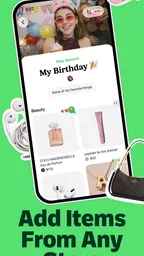
The app makes most sense when gift planning is social. Imagine a family preparing for a birthday: one person adds ideas over time, then shares the list with relatives who want to contribute. Rather than each person asking the recipient privately for suggestions, the group has a common reference point. The recipient can focus on adding useful ideas, while gift-givers can browse when they are ready to choose.
There is a trade-off, though. A shared list works best when everyone is willing to use it. If half the group prefers text messages or makes decisions without checking the list, Giftful cannot by itself prevent duplicated effort or confusion. I would introduce it with a short message explaining what the list is for and encourage people to check it before buying, instead of assuming that sharing alone will change everyone’s habits.
For heavy use, organization matters more than volume. A list used for several occasions can become harder to interpret if old ideas remain mixed with current ones. I would keep each occasion’s purpose clear and remove suggestions that are no longer relevant. This is a practical way to keep a gift list useful without turning it into a permanent dumping ground for things someone once considered.
There is also a useful distinction between ideas for the recipient and tasks for the group. Giftful is best used to communicate what would be welcome; the people choosing gifts still need to coordinate among themselves. If your group often buys jointly, agree who is handling which idea outside the list unless your own workflow makes the division obvious. A shared wishlist can inform a decision, but it should not be mistaken for a complete event-planning system.
Reliability is partly a social habit
For a gift-list app, reliability means more than opening without trouble. The list has to remain a dependable source of current preferences, and contributors have to remember to consult it. I would make a small update whenever a preference changes rather than waiting until the week of an event. That reduces the chance that someone acts on an outdated suggestion.
Giftful’s role is clearest when the list itself is the agreed source of truth. If the same ideas are also scattered across group chats, notes, and email, people may not know which version to trust. Before a busy celebration, I would share the current list again and say plainly that it is the one to check. This simple routine is more likely to help than adding every possible suggestion at once.
When an app becomes part of an important occasion, it is sensible to keep your own expectations measured. I would not rely on any single shared list as the only record of plans that matter to the group. If an event involves a particularly important purchase or a coordinated contribution, a quick confirmation among the people involved can prevent misunderstandings. That is not a flaw unique to Giftful; it is a reminder that a wishlist communicates preferences, while people still make the final decisions.
The strongest non-obvious use is as a low-pressure way to collect ideas well before a celebration. Instead of asking someone to invent a list on demand, they can add things as they notice them. Gift-givers then have time to choose, compare, and coordinate. It is a better fit for ongoing preparation than for someone who wants a last-minute shopping search engine.
Who will appreciate it, and who may not
I would recommend trying Giftful if you regularly exchange presents with family or friends, especially when several people buy for the same recipient. It can also be helpful for someone organizing a baby-related registry or collecting birthday ideas over time. The shared-list format is particularly appealing when people want suggestions but still want room to choose a gift that feels personal.
It is less compelling if you prefer to keep gift ideas private, do not want to maintain a list, or have a group that already coordinates smoothly in another tool. A simple note or a message thread may be enough for one recipient and one occasion. Likewise, if your main goal is to discover products through a retailer’s recommendations, Giftful’s list-centered purpose may not replace a dedicated shopping app or store.
Compared with the usual alternatives, a notes app is flexible but often leaves the owner responsible for copying and explaining the list. A group chat is familiar, but suggestions can disappear under unrelated messages. Giftful’s advantage is that the gift ideas have a dedicated shared home. The cost of that convenience is asking your circle to adopt another app and keeping the information tidy enough to remain useful.
Device fit and practical expectations
The current version is 3.2.1, and the app requires Android 7.0 or later. It carries a Teen content rating. Those details make it straightforward to check basic compatibility before installing, but a compatible device alone does not guarantee that every person in a gift group will want to use the same tool. The best test is whether the people who need the list can comfortably access and keep up with it.
I would not choose Giftful on the assumption that it is a resource-intensive shopping platform or that it handles every part of purchasing. Its purpose is narrower: organizing gift preferences and making them available to others. For everyday use, the sensible performance expectation is that a simple list should be easier to manage than repeated manual explanations. During a busy event, keep the list focused and share it early, so the app is not asked to solve a communication problem at the last minute.
If you are helping a less tech-comfortable relative, consider whether they will be comfortable opening and using a shared list before relying on it. You might explain the process in a message and give them time to look through it. In a group where not everyone wants another app, keep a familiar backup way to communicate the essentials. That makes Giftful a useful option without turning adoption into a source of stress.
My take after weighing the trade-offs
Giftful earns its place when scattered gift suggestions have become a recurring nuisance. I like the clear focus on shared lists and the way that focus can help a group move from vague questions to concrete ideas. The most effective workflow is modest: create a list for a real occasion, add specific suggestions with helpful context, share it with the right people, and keep it current.
At the same time, I would not expect the app to organize a whole celebration or make every gift decision for its users. Its usefulness depends on participation and on someone taking responsibility for keeping the list meaningful. If your group is unlikely to check it, a familiar conversation may remain the better choice. If people are willing to use a common list, though, it can save repeated explanations and make gift planning feel less scattered.
Overall, I would recommend Giftful to people who want a dedicated place for birthday, baby, and other gift ideas that can be shared with family or friends. It is free to try, has reached over 100 thousand installs, and has an average rating of 4.8, but the deciding factor for me is whether your group will actually use the list. For coordinated gift-giving, Giftful is a practical, focused alternative to a messy chat thread; for private, one-off, or retailer-led shopping, a simpler note or a conventional shopping app may suit you better.
What we like
- Create separate wish lists for different occasions.
- Share lists with friends and family.
- Mark gifts as purchased to help prevent duplicates.
- Add gift ideas from across the web.
- Keep gift planning organized in one place.
What could be better
- Friends may need the app to access shared lists.
- Gift availability and prices can change after saving.
- Some retailers may not provide rich product details.
- Lists require manual updates when plans change.
- The app offers limited value if your contacts do not use it.





