


Gap review
 Analysis by Appsdrops
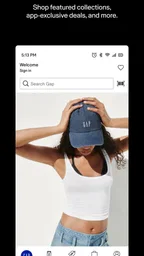
When I’m deciding whether to shop through a brand’s app or browse a broader clothing retailer, I start with one question: do I already want that brand, or am I still exploring? Gap is most useful in the first case. It gives Gap shoppers a dedicated mobile place to look through the brand’s clothing, rather than asking them to sift through unrelated labels and products.
That focus is both the app’s main appeal and its main limitation. If you like Gap’s style and want to check its current selection on your phone, the app makes sense. If you want to compare many brands, hunt for the widest possible range of styles, or simply prefer shopping in a browser, it may not change your routine much.
How to decide whether a brand-specific shopping app suits you
I think of the Gap app as a brand-focused shopping tool, not a general fashion marketplace. Its developer is Gap Official, and its purpose is to help people shop the brand’s clothing through a mobile app. That distinction matters: the experience is relevant when Gap is already on your shortlist, but it is less compelling when you have not settled on a retailer.
The app is free, so trying it does not require a purchase. It is rated for Everyone, and the current version is 19.1.0, with iOS 11 as the minimum operating-system requirement. The app was released on March 22, 2021, and has since reached over one million installs. Its average rating is 4.9 from around 28,000 ratings, alongside roughly 1,200 written reviews. Those figures suggest plenty of shoppers have tried it, though a high average alone cannot tell you whether its shopping flow suits your habits.
My practical test is simple: if I expect to browse Gap repeatedly, a dedicated app can be worth keeping. If I only visit occasionally, the app store or a mobile browser may be enough. Installing another shopping app has a small but real cost in attention: it occupies space, may invite notifications, and gives me one more place to check when I am comparing clothes.
What the focused experience does well
The biggest advantage is staying within one brand’s assortment. Instead of filtering a large multi-brand catalog down to Gap, I can start with Gap in mind and spend my browsing time on that label. That is especially handy when I am replacing a familiar wardrobe staple or looking for something from the brand’s current collection.
A realistic use case is a quick browse during a commute or a quiet moment at home. I might have a Gap item in mind but not be ready to buy. Opening the brand’s app gives me a direct way to explore what is available without first navigating a general retailer’s broader catalog. I can use that visit to narrow down what interests me, then make the purchase decision later when I have time to think it through.
There is also a useful distinction between discovering a brand and shopping one. A broad retailer is usually the better starting point if I need inspiration across labels; Gap’s app is the more direct choice once I already want to see Gap. That narrower scope can make browsing feel more purposeful, but it cannot solve the problem of wanting a different aesthetic or a wider selection of brands.
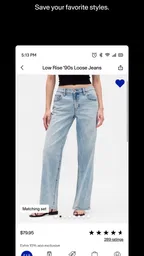
One small but valuable habit is to treat mobile browsing as a shortlist-building step rather than a commitment to buy immediately. When I shop for clothing, I can get carried along by attractive images and lose sight of what I actually need. With a single-brand app, I can decide beforehand whether I am looking for a specific type of item, explore with that goal, and stop once I have a few possibilities. That keeps a focused catalog from turning into aimless scrolling.
Where it fits in an everyday shopping routine
For someone who regularly shops Gap, the app can serve as a convenient place to check the brand’s current styles without beginning from scratch each time. It is also a reasonable option for a shopper who has already decided that Gap is the label they want to consider. The benefit is less about replacing every other way to shop and more about making that particular brand easier to browse on a phone.
I would use it differently depending on the purchase. For a planned wardrobe update, I would first make a short list of what I need, then browse Gap for those items rather than opening the app just to see what catches my eye. For a more uncertain purchase, I would compare the options with other retailers before deciding. Clothing choices depend on personal fit and taste, so a digital browse is useful for narrowing choices, not a guarantee that every item will work for me.
That is one of the key trade-offs: a brand app can reduce distraction, but it also limits the comparison set. If I am shopping for a particular Gap piece, that focus is welcome. If I am trying to find the best match among many brands, it is a reason to switch to a multi-brand retailer or use more than one shopping channel.
When another shopping option is the better fit
I would not choose Gap as my only shopping app if I routinely compare labels, prices, or styles across a broad range of retailers. A department-store or fashion marketplace app is better suited to that kind of research because it brings multiple brands into one place. I am not claiming those alternatives offer a better Gap selection; their advantage is simply the broader comparison environment.
A mobile browser may also be the sensible alternative if I shop Gap only once in a while. It avoids adding a dedicated app to my device and can be enough for an occasional look. The app is more appealing when I expect to return to it, while a browser suits a one-off visit or someone who prefers to keep shopping activity consolidated.
In-person shopping has its own advantage when I care most about seeing fabric, checking how a garment feels, or trying clothes on before buying. An app can help me explore and plan, but it cannot reproduce that tactile part of the decision. If I am especially uncertain about fit or material, visiting a store is a more appropriate next step than relying on any phone-based catalog.
There is also a useful boundary for gift shopping. If I know the recipient likes Gap, the app can help me browse that brand. If I only know their general taste, a broader retailer gives me more room to look across labels. I would not treat a single-brand catalog as a substitute for a wider search when the recipient’s preferred brands are unclear.
Keeping the app useful without adding shopping friction
The app is easiest to justify when I have a repeatable reason to open it. Before browsing, I find it helpful to decide what I am looking for and whether I am shopping now or simply exploring. That small distinction can prevent a quick check from becoming an unplanned purchase. It also makes the app’s brand focus work in my favor: I am using it to answer a specific question about Gap rather than expecting it to cover the whole clothing market.
If I am comparing a potential purchase with options elsewhere, I would keep the comparison fair. I would look at the actual items I am considering, rather than assuming that a brand-specific app is automatically better because it is more focused. Likewise, I would not judge a broader marketplace solely by how quickly it gets me to Gap products. Each format solves a different problem: one is centered on a single label, while the other is built for wider browsing.
There is no need to treat installing the app as a permanent commitment. I can try it when I have a Gap shopping task, see whether the dedicated experience saves me time, and keep using it only if I return often enough to justify it. Since the app is free, this is a low-cost way to test the format; the more important question is whether its focused catalog matches how I shop.
My recommendation for Gap shoppers
I recommend Gap to people who already shop the brand and want a dedicated mobile way to browse its clothing. Its strongest case is convenience for brand-minded shoppers, not an all-purpose solution for fashion discovery. The large number of installs and strong average rating make it a well-established choice among people who have tried it, but the right fit still depends on your shopping style.
I would skip it if I rarely shop Gap, prefer to compare several labels in one session, or need to inspect clothing in person before making a decision. In those situations, a browser, a multi-brand shopping option, or a store visit may be more useful. I would also avoid installing it simply because I want a general-purpose fashion app; its single-brand focus is precisely what makes it useful to some shoppers and limiting to others.
My bottom line: if Gap is already one of the brands you look to, the app is a straightforward place to start a browse and plan a purchase. If you are still deciding which brand to shop, begin somewhere broader and come back to Gap when you want a closer look at its range. That is the clearest way to get value from the app without expecting it to do a job it was not designed for.
What we like
- Quickly shows gaps in knowledge so you can focus your study time.
- Short practice sessions make it easy to review on the go.
- Progress tracking helps you see how your learning improves.
- A simple interface keeps lessons easy to navigate.
- Personalized review can reinforce topics you find difficult.
What could be better
- The selection of study subjects may feel limited.
- Some features may require a paid subscription.
- Useful content depends on the quality of available materials.
- Repeated review can make practice feel monotonous.
- An internet connection may be needed for some features.





