


FreeTone Calls & Texting review
 Analysis by Appsdrops
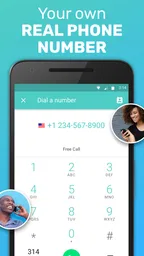
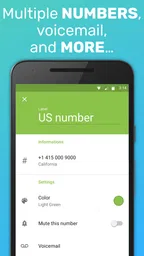
I see FreeTone Calls & Texting as a practical second line rather than a complete replacement for a mobile carrier. It is a social app from TextMe, Inc. built around calling and messaging, with a free phone number for use in the US and Canada. That can be especially useful when I want a separate number for a particular group of people, or when I need a way to keep in touch without handing out my main number.
The appeal is straightforward, but the best experience depends on treating the app as a communication tool with a few boundaries. I would set it up deliberately, check how its calling and messaging fit my routine, and avoid assuming that a free app number behaves exactly like the number attached to a standard phone plan. Used with those expectations, it can be a handy everyday option.
A dependable routine starts with the second number
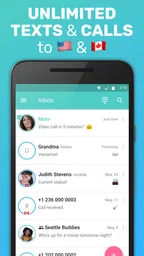
The basic workflow is familiar: use the app’s phone number to make calls and send SMS or MMS messages. For someone who wants to keep personal and less-personal conversations apart, that separation is the useful part. I might give this number to a local club, a marketplace contact, or people I meet through a temporary project, while reserving my regular number for close friends and family.
A realistic example is arranging a pickup with someone I do not know well. I can use the FreeTone number for the conversation and photos or other MMS messages, then keep the details in that separate thread instead of mixing them into my usual messages. The benefit is not that this eliminates every privacy concern; it is that it gives me a more organized boundary and more control over which number I share.
There is also a useful household scenario. If I help coordinate a shared activity, I can use the app number for messages about schedules and changes. That gives participants one consistent contact point and keeps those conversations from taking over my personal texting history. I would still tell people which number to use and keep an eye on the app so replies do not get lost among messages sent to my main line.
FreeTone is in the social category, and I think that framing fits better than viewing it as a full phone service. The app is designed for contact and conversation, not for replacing every function people expect from a carrier account. Its US-and-Canada focus matters too: I would check that my intended contacts and calling needs fit that scope before making it my default communication method.
Set expectations before sharing the number
When I start using a second number, I choose a clear purpose for it before distributing it. A number used for family coordination has different expectations from one used for short-term arrangements. Keeping the purpose narrow makes it easier to decide who should have it, which conversations belong there, and whether I still need the app after a project or event ends.
I would also tell important contacts that this is the number I check through FreeTone, rather than assuming they will recognize it. That small step helps avoid missed replies, especially if someone already has my regular number saved. For a conversation that matters, I would confirm that the other person can reach me through the app before relying on it for time-sensitive plans.
In the app’s store listing, the average rating is 4.1 from around 132,000 ratings, and it has passed 10 million installs. Those figures suggest that it has reached a broad audience, but they do not settle whether it suits my particular routine. I would judge it by the quality of my own calls and message habits, especially if I plan to depend on it for anything more important than casual coordination.
Check the practical details that affect daily use
FreeTone is free to download, which makes it easy to try without committing to a subscription up front. It also includes in-app purchases, ranging from $0.99 to $79.99 per item, so I would pay attention to any purchase prompt and decide whether an optional paid item has value for my needs. I would not treat the word “free” as a reason to tap through purchase screens without reading them.
The app is rated Everyone, but that age label is not a substitute for thinking about how a phone number will be used. If a younger family member is setting it up, I would discuss who can contact them and what information should stay private. A separate number can help with organization, but it does not by itself guarantee that every interaction is appropriate or safe.
FreeTone was released on October 23, 2014, and the current version is 3.57.0. It requires Android 7.0 or later. I would check the operating system requirement before trying to install it on an older device, and I would keep the app updated through the store so I am using the current release available for my phone.
One setting habit worth adopting is to review the app’s own options and the phone’s notification controls soon after setup. I would make sure incoming calls and messages are noticeable enough for my routine, then reduce interruptions if every alert becomes distracting. I would also check that the app is allowed to notify me in the way I expect. The exact controls can differ by device, so I would use the options actually shown on my phone rather than assume every Android version presents them identically.
For privacy and organization, I would be selective about which conversations I start with the second number. Before sharing it broadly, I would decide whether it is meant for ongoing contacts or just a particular purpose. That gives me a practical rule for later: if a conversation no longer belongs to that purpose, I can stop using the number for it instead of letting a temporary channel become an unmanaged inbox.
Build faster habits without expecting magic shortcuts
The most useful efficiency trick is often a repeatable routine rather than a hidden feature. I would save the FreeTone number under a contact name that makes its role obvious, and tell people to save it under that name too. That reduces the chance that someone mistakes it for my primary line and makes it easier to recognize when a call or message comes through the app.
I would also keep a simple mental division between the app and my regular messaging setup. For example, I might check FreeTone at set points during the day for non-urgent replies, while using my main line for conversations that need immediate attention. This habit prevents a second number from becoming an extra source of constant notifications, and it gives contacts a fair expectation about when I am likely to respond.
For recurring arrangements, I would reuse a clear message pattern: identify myself, state the purpose of the contact, and include the key detail in the same thread. This is especially helpful when coordinating a pickup or a group schedule, where a short exchange can otherwise become confusing. Keeping the relevant information together makes the app more useful without relying on undocumented tools or assuming it has specialized workflow features.
MMS can also make a practical difference when a plain text description is not enough. If I am sharing a visual detail related to an arrangement, I can use the messaging channel for that conversation rather than switching between unrelated apps. I would still avoid sending sensitive material just because the app supports multimedia messaging; convenience is not the same as a guarantee of privacy.
Where a second-line app reaches its limits
The main trade-off is that a free app-based number should not automatically be treated like a carrier-issued number. I would not make it the only contact method for critical situations, or assume every person and service will handle it just as they handle a conventional mobile number. If a particular organization requires a standard carrier number, or if a contact insists on reaching me through my primary line, FreeTone may not be the right channel.
It may also be a poor fit for someone who wants one seamless inbox and has no reason to separate contacts. A second number adds a place to check, another notification stream to manage, and a little more responsibility for telling people where to reach me. If I already have a reliable plan and mainly want uncomplicated communication with friends, the usual messaging app tied to my everyday number may be simpler.
Compared with carrier calling and texting, FreeTone’s strongest case is the extra line and its free entry point, not a promise that it will reproduce every carrier feature. Compared with common internet-based messaging apps, its phone-number approach can be more comfortable for contacts who prefer calling or SMS/MMS rather than joining another messaging service. The better choice depends on the people I communicate with and whether I need a distinct number more than I need a single unified communication system.
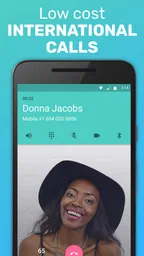
Another limitation is geographic fit. The app’s calling and texting offer is centered on the US and Canada, so I would not choose it as a general international calling solution without first checking that my actual use falls within what it supports. If most of my contacts are elsewhere, a service designed around those destinations may be a better match.
TextMe, Inc. has kept the app in active versioned form, and the current release is 3.57.0. Still, version numbers alone do not tell me how it will perform on every device or network. Before moving important conversations to it, I would try a call and a message with a trusted contact, then confirm that notifications arrive as expected. That simple test is more useful than assuming the app will behave identically on every phone.
Who will get the most from FreeTone
I would recommend trying it if you want a separate US or Canadian number for casual calling and texting, especially for a side project, community group, or one category of contacts. It is also worth considering if you regularly exchange SMS or MMS with people who do not want to install a new messaging platform. The free download makes a low-commitment test possible, while optional in-app purchases mean I would keep an eye on what I choose to buy.
I would skip it if you need a guaranteed replacement for a carrier line, rely on a number for important account or emergency contact purposes, or do not want to manage more than one inbox. I would also choose another option if your main need is a polished, unified conversation history across all contacts or communication outside the app’s US-and-Canada focus.
Overall, FreeTone Calls & Texting is most convincing when I use it with a clear job: a second number for calls, SMS, and MMS, with a simple routine for checking it and a sensible boundary around what I share. The right settings and habits matter more than trying to turn it into something it is not. If you want that extra line and are comfortable managing it alongside your usual number, it is a practical app to test; if you need your primary phone service to do everything, I would keep looking.
What we like
- Offers a second number for calling and texting.
- Includes voicemail for missed calls.
- Supports group messaging with other users.
- Lets you earn credits through in-app activities.
- Works over Wi-Fi without a cellular plan.
What could be better
- Free calling and texting availability may vary by country.
- A stable internet connection is needed for calls.
- Some features require purchased credits.
- The free number may be reclaimed after inactivity.
- Advertisements may appear in the free version.





