




Freebie Alerts: Free Stuff App review
 Analysis by Appsdrops
I like the idea behind Freebie Alerts: instead of checking several neighborhood marketplaces one by one, I can use a social app focused on alerts for free items. That is especially appealing when a useful household find may be claimed quickly. The trade-off is that the app’s value depends heavily on what is being posted nearby and whether I have a working connection when I want to browse or act. I would treat it as a convenient way to spot possibilities, not a guarantee that a particular item will be available.
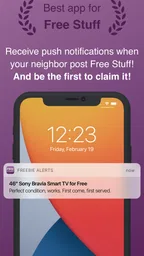
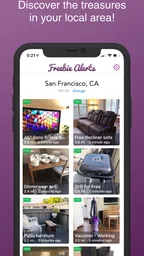
It is a free social app from Freebie Alerts - Free Stuff Alerts, with optional in-app purchases ranging from $1.99 to $9.99 per item. It brings free-item activity from Nextdoor, Letgo, OfferUp, and TrashNothing into one alert-focused experience. The practical benefit is less hopping between services; the practical limitation is that those listings still come from other people and communities, so timing, local activity, and reliable connectivity all shape what I see.
Alerts are most useful when the connection is steady
For me, the clearest use case is keeping an eye out for things I can genuinely collect: a spare chair, a kitchen item, or supplies for a small home project. An alert can bring a new possibility to my attention without requiring me to repeatedly open each source. That is a better fit for casual, ongoing searching than for a time-sensitive need where I must find one exact item immediately.
The app’s focus on notifications makes network access central to the experience. When I am connected, alerts can help me notice activity while doing something else. If I am in a weak-signal area, I would not assume that a new listing or notification will reach me promptly. The sensible approach is to check again once the connection is stable, especially if I are arranging a pickup or responding to a promising listing.
One useful habit is to decide in advance what counts as worth pursuing. Free listings can be tempting simply because they cost nothing, but collecting something still takes time and effort. I would keep a short mental list of items I actually need and consider distance, condition, and pickup practicality before messaging anyone. That makes alerts useful rather than turning them into a stream of distractions.
What combining local sources changes
Compared with browsing each marketplace separately, a single alert-oriented app can reduce the effort of checking several places. It does not make the underlying communities identical, though. Listings may differ in detail and response speed, and the person offering an item may be active on the source where it was posted rather than in the alert app itself. I would use the notification as a lead, then read the listing carefully and follow the available path to contact or coordinate.
This distinction matters when a listing looks especially attractive. An alert is not a reservation, and seeing an item first does not mean it is still available. I would avoid making a special trip based only on a notification; first, I would confirm the details and pickup arrangement through the relevant listing or conversation. That small pause can prevent a wasted journey.
Using it between errands and at home
On a phone, the app makes most sense in short visits: checking an alert while waiting for a bus, looking over possibilities during a break, or reviewing listings at home before planning a pickup. These are moments when a quick glance is useful, but a stable connection is still important if I need to open more information or coordinate with someone.
For example, imagine I am replacing a basic lamp. I could keep an eye on local free listings during the week, then compare any promising option with what I already have before arranging collection. The app helps surface opportunities, but I would still ask about the item’s condition, make sure the location is manageable, and agree on a practical time. The best result is not simply finding something free; it is finding something useful without creating a difficult pickup.
It is less suited to someone who needs a guaranteed item by a deadline. If I needed a specific appliance today, a normal purchase or a direct search through a marketplace with active listings might be more dependable. Freebie Alerts is better for flexible browsing, where I can wait for a suitable offer and accept that some alerts will not lead anywhere.
When a notification does not lead to a result
There are several ordinary reasons an alert may not turn into a successful find: the item may already be claimed, the listing may lack details, or the person offering it may not respond quickly. A poor connection can add another snag by delaying the moment I see or open the listing. I would not read every missed opportunity as a problem with the app; free-item exchanges are naturally competitive and depend on other people following through.
If an alert seems incomplete, I would first check whether my connection is working and then reopen the relevant content rather than relying on an old notification. If the listing is gone or the details no longer fit, I would move on instead of spending too long trying to revive it. This is a modest but useful workflow: notifications help me notice, while a fresh check helps me decide.
It also pays to keep expectations calm. An alert-based search can be uneven: a quiet stretch may be followed by several possibilities, and none may be right for my needs. I would not keep the app open constantly or organize my day around every notification. A couple of deliberate checks when I have time to assess and respond is a more comfortable way to use it.
Keeping data use intentional
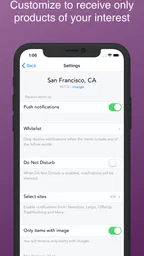
Because the app centers on alerts and listings, I would think about when I want notifications to interrupt me and when I would rather browse deliberately. If I am searching for a particular kind of useful item, timely alerts may be worthwhile. If I am only curious, frequent checking can consume attention without producing much value. Choosing a limited purpose for the search helps keep the experience focused.
I would also be mindful of mobile data when opening listing details or moving between sources, particularly if I am away from Wi-Fi and have a limited plan. I cannot assume every part of the experience behaves the same on every connection, so I would avoid relying on it for a pickup decision until the information I need has actually loaded. A quick alert is useful; a confirmed location and clear arrangement are what make a trip sensible.
Personal safety and practical judgment still matter in local exchanges. I would keep communication clear, avoid sharing more personal information than necessary, and choose a pickup plan that feels appropriate. The app can help me discover free items, but it cannot judge whether a particular arrangement is convenient or comfortable for me. That decision remains mine.
Who will get the most from it
I think the strongest fit is someone who likes secondhand and reuse, has some flexibility about what to acquire, and is willing to collect items locally. It can also suit people who already check several neighborhood sources and want a more alert-driven way to notice free offers. A rating average of 4.7 from around 276,000 ratings, alongside more than 5 million installs, suggests that many people have found the approach appealing, though individual results will still depend on their area and habits.
Someone who dislikes notifications, has little time to arrange pickups, or lives where these sources are quiet may get less out of it. The same goes for a person who wants a carefully curated shopping catalogue or guaranteed stock: this is about free listings from local communities, not a conventional retailer. In those cases, browsing one preferred marketplace manually—or buying from a seller with a clear, confirmed listing—may be a better match.
The app is rated Teen and was released on June 9, 2019. Its current version is 3.10.3, and it requires Android 7.0 or later. Those details make it straightforward to judge basic compatibility, while the free download leaves room to try the alert-based approach before deciding whether any optional purchases are worthwhile. I would start with the free experience and only consider a purchase if I understood exactly what it adds to my own routine.
My verdict on staying connected
After considering how I would use it day to day, I see Freebie Alerts as a practical discovery tool rather than a complete buying or exchange service. Its strongest idea is bringing attention to free-item activity from several familiar sources, which can save repeated checking. Its weakest point is the same uncertainty that comes with local listings: timing, availability, responses, and network quality can all affect whether an alert becomes a real pickup.
I would recommend trying it if you are happy to browse casually, respond thoughtfully, and collect only things that make sense for your home or plans. I would skip it if you need certainty, dislike interruptions, or cannot easily travel to collect what you find. Keep your search focused, confirm details before setting out, and treat alerts as leads rather than promises. With those expectations, it is a useful way to look for free finds without letting the hunt take over your day.
What we like
- Alerts help users spot newly posted freebies quickly.
- Location filters make nearby offers easier to find.
- The app covers several local giveaway platforms.
- Saved listings make promising offers easy to revisit.
- A map view helps assess how far an item is away.
What could be better
- Free listings can disappear before users respond.
- Some offers require travel or pickup coordination.
- Availability and listing quality vary by location.
- Users may encounter duplicate or outdated posts.
- Claiming items often depends on contacting the giver directly.





