




Five Below: Shop Fun Finds review
 Analysis by Appsdrops
I like shopping apps best when they help me make a quick, sensible decision rather than turn a small errand into a long browsing session. Five Below: Shop Fun Finds is aimed at that lighter kind of trip: a digital way to explore the retailer’s mix of gifts, toys, candy, and small seasonal items, save ideas to a wishlist, and plan an in-store pickup. My impression is that it works best as a companion to visiting a Five Below store, especially when I want inspiration or need to gather a few inexpensive-feeling treats and gifts in one place.
Browsing that suits a quick store run
Five Below: Shop Fun Finds is a free shopping app from Five Below, Inc. Its focus is specific: browsing the kinds of playful, giftable purchases associated with the retailer, rather than comparing every product category under the sun. That focus makes the app easier to understand than a broad marketplace, but it also means it is most useful when you already have a reason to shop at Five Below.
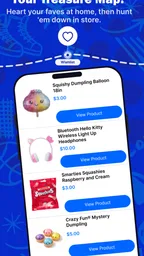
The practical appeal is the combination of discovery and store planning. I can look through possible purchases, keep appealing items on a wishlist, and use the pickup option to connect online browsing with an in-person visit. That is a useful middle ground if I want to avoid wandering around without a plan but still prefer collecting an order at a store.
The app is rated for Everyone, and its audience is easy to picture: parents looking for a small reward, someone preparing a stocking, a student picking out a cheerful gift, or a shopper who wants candy and a toy without making several separate stops. The app has a 4.2 average from around 27,000 ratings, with over 5 million installs. Those figures suggest it has found a substantial audience, though they do not tell me whether a particular item will be available at my local store.
Where the wishlist earns its place
A wishlist is more than a convenient place to park products when the store’s assortment includes lots of tempting little purchases. I’d use it to collect a few candidate gifts before deciding, rather than buying the first appealing thing I see. For a birthday bag or a seasonal treat, that makes it easier to compare options and keep the shopping trip focused.
There is also a useful distinction between planning and purchasing. I can browse when I have a spare moment, save possibilities, then check the list before heading out. That workflow is particularly handy for a parent making a short stop with a child: agreeing on a couple of options at home can make the actual visit less open-ended. It will not remove every impulse purchase, but it gives the trip a starting point.
Pickup changes the shape of the visit
For me, the most practical reason to use the app is the chance to choose store pickup. It can turn a browse-first task into a more direct errand: select items ahead of time, then go to the store to collect them. That is appealing when I already know what I want and would rather not spend the visit searching through shelves.
I would still treat pickup as a convenience, not a guarantee that every shopping decision can be made from a screen. The app’s value depends on whether the products I want suit the pickup flow and the store I plan to visit. If I’m shopping for a very particular item, I’d check the available choices carefully before building my whole errand around it. If I’m browsing for a surprise or want to judge a product in person, walking the aisles remains the better approach.
A realistic use case is putting together a small set of party-bag fillers. I can browse for a mix of toys and candy, save the promising choices, and then narrow the list to what fits the occasion. If I’m short on time, pickup may help make the collection more purposeful; if I want to see colors, packaging, or size before deciding, the store visit gives me that chance. The app supports both styles rather than making one the only sensible way to shop.
How it compares with other ways to shop
Compared with a general retail marketplace, Five Below’s app is more focused on casual finds and small gifts. That focus can be a plus when I’m after something fun rather than a carefully specified household purchase. A broad marketplace is usually the more natural choice when I need extensive product comparisons, a narrow technical specification, or an enormous range of sellers. This app makes more sense when the retailer’s own assortment is already part of the plan.
Compared with simply walking into a store, the app gives me a place to gather ideas before I go and a pickup option for a more directed visit. In-store browsing, on the other hand, is better for spontaneous discovery and checking an item firsthand. I would not replace one with the other entirely: I’d use the app to shortlist, then rely on the store when seeing the product matters.
It is also different from using a shopping app mainly to track a major purchase. Five Below is better suited to several modest, cheerful additions than to researching one costly item in depth. If I need detailed comparison tools or a dependable source for a specific hard-to-find product, I would start elsewhere and use this app for the more playful end of the shopping list.
What the version history means for shoppers
The app was released on December 23, 2015, and its current version is 7.1.1. That timeline shows it has continued beyond its initial launch, but a version number by itself does not tell me which individual features changed or how the interface has evolved. I would rather judge the current experience by what it helps me do now: browse Five Below’s selection, assemble a wishlist, and plan pickup where it suits my trip.
For existing users, the useful question is whether the app still fits their routine, not whether a newer version number automatically makes shopping better. If you already use it to save ideas before visiting, the core workflow remains easy to understand. If you have not opened it in a while, it is worth checking the current browsing and pickup experience before relying on it for a time-sensitive errand. I would avoid assuming that an older saved plan reflects what is currently available.
For someone installing it for the first time, the current release is version 7.1.1, and the minimum operating system is 8.0. The app is free, so trying it does not require paying an upfront app price. I’d still decide based on whether Five Below is a store I actually shop at: free access is not much of a benefit if the retailer’s range and store-based approach do not match my needs.
Useful trade-offs before you rely on it
The biggest limitation is the same one that gives the app its character: it is tied to one retailer and a particular style of shopping. A wishlist can help me organize possibilities, but it cannot make the selection as broad as a multi-retailer marketplace. Nor does a pickup option automatically make the app the best choice for every errand; for a shopper who prefers to browse everything in person, the app may be an unnecessary extra step.
I’d also keep expectations practical when shopping for gifts. The app can help me collect and review ideas, but the final choice still depends on the recipient, the occasion, and whether an item feels right in person. For a flexible stocking or party favor, browsing can be enjoyable. For a specific present where size, material, or exact suitability matters, I would use the app to discover candidates and then inspect the product more carefully before committing.
Another trade-off is that browsing a range of small treats can encourage adding extras. I find a wishlist useful precisely because it separates “that looks fun” from “I need to buy it today.” Before pickup or a store visit, I’d review the list and remove anything that does not fit the occasion. This small habit makes the app more useful as a planning tool and less likely to become an excuse for an unfocused shopping trip.
Who I’d recommend it to
I’d recommend it to people who already enjoy shopping at Five Below and want a convenient way to collect gift ideas, plan a seasonal browse, or make a store trip more intentional. It is especially suitable for shoppers who buy several small items at once: a mix of candy, toys, and little presents for a gathering, for example. The wishlist can help keep those separate ideas in one place, while pickup offers a more direct route when browsing is not the point of the visit.
I’d suggest skipping it if you rarely shop at this retailer, need a broad comparison across brands and stores, or prefer to make every decision only after seeing products in person. It is also not the tool I would choose for an urgent, highly specific purchase unless I had already checked that the item and the pickup plan suited my needs. In those situations, a general retailer’s app or an in-person search may be more dependable for the job.
Five Below, Shop Fun Finds is a focused shopping app rather than an all-purpose retail assistant. Its best features, in my view, are the simple planning loop of browse, save, and visit, plus the option to connect that planning to store pickup. The retailer’s developer, Five Below, Inc, has built an app for a particular kind of cheerful, casual shopping, and that narrow purpose is both its strength and its boundary.
My recommendation is to use it as a shortlist and store-trip planner, not as a substitute for every kind of shopping. If you enjoy the retailer’s assortment, the app can make a quick gift hunt or a seasonal errand more organized. If your priority is deep product research, a much wider selection, or seeing everything before making a choice, you will probably be happier with another approach.
What we like
- The app makes it easy to browse Five Below products by category.
- Product listings show prices before you add items to your cart.
- You can save items to a wishlist for later.
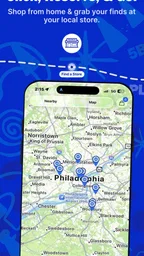
- Store details can help you find a nearby Five Below location.
- The app provides a convenient way to check current promotions.
What could be better
- Product availability may vary by store and location.
- Some items may sell out before you can complete a purchase.
- Online selection may differ from what is available in stores.
- Delivery fees can make small orders less appealing.
- Shopping features may require an account to access fully.





