
Family Dollar review
 Analysis by Appsdrops
Family Dollar is a free shopping app from Family Dollar Stores, intended for people who already shop with the retailer and want to decide whether adding a phone-based step to their routine is worthwhile. My practical view is simple: it makes the most sense when you want a direct connection to Family Dollar, not when you are looking for a general-purpose shopping or price-comparison tool.
What to weigh before installing
Family Dollar is a shopping app, and its focus is narrower than that of a broad retail marketplace. That can be useful: if Family Dollar is already part of your regular errands, a retailer-specific app may be more relevant than a larger service filled with stores you do not visit. If you rarely shop there, the value of installing another app is less obvious.
The app is free, so the main cost is not a purchase price but your time and attention. Consider whether you are likely to open it before or during a Family Dollar trip, and whether its current tools fit the way you plan shopping. A phone app is most helpful when it solves a recurring task; simply having the retailer’s name on your home screen does not automatically make a shopping trip easier.
Family Dollar Stores is the developer. The app has an average rating of 3.6 from around 41,000 ratings, alongside about 15,000 written reviews. Those figures suggest a substantial audience with mixed experiences rather than universal satisfaction. I would treat that as a reason to try it with a specific purpose in mind, not as a verdict that it will work well or poorly for every shopper.
It has been installed over 10 million times and is rated for Everyone. The current version is 8.3.2, and it requires iOS 12 or later. The app was released on June 5, 2017, so it is an established product, though the release date by itself does not tell me how well any particular feature works today.
Where a retailer-specific app can help
The strongest case for Family Dollar is convenience through focus. A dedicated retailer app can be a sensible place to start when you are already deciding what to buy at Family Dollar. Rather than browsing an all-purpose shopping service and then switching mentally between different retailers, you can keep your planning centered on the store you intend to visit.
That focus is especially useful for routine errands. Imagine you are making a short list of household basics before stopping at Family Dollar on the way home. A store-specific app is worth checking if it helps you prepare for that particular visit. The useful habit is to consult it while making the list, then keep the list itself organized in whatever way you normally use. This avoids relying on an app for a task it may not support in your current version.
A second practical use is deciding whether the app deserves a place in your regular shopping routine. Try it around one planned trip rather than installing it and expecting an immediate payoff. Notice whether it helps you find relevant information or plan more confidently. If it does, keep it; if you end up returning to your usual notes and browsing habits, removing it is a reasonable outcome.
There is also a useful distinction between a retailer app and a general shopping app. The retailer’s own product is naturally the more focused option when your destination is already Family Dollar. A general app may be better when you are comparing several stores, collecting a household list that spans retailers, or trying to keep all your shopping in one place. These are different jobs, so the best choice depends on the errand rather than on which app has more features in the abstract.
Make the first session purposeful
For a fair trial, open the app with a real question in mind: “Can this help me prepare for my next Family Dollar visit?” That is more informative than tapping through screens without a shopping goal. If the app’s available options do not answer the question you came with, you can decide quickly whether it deserves further attention.
It is also sensible to check that the app is current before judging its usefulness. The listed version is 8.3.2, and the developer says it continually evaluates the app experience. That signals ongoing attention, but it is not a guarantee that every screen, device, or shopping need will feel smooth. Your own test should focus on the tasks you actually need, not on assumptions about what a retailer app ought to include.
When another approach may suit you better
If you shop across multiple retailers, Family Dollar may be too narrow to serve as your main planning tool. A notes app or a general shopping list can be easier for combining items from several stores. Likewise, if your main goal is comparing options across different retailers, a single-store app is not automatically the right place to make that comparison. Use Family Dollar for Family Dollar-related planning and a broader tool for broader decisions.
It may also be the wrong choice if you prefer to shop without using your phone, or if you only visit the retailer occasionally. In those situations, adding an app can create one more thing to maintain without changing the shopping experience much. You do not need to install it simply because you shop there once in a while.
Another trade-off is that an app cannot remove every source of friction from an in-store trip. Your plan may still need to adapt to what you find when you arrive, and using a phone while shopping can be less convenient than carrying a short written list. I would keep a simple backup list for essentials if forgetting an item would mean making a second trip; that is a practical safeguard, not a feature claim about the app.
The mixed average rating is worth considering alongside your own needs. A 3.6 average from a large number of ratings indicates that experiences vary. Rather than assuming the app will match the most enthusiastic or most frustrated reviewers, I would test the specific workflow that matters to you. If you are hoping for a particular capability, confirm it in the current app before depending on it for a time-sensitive errand.
Keep the switch low-risk
Trying Family Dollar does not require changing your whole shopping system. Keep using your existing list or routine while you explore the app, and only move a task over if the app handles it more conveniently. This side-by-side approach makes the decision easier: you can tell whether it adds value instead of confusing novelty with improvement.
If you decide it is not useful, switching back is straightforward in principle because your broader shopping habits do not have to depend on it. Keep important reminders somewhere you already trust, and avoid making the app your only record of a shopping plan until you know it suits you. This is a good rule for any single-retailer tool, especially when your shopping regularly includes more than one store.
My recommendation
I would recommend Family Dollar to people who shop at the retailer often enough to benefit from checking a dedicated store app and who are comfortable using a phone as part of their planning. Its free price makes a low-commitment trial reasonable, while its retailer-specific focus gives it a clear role for Family Dollar errands.
I would skip it if you rarely shop there, want one app to coordinate several retailers, or prefer to keep shopping entirely offline. In those cases, your existing notes or a general-purpose shopping tool may be a better fit. The most reliable way to decide is to try the app before one real trip, judge it against a specific need, and keep it only if it makes that trip easier.
What we like
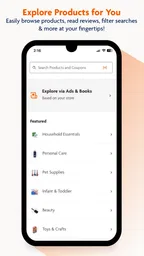
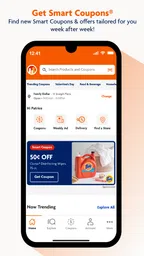
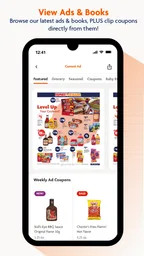
- The app makes it easy to browse current Family Dollar deals.
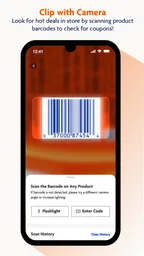
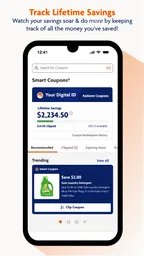
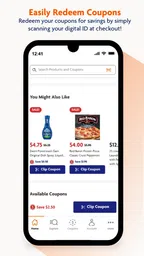
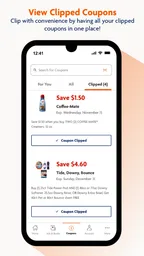
- Digital coupons can help lower the cost of eligible purchases.
- Users can check product availability at nearby stores.
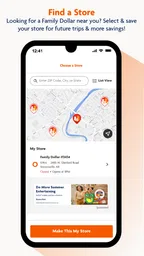
- Store details help shoppers find locations and opening hours.
- The shopping list feature helps organize planned purchases.
What could be better
- Deals and product availability can vary by location.
- Some offers require users to activate coupons before shopping.
- The app is less useful for shoppers who live far from a store.
- Account sign-in may be needed to access personalized features.
- App performance can vary across devices and network connections.





