


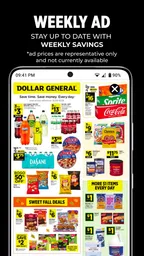
Dollar General-Digital Coupons review
 Analysis by Appsdrops
I would treat Dollar General’s app as a practical shopping companion, not as a reason to hand over more personal information than I’m comfortable sharing. Its main appeal is straightforward: it brings digital coupons and shopping tools for Dollar General into one place. The useful question is whether that convenience fits your routine—and whether you’re comfortable using an account to get it.
Convenience is useful, but trust starts with your choices
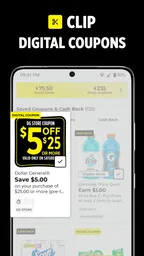
Dollar General-Digital Coupons is a free shopping app from DOLLAR GENERAL CORPORATION. It is aimed at people who already shop at Dollar General and want to check offers or browse the local weekly ad from a phone. The app’s stated connection between deals and a myDG account matters: rather than treating it as a simple paper-ad viewer, I’d approach it as an account-based shopping tool.
That distinction is worth considering before you install it. If your goal is only to compare prices across several retailers, a general shopping or grocery app may be a better starting point. If you regularly shop at Dollar General, though, keeping its offers and weekly ad close at hand can make planning a trip less cumbersome. The benefit is specific to that store, rather than broad price discovery.
The app has a 4.7 average from around 830,000 ratings, with over 10 million installs. Those figures suggest it has reached a large audience, but they don’t tell me whether its account approach suits an individual shopper. I’d judge that by the tasks I need it for and the choices I’m comfortable making in the app.
What the app is good for in an ordinary shopping routine
In practical terms, the strongest use case is planning a Dollar General visit. I can imagine checking the weekly ad before leaving home, then looking through digital coupons while making a list of items I already intended to buy. This order helps keep the app in a supporting role: I’m using deals to refine a trip, rather than letting a coupon create an unnecessary purchase.
A realistic example is a quick household restock. Before going out for cleaning supplies, snacks, or other everyday items, I’d review the local ad and available digital offers, then note which ones match the shopping list. That is more useful than browsing offers without a purpose, especially when time is short and I want to avoid adding tempting extras to the basket.
The local weekly-ad angle is particularly relevant if store offers differ by location. I’d check that the app is showing the area I actually shop in before relying on an offer to plan a trip. This is a small step, but it can prevent the frustration of expecting a deal based on an ad that doesn’t match the store you intend to visit.
Account use and the limits of what a shopper can judge
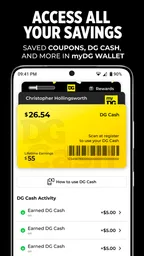
The myDG account is central to the way the app presents its deals, so I wouldn’t assume that every useful function is available without signing in. Before creating or using an account, I’d pause to consider whether I expect to use digital coupons often enough to justify that extra step. For occasional visits, checking the weekly ad may be all I need; for regular trips, the account-linked coupon experience may be more worthwhile.
Trust is not something I can settle from an app’s general purpose alone. I would look at the permission prompts shown on my own device, read the privacy information available in the app store, and decide whether each requested access makes sense for the task I’m doing. I wouldn’t grant a permission simply because an app asks for it, and I wouldn’t assume a permission is required unless the app explains why it needs it.
The same cautious approach applies to personal details. I’d enter only what the account setup actually asks for, and I’d review any choices presented during sign-up rather than tapping through automatically. If the app offers controls for account information or communication preferences, I’d check those in the account area and adjust them to match how I want to use the service. Those are sensible checks, not claims about a particular setting being available.
Small habits that make the coupon workflow more useful
One helpful habit is to browse offers after writing a basic list, not before. That keeps the coupons tied to planned needs and makes it easier to judge whether an offer is genuinely useful. It also reduces the chance that a prominently displayed deal will distract me from what I came to buy.
I’d also review the coupon details before making a trip, rather than relying on memory at checkout. Digital offers can have conditions, and the practical value of a coupon depends on whether the product and terms fit the purchase. Reading the offer carefully is a better safeguard than assuming that seeing a coupon in the app means it applies to every similar item.
Another useful routine is to check the local ad and coupons together, then make one concise shopping plan. The ad can help me spot what is promoted, while the coupon section can highlight additional savings. Keeping those steps together is more efficient than opening several retailer apps and trying to reconcile different offers at the last minute.
Finally, I’d avoid treating the app’s offer list as a complete measure of value. A discounted item is not automatically cheaper than an alternative elsewhere, and a trip made solely for one coupon may not be worth the time. For a full household shop or a strict budget comparison, I’d still compare the total basket with other stores rather than judging each promotion in isolation.
How it compares with paper ads and broader shopping apps
Compared with a paper weekly ad, the app is easier to check while away from home and can keep store-specific shopping information together. Paper can still be preferable if you don’t want to create an account, use a phone in the store, or navigate digital offers. The choice is less about which format is universally better and more about whether the app’s account-based convenience earns a place in your routine.
Compared with broad coupon or price-comparison apps, Dollar General’s focus is narrower. That is a strength when I’m shopping at that retailer and want its ad and digital offers in one place. It is a limitation when I’m deciding where to shop, because a retailer-specific tool is not a substitute for comparing a whole basket across different stores.
I would skip it if I rarely shop at Dollar General, dislike managing retail accounts, or want a single app that covers many chains. I’d also be cautious about installing it just to chase occasional deals: savings only help when the items are useful and the extra app fits the way I shop. On the other hand, regular customers who already check the weekly ad may find the digital version a convenient addition.
Compatibility, maturity, and a measured verdict
The app is rated for everyone and requires Android 7.0 or later. Its current version is 16.1.226, and it has been available since November 13, 2012. That long history and broad reach make it a familiar, established option for Dollar General shoppers, but I would still keep the app updated and review its behavior on my own device rather than assuming every version or phone experience is identical.
There are trade-offs beyond account use. A retailer-specific app adds another place to check, and digital coupon shopping asks for a little attention: I need to confirm the local ad, understand the coupon terms, and remember to use offers that match my list. If I prefer a fast, no-account browse or want to compare several retailers at once, the app may feel like extra work rather than a shortcut.
My recommendation is cautious but positive for people who shop at Dollar General regularly. I’d use it to plan a store-specific trip, review offers against a real list, and make deliberate choices about account setup and any prompts the app presents. The most sensible approach is to let the app support a shopping plan, not make the plan for you.
Dollar General-Digital Coupons is a focused tool, not an all-purpose shopping assistant. Its value comes from the combination of local weekly-ad browsing and digital deals tied to a myDG account. If that matches your habits, it can make checking Dollar General offers more convenient; if your priorities are retailer-neutral comparisons or minimizing account-based services, a different option—or simply the paper ad—may suit you better.
What we like
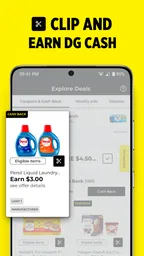
- Coupons can be clipped in advance and applied at checkout.
- A single account keeps your clipped offers together.
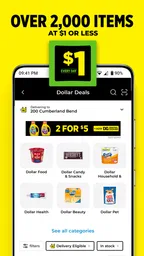
- The app makes it easy to browse deals by product.
- Digital coupons can reduce the need for paper offers.
- The store locator helps find nearby Dollar General locations.
What could be better
- Some coupons require a minimum purchase to qualify.
- Offers may be limited to one use per account.
- Clipped coupons can expire before your next shopping trip.
- Coupon exclusions may make eligibility unclear.
- Digital offers require internet access to browse and load.





