



DICK'S Sporting Goods review
 Analysis by Appsdrops
I tend to judge a shopping app by whether it helps me make a better decision before I’m standing in a store or committing to an order. DICK’S Sporting Goods is most useful when I’m shopping for sports gear as well as everyday activewear: it gives me a dedicated place to browse products from the retailer, rather than making me sift through a broad marketplace. I can see why a household might keep it handy, especially when one person is researching shoes while another is trying to settle on equipment or clothing.
Useful when one household is shopping for different sports
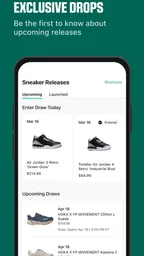
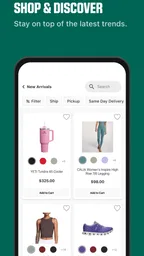
The app is a free shopping app from DICK’S Sporting Goods, built around sportswear, sneakers, and sports shopping. In practice, its appeal is the focused selection: if I’m comparing familiar athletic labels such as Nike, Adidas, and New Balance, I can start in one retailer’s shopping environment instead of jumping between general shopping apps. That focus is helpful, though it also means the app makes the most sense when DICK’S is already a place you would consider buying from.
A realistic household use is a weekend shopping conversation: one person needs running shoes, another wants a new layer for practice, and someone else is checking what gear might be worth replacing. I’d use the app to browse and narrow down choices before discussing what actually needs to be bought. It can make that early research more convenient, but it doesn’t remove the need to agree on size, budget, intended use, or whether a particular item is right for the person who will wear or use it.
The most useful habit is to treat browsing as the first step, not the final decision. Product photos and descriptions can help narrow a shortlist, but fit and feel matter with footwear and apparel, and sports equipment can depend on the player’s needs. If someone in the household is unsure between two shoe styles, I would use the app to identify the candidates and then consider trying them on or checking the retailer’s current options before deciding.
Keep the shopping task clear on a shared phone
On a shared device, I’d be deliberate about who is doing the browsing and what the task is. One person can look for a specific pair of sneakers, while another can use the same app later for a different need. Keeping the search focused reduces the familiar trap of turning a practical purchase into a long scroll through unrelated categories.
I would also avoid assuming that a shared device means a shared shopping account or a shared set of personal preferences. If multiple people use the same phone, each should understand whose account is active before making account-related choices or proceeding toward a purchase. That is sensible for any retail app, and particularly so when adults and younger shoppers share a device. I wouldn’t rely on the app itself to create household boundaries; clear agreement between the people using the phone is the safer approach.
One small but practical workflow is to search with the eventual user in mind. Instead of browsing sneakers in general, decide whether the need is for everyday wear, training, or a particular sport, then compare only options that plausibly fit that purpose. That keeps the conversation useful: a parent or partner can help research, but the person who will wear the shoes should have a say in comfort and style.
Coordinate choices without turning browsing into a group project
For household coordination, I’d use the app to establish what needs attention and then discuss the shortlist outside the shopping session. A quick conversation about size, intended use, and a spending limit can prevent two people from independently looking at different kinds of products. It is especially useful when one person is doing the research for someone else, because the buyer may know the brand they prefer but not the fit or features the user needs.
There is a trade-off here: a retailer-specific app can make it easier to explore that retailer’s stock, but it is not the same as comparing every seller in one place. If my priority were finding the lowest price across many shops, I’d also check broader shopping options. If my priority were seeing what DICK’S Sporting Goods offers, a focused app is more convenient than opening a general marketplace and filtering away unrelated results.
I’d be cautious about making a decision based on a single appealing image or a sale-style message. For equipment, the important question is whether the item suits the activity and the user, not just whether it looks like a good deal. For shoes, sizing and comfort can vary by design. The app can help with discovery, but a household still benefits from a quick check that the chosen item matches the real need.
Age, trust, and who should make the purchase
The app is rated for Everyone, so its age context is broad. That does not mean every household should treat shopping as an unsupervised activity for younger children. I’d let a younger family member browse with an adult nearby, especially if the session could move from looking at products to account or purchase decisions. The important boundary is between helping someone explore options and allowing a child to make a transaction without an adult’s agreement.
For teens, it can be a useful way to research sportswear or gear they can explain they need. I’d encourage them to bring a specific shortlist to the conversation rather than asking an adult to approve a vague shopping basket. That makes it easier to weigh practical details such as intended sport, fit, and whether the item solves a genuine need. It also avoids treating a product’s presence in the app as proof that it is the right choice.
There is no reason to assume that a retail app can manage family roles or decide who is allowed to buy. I’d handle those expectations through the household’s usual device and account practices. If a shared phone is used for personal shopping, the person browsing should check which account is in use and make sure everyone understands who is responsible for any order. Those simple habits matter more than expecting a shopping app to act as a family organizer.
What the app’s reputation and upkeep suggest
DICK’S Sporting Goods has an average rating of 4.8 from around 60,000 ratings, with roughly 4,400 written reviews and over 5 million installs. Those figures suggest that many shoppers find it worth keeping around, though popularity cannot tell me whether a particular product will fit well or whether the retailer’s selection suits every sport. I use that reputation as a sign that the app has a substantial audience, not as a substitute for checking the details of a purchase.
The app has been available since April 21, 2014, and its current version is 7.2.6, with iOS 11 as the minimum operating system. For someone using an older device, the operating-system requirement is worth checking before planning to rely on the app. The developer is DICK’S Sporting Goods, which makes the app a direct retail channel rather than an independent comparison service. That distinction matters if your main goal is to browse this retailer’s offerings rather than compare the whole market.
One reasonable expectation is that an app focused on one sporting-goods retailer will be most useful to people who already shop there or are considering doing so. If you rarely buy sportswear or equipment from DICK’S, installing it may not improve your routine much. A general shopping app is likely a better fit for a household that wants one place to compare many kinds of products and sellers; this one is better suited to a specific sports-shopping errand.
Where it fits—and where another option is better
I’d recommend the app to someone who regularly shops for athletic clothing, sneakers, or sports gear at DICK’S and wants to browse on a phone before heading to the retailer or making a purchase decision. It can also help a household coordinate research when different people need different products, provided they communicate about who is shopping and who will use the item.
I’d skip it if you want a neutral catalog of products from many retailers, if your shopping is mostly unrelated to sport, or if you expect an app to settle questions of fit, suitability, or household permission on your behalf. In those cases, a broader marketplace, a specialist comparison service, or an in-person visit may be more useful. The app’s strongest role is narrower: helping you explore sports-related shopping at one retailer.
For a shared household device, my verdict is practical rather than enthusiastic: it is a handy research companion when the shopping need is specific and the adults keep account and purchase responsibilities clear. I’d use it to make a shortlist, check that the eventual user agrees with the choice, and then decide whether to buy through the retailer or compare alternatives. That approach gets the convenience without confusing browsing with a final purchase or assuming the app can manage a family’s boundaries.
What we like
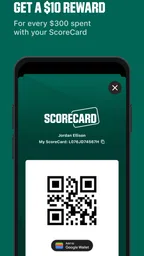
- ScoreCard rewards make it easier to earn benefits on eligible purchases.
- The app supports convenient in-store pickup for many products.
- Product pages include customer ratings and reviews.
- Saved payment details can speed up checkout.
- Order tracking helps you follow purchases after checkout.
What could be better
- Some products may be unavailable for pickup at nearby stores.
- Promotional offers can have exclusions and eligibility rules.
- The large catalog can take time to browse on a small screen.
- Product availability and prices may vary by location.
- Some purchases may require returns through a store or by mail.





