





DHgate-online wholesale stores review
 Analysis by Appsdrops
I find DHgate most useful when I treat it as a way to explore wholesale-style shopping, not as a shortcut to a perfectly predictable everyday purchase. The app brings a broad marketplace onto a phone, which can make browsing convenient, but a large catalog also asks more of the shopper: I need to slow down, read each listing carefully, and decide whether the item and seller suit my needs. For someone comparing unusual products or looking for variety, that trade-off can be worthwhile. For a shopper who wants the simplest possible checkout and a familiar local retailer, it may feel like more work than necessary.
Finding your way through a large marketplace
DHgate is a free shopping app from dhgate.com, a developer whose name is closely tied to the service. It has an average rating of 4.1 from around 556,000 ratings, with more than 100,000 written reviews and over 10 million installs. Those figures suggest that it has a substantial audience, but they are not a substitute for checking the details of the particular item I want to buy.
On a phone, the basic challenge is not simply opening a shop; it is narrowing a very broad choice into a manageable one. I recommend starting with a specific product need rather than browsing without a purpose. Search for the kind of item you want, then compare listings in terms of the photos, description, seller information, and stated options. This makes the app more useful and reduces the risk of choosing based on a thumbnail or a catchy product name alone.
My most practical habit is to treat each listing as its own decision. Two products that look similar in search results may differ in dimensions, materials, included pieces, or other details that matter once the parcel arrives. I read the item description before deciding, and I check that the selected option matches what I meant to order. That extra pause is especially valuable when a listing presents several variants together.
The app’s Teen content rating is a reminder that shopping interfaces are not automatically suited to every age or level of experience. A younger user may need help understanding product descriptions, comparing sellers, and making a considered purchase. I would not treat easy access to a marketplace as a reason to skip adult guidance where it is appropriate.
DHgate is on version 7.1.9, and it was released on September 14, 2016. It requires Android 9 or later. That information is useful when deciding whether an older Android device can run it; it does not, by itself, tell me how comfortably the app will work on a particular handset. I would check that the phone’s software is compatible before planning to use it for a time-sensitive purchase.
Making text and product details easier to assess
Shopping decisions often depend on small pieces of text: a specification, a variant name, or a condition attached to a particular listing. I find it safer to enlarge or otherwise adjust the phone’s text display if that makes reading easier, then revisit the listing rather than relying on a quick glance. The important point is to verify that the product details remain understandable on the screen I actually use.
Photos can help me judge appearance, but they cannot answer every practical question. I compare images with the written description and look for any mismatch between what is shown and what is specified. If a key detail remains ambiguous, I would pause and seek clarification through the options available in the app rather than assuming the most favorable interpretation. This is a useful safeguard for anyone who has trouble distinguishing small visual details or finds dense text tiring.
For people who use screen magnification, larger system text, or other display adjustments, the same careful approach applies: inspect the whole listing, not just the first visible section. A product can look suitable at a glance while an important qualification is farther down the page. I cannot assume that every screen or control will respond ideally to every accessibility setting, so I would test the browsing flow with the settings I rely on before depending on the app for a complicated order.
When I am comparing several candidates, I avoid holding all the details in memory. I note the differences that matter to me—such as size, color, or what is included—outside the app, then return to each listing to confirm them. This small workflow can reduce mistakes for anyone who finds rapid switching between screens, reading long descriptions, or remembering multiple options difficult.
Motor and sensory comfort while browsing
A marketplace can be demanding for someone who has limited hand movement, tremor, fatigue, or difficulty making precise taps. The most helpful adjustment is to keep the task narrow: search for one item, inspect a few promising listings, and avoid racing through a long stream of results. Deliberate browsing gives me more time to target controls and catch an accidental selection before moving forward.
I also recommend treating the final review of an order as a separate step rather than an extension of browsing. Before confirming anything, check the chosen item and its options again. That pause is useful for anyone who may tap the wrong variant, lose their place, or find dense screens tiring. If interacting with a phone is uncomfortable, a larger-screen device may be a better place to compare listings, where available, while the app remains convenient for quick checks.
Visual shopping can create sensory strain when there are many product images and competing details. I find it easier to set a limit for a session: decide what I need, compare a small number of candidates, and stop if I am no longer reading carefully. That is not a special feature; it is a practical way to avoid decision fatigue in a large catalog. Someone sensitive to busy screens may prefer to search directly for a known item instead of browsing broadly.
Audio conditions matter too. In a noisy place, I would not rely on spoken prompts or quick attention to a small notification; I would wait until I can review the order calmly. Conversely, if reading on a screen is difficult in a particular moment, postponing a purchase is wiser than guessing at a listing. The app is most accessible in practice when the surrounding situation allows enough time and attention for careful comparison.
Using DHgate in everyday situations
One realistic use case is planning a purchase at home rather than making an impulse decision while commuting. I can search for a particular kind of item, compare several listings at a comfortable pace, and revisit the details before choosing. This is especially helpful when I am looking for something less ordinary than the products I usually find at a nearby shop. The app’s wholesale-oriented marketplace makes variety part of the appeal, but variety also means I should expect to do more evaluation myself.
For a time-sensitive need, I would compare DHgate with a familiar local retailer or another shopping service that gives me a clearer route to the exact item I need. A broader marketplace can be useful for discovery, but it is not automatically the best choice when I cannot tolerate uncertainty or need a purchase to fit a deadline. I would not choose a listing solely because it appears first or looks inexpensive; I would first establish whether its details and seller information give me enough confidence.
For someone using assistive technology, I suggest testing the complete journey before relying on the app: find a product, open its details, choose an option, and review the intended order. If any step becomes difficult, use the device’s available accessibility settings or consider completing the comparison on another device or through an alternative shopping route. Because I cannot assume that every combination of device, settings, and app screen behaves the same way, a short trial is more useful than a broad promise about accessibility.
DHgate is free to download, which makes trying its browsing experience low-commitment. That should not be confused with a guarantee that every purchase will suit every budget or expectation. I would still assess the item and its terms on their own merits, and I would keep the distinction between downloading a shopping app and deciding to place an order very clear.
Where the experience can still be difficult
The main friction is the work involved in making a confident choice across a large marketplace. Product photos and concise listing titles can draw attention, but the buyer still has to check the less prominent details. That may be tiring for someone with low vision, a cognitive disability, limited reading stamina, or a preference for a very simple shopping flow. In those cases, a retailer with a smaller, more familiar selection may be a better fit.
Another limitation is that no app can remove the uncertainty of choosing a product from a listing. I would not assume that similar images mean identical goods, or that a broad category label answers a question about a particular item. If the description does not make a decision-critical point clear, I would avoid guessing. A shopper who needs hands-on inspection, immediate possession, or a straightforward return to a nearby store may be better served by buying locally.
Navigation can also become a burden when I am tired or interrupted. If I switch between listings repeatedly, it is easier to forget which option had the detail I wanted. My workaround is to compare fewer items at once and write down the decisive differences. That is a simple, concrete way to make the experience more manageable, although it does not replace a clearer listing or eliminate the need to review each choice.
For accessibility, the distinction between a useful adjustment and a guaranteed solution matters. A larger font, magnification, or voice control may help with some tasks, but a shopper should check whether the actual controls and content remain practical on their device. If a screen is difficult to operate safely, I would not push through a purchase just because the app offers a large selection. Switching to a different device, asking for assistance, or using another retailer can be the more inclusive decision.
Who I would recommend it to
I would recommend DHgate to patient shoppers who enjoy comparing options and are comfortable reading product details before committing. It can suit someone searching for a particular kind of item that is not easy to find in their usual shops, or someone who prefers to browse a wholesale-style marketplace from a phone. The large audience—more than 10 million installs—shows that many people use it, but my advice remains personal: approach each listing with care instead of assuming popularity guarantees a good match.
I would be more cautious about recommending it to someone who wants minimal decisions, struggles with small-screen reading, or needs a purchase to be completely predictable. It may also be a poor fit for shoppers who depend on rapid, precise interaction and cannot comfortably pause to verify an order. In those situations, a local store or a more familiar retailer with a simpler selection could reduce the effort and uncertainty.
My overall view is that DHgate is most rewarding when I use it as a discovery and comparison tool, not when I rush through it. Its value depends on how well the shopper can inspect a listing and judge whether it meets a real need. I would use it for deliberate browsing, keep the shortlist small, and verify the chosen option before checkout. Anyone who can take that careful approach may appreciate the range; anyone who needs a more direct, low-effort route should feel comfortable choosing another way to shop.
As a shopping app, DHgate offers a practical way to explore a broad catalog, but inclusive use depends on the person, device, and situation. I like that I can browse when it suits me, yet I would not call a large selection accessible by itself. A good experience comes from readable details, patient comparison, and the freedom to stop when a listing or screen is not clear enough. That is why I recommend it selectively: it can work well for thoughtful, self-directed shoppers, while a simpler or more hands-on alternative may be kinder to someone’s time, vision, dexterity, or need for certainty.
What we like
- Buyer protection can help if an order does not arrive as described.
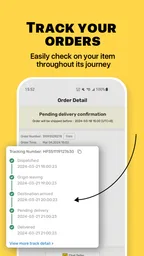
- Order tracking makes it easier to follow shipments across borders.
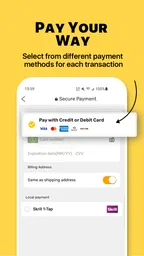
- The app supports secure payment methods for online purchases.
- Product ratings and reviews offer useful seller feedback.
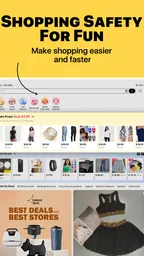
- Shopping across multiple categories is convenient in one app.
What could be better
- Shipping times can vary widely depending on the seller and destination.
- Product quality may differ from listing photos and descriptions.
- Returns can be difficult or costly for international orders.
- Some listings have minimum order quantities or bulk pricing.
- Import duties and taxes may add unexpected costs.





