







Coupons, Promo Codes, Deals review
 Analysis by Appsdrops
I tend to think about coupon apps less as places to browse and more as tools for answering a practical question: can I make a purchase I already planned a little cheaper without turning the search into a second job? Coupons, Promo Codes, Deals is built around that question. It brings shopping offers for major retailers into one app, with a particular emphasis on finding discounts before you check out. In my experience, that focus is more useful than a large collection of offers by itself.
The app is a free shopping tool from Krazy Coupon Lady. Its central appeal is straightforward: instead of checking several retailer pages and coupon sources one by one, I can use one place to look for a relevant deal. It has a 4.8 average from around 72,000 ratings, and more than a million installs. Those figures suggest that it has found an audience, but they matter less than whether its offers fit the way you actually shop.
Finding an offer before you buy
The most important capability is the app’s coverage of deals, coupons, and promo codes across retailers such as Walmart, Amazon, and Target. That range makes it useful when I am comparing where to buy something, not just when I already have a favorite store in mind. The practical benefit is having a place to start a search before paying full price or committing to a retailer.
That does not mean every offer will suit every basket. A discount can be compelling on its own and still be irrelevant if it applies to the wrong item, requires a purchase you did not plan to make, or comes from a store you would not normally use. I treat the app as a way to surface possibilities, then check whether an offer matches what I intended to buy. The best saving is usually the discount on something you already needed, not a deal that persuades you to spend more.
The name is broad, but the experience is most valuable when I approach it with a clear shopping goal. Looking for a particular household item or planning a bigger seasonal purchase gives the offers context. Browsing without a purpose can still be entertaining, but it makes it easier to confuse an attractive promotion with a genuine saving.
How I would use it for an ordinary purchase
Say I need to replace a household staple and expect to shop at one of the major retailers covered by the app. I would first search or browse for a relevant offer, then compare its terms with the exact item and store I have in mind. Before completing the purchase, I would confirm that the code or coupon applies in the retailer’s checkout process. That last check is important: an offer being visible in a coupon app is not the same thing as a discount being applied to my order.
This workflow keeps the app in its strongest role: a starting point for deal discovery, rather than a substitute for checking the retailer’s final price. If the offer requires a different product size or a particular order condition, that can change whether it is worthwhile. I would also compare the resulting total, not just the headline discount. A smaller promotion on the item I need may be better than a larger one that sends me toward an unnecessary add-on.
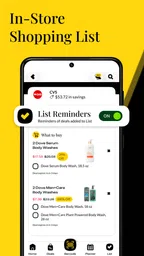
For a more involved shopping trip, I would make a short list first and check each item separately. That is a useful way to avoid losing track of what I came for while exploring offers. It also makes it easier to notice when a deal is genuinely relevant to several planned purchases, rather than treating a single coupon as a reason to rebuild the whole basket.
When it earns a place in my routine
The clearest everyday use is preparing for a shopping run or an online order that is already on the calendar. I can check for deals before leaving home or opening a retailer’s checkout, then decide whether an offer changes where I buy. For example, if I need several routine items and one retailer has a useful promotion on something already on my list, I can consider whether consolidating the purchase makes sense. If the promotion only tempts me to add something unrelated, I can ignore it and keep to the list.
It also makes sense to check before a major seasonal shopping period. Black Friday is an explicit part of the app’s shopping focus, so it can serve as a place to look for deals when many retailers are promoting discounts at once. I would still set a budget and identify the products I actually want beforehand. A busy sale period can produce plenty of enticing offers, but the app cannot decide whether a purchase is worthwhile for your household.
A useful habit is to compare the offer with the retailer’s own displayed price immediately before buying. Retail pricing and promotion terms can change, and a coupon’s value depends on its conditions. Checking at the point of purchase helps prevent a common disappointment: planning around a discount that does not apply to the item or order you have assembled.
Where the convenience has limits
The main tradeoff is that deal discovery still takes judgement. A broad selection can save you from checking multiple sources, but it does not remove the need to read the terms and verify the final total. If you want an app that automatically manages a shopping list, guarantees that every code will work, or completes the purchase for you, this is not the right expectation to bring to it. Its value is in helping you find offers, not making every buying decision on your behalf.
Another limitation is that a coupon-focused approach can encourage browsing beyond your original plan. I find it helps to open the app with a particular product, retailer, or budget in mind. That makes it easier to dismiss promotions that are only attractive because they look like a bargain. A discount on a product you do not need is still spending, and an offer that changes your preferred retailer may not be worthwhile once you consider the whole order.
There is also a difference between this kind of app and a retailer’s own shopping app. A retailer app may be more direct when I already know exactly where I want to shop and need to check its own current prices or checkout details. Coupons, Promo Codes, Deals is more useful earlier in the process, when I want to look across several familiar retailers for a possible offer. I would use them for different jobs rather than expect one to replace the other.
Compared with searching the web manually, the app offers a more focused place to begin. Manual searching can be preferable if I am pursuing one very specific product and want to compare several sources in detail. The app’s advantage is convenience across multiple retailers; the tradeoff is that I still need to verify the exact terms and compare the final price myself. For someone who enjoys carefully researching every purchase, that extra checking may feel like little more than another step.
Who is most likely to benefit
I would recommend giving it a try if you already shop at large retailers and are willing to check for a relevant promotion before buying. It is especially suited to people who plan purchases in advance, compare stores, or enjoy making a shopping budget go further. The app is free, so trying it does not require a purchase commitment, and its Everyone age rating makes it broadly accessible.
On the other hand, it may be unnecessary if you shop at only one retailer, rarely use coupons, or prefer to buy quickly without reviewing offers. Someone who mainly wants store-specific information may be better served by that retailer’s own app. And if finding a discount tends to lead you into impulse shopping, a deal browser may add temptation rather than value; a written list and a firm budget should come first.
The app has been available since December 11, 2015, and its current version is 2026.35.0. I see those details as background, not a reason to assume that any particular coupon will work for a particular order. What matters in daily use is whether the offer is relevant, whether its conditions match your purchase, and whether the final total beats the alternative you would otherwise choose.
A practical verdict for deal-minded shoppers
Coupons, Promo Codes, Deals makes the most sense as a pre-purchase check: a convenient way to look for an offer at Walmart, Amazon, Target, and other retailers before you commit. I like that its purpose is clear, and I would use it when I have a concrete shopping need or am preparing for a sale period. Its usefulness depends less on how many offers catch my eye than on how often I find one that fits a purchase I already planned.
My advice is to start with your shopping list, look for a matching deal, and verify the terms and checkout total before deciding. Used that way, the app can help you spend more thoughtfully without making every trip revolve around coupons. Used as an endless stream of reasons to buy, it can do the opposite. For a patient shopper who wants a convenient place to search for discounts, it is a worthwhile tool; for someone who wants automatic savings with no checking or restraint, it is not a complete solution.
What we like
- Finds discounts for a wide range of stores and brands.
- Promo codes are easy to copy and apply at checkout.
- Deal listings can help shoppers compare savings quickly.
- Favorite offers are convenient to revisit later.
- Regular browsing may uncover limited-time bargains.
What could be better
- Some promo codes may be expired or invalid.
- Deals can have exclusions or minimum purchase requirements.
- Savings may be limited to specific stores or locations.
- Offer details can change before checkout.
- Frequent deal browsing may encourage unnecessary purchases.





