

Costco Wholesale review
 Analysis by Appsdrops
I find the Costco Wholesale app most useful when a shopping trip involves more than one person or a list that needs checking while I’m away from home. It puts Costco shopping in a phone-sized workspace, which can make planning and quick lookups less cumbersome than relying on a browser or waiting until I reach a warehouse. It is a free shopping app from Costco Wholesale, but its value depends on how often Costco is already part of your routine: it complements membership-based shopping rather than replacing the need to decide what your household actually needs.
One household, one shopping plan
For a shared household, the practical benefit is less about handing the phone around and more about having a convenient way to think through a Costco run before leaving. I might check an item while someone else is making dinner, then bring that information into the conversation about whether the trip is worthwhile. That can help avoid the familiar problem of arriving at a warehouse with a vague list and leaving with bulky extras but forgetting the one thing everyone needed.
The app is best treated as a shopping companion, not as an automatic household organizer. I would agree on who is handling the account and who is responsible for the final list, rather than assume that installing it gives everyone a shared view or coordinated access. If two people independently check products or plan separate trips, it is still worth confirming the details with each other. A phone app can make information easier to reach; it cannot resolve differing assumptions about quantities, timing, or who is making the purchase.
That distinction matters particularly in homes where one person shops for several people. Costco’s warehouse format encourages buying larger quantities than a typical corner store, so a quick discussion about storage space and consumption is often more useful than simply adding another item. I would use the app to support that decision-making, then keep the household’s actual priorities in mind rather than treating every convenient browse as a reason to shop.
Decide who handles the account
Before setting it up for shared use, I would make a simple choice: is the app mainly for the person who manages Costco shopping, or is each household member using their own device for their own needs? That boundary helps keep expectations clear. Account access and purchasing decisions can be personal, and sharing a phone or login casually may not suit every household. I would avoid leaving a signed-in device unattended if other people can use it, especially when it is also used for unrelated personal accounts.
For a couple or family, a sensible workflow is for one shopper to check the app and then send the relevant information through whatever communication method the household already uses. That does not require assuming there is a built-in shared list or family feature. It also makes it easier to separate “I found this” from “we agreed to buy this.” If another person is expected to pick up something specific, spell out the item and any important details instead of relying on a remembered glance at the screen.
I also recommend deciding when to check the app. A short planning session before a Costco trip is more useful than browsing without a purpose while standing in a crowded aisle. I would check the main needs first, compare them with what is already at home, and then use the phone for any last-minute lookups. This keeps the app in a supporting role and makes it less likely that a convenient screen turns into an unplanned cart.
Coordinate around the trip, not just the phone
A realistic use case is a household preparing for a weekend meal. One person notices that a staple is running low, while another is already near a Costco warehouse later in the week. The app can help the shopper check relevant information on the go, but the useful coordination happens when the household agrees on what is needed, how much makes sense, and whether the trip fits the schedule. For bulky goods, that last question matters: a good purchase can still be inconvenient if there is no room in the car or pantry.
I would also use it to reduce unnecessary trips. If the shopping decision is still uncertain, check the app before committing time to a drive, then make the trip only when the purchase list is substantial enough to justify it. This is especially helpful for households that share a vehicle or coordinate errands around work and school. The app cannot make the warehouse run itself efficient, but it can make the planning stage less dependent on memory.
There is a trade-off, though. A mobile app is less comfortable than a full browser for comparing several items side by side or keeping a long plan visible while discussing it. If I am doing careful household budgeting or building a detailed inventory, I prefer a larger screen or a shared note that everyone already knows how to use. The Costco app makes the most sense for quick, situational checks and shopping tasks tied specifically to Costco, not as a universal family planning system.
Age, trust, and realistic expectations
The app is rated for Everyone, so its stated age context is broad. In a household, that does not mean every child should be allowed to make purchases or use an adult’s account freely. I would keep shopping decisions and account access with the adult who manages them, and let younger family members help by naming what is running low or checking a list together. That is a practical household boundary, not a claim that the app includes special family controls.
Trust is also about understanding what a phone check can and cannot settle. I would treat information in the app as a useful aid, not a guarantee that every warehouse visit will match my expectations. When timing is important, I would verify the detail that matters before setting out rather than assume that a previous screen check remains current. This is a general habit for shopping on the go and helps avoid making a long trip based on an assumption.
With an average rating of 4.8 from around 471 thousand ratings, the app has attracted a strong response from shoppers. It has more than 10 million installs, and its 35 thousand reviews add further evidence that people use it as part of their Costco routine. Those figures are encouraging, but I would not read them as proof that it will fit every household: someone who rarely shops at Costco may get little value from installing a retailer-specific app.
Where it fits among shopping options
Compared with a general shopping app, the Costco app has a narrower purpose: it is built around one retailer and the way people shop there. That focus is an advantage when Costco is already on your regular route, because you are not trying to translate a broad marketplace interface into a warehouse visit. By contrast, if your household mainly shops across several grocery stores, a general list app or the retailers’ own apps may be easier for comparing weekly needs in one place.
It also differs from simply using a mobile browser. The app is the more direct option when you expect to check Costco-related shopping information repeatedly, while a browser may be enough for an occasional visit or someone who does not want another installed app. I would choose based on frequency: regular Costco shoppers are more likely to appreciate having a dedicated shortcut, while infrequent visitors may prefer to keep their home screen uncluttered.
The main limitation is that convenience can create a false sense of completion. Looking up a product is not the same as coordinating who buys it, deciding whether the quantity suits your household, or confirming that a warehouse trip is still worthwhile. For me, the app works best when paired with a short list and a clear plan. It is not a substitute for a household budget, pantry check, or conversation about what everyone actually needs.
Who I would recommend it to
I would recommend Costco Wholesale to people who shop at Costco often and want a practical way to handle shopping-related checks while away from a computer. It is particularly useful for the person who organizes household errands, coordinates purchases with a partner, or needs to make a decision before committing to a warehouse trip. The app is free, and the current version is 26.10.3 for devices running iOS 12 or later, which makes the basic decision to try it straightforward for compatible users.
I would skip it if Costco is only an occasional stop, if you want one app to manage shopping across many retailers, or if your main need is a collaborative household inventory. In those cases, a shared note or a broader shopping tool may fit better. I would also avoid installing it on a device that is shared without first agreeing who will use the account and make purchasing decisions.
Overall, I see the app as a useful, focused tool rather than a complete household shopping solution. It earns a place on my phone when Costco is part of my regular routine because it supports planning and quick checks without requiring a full computer session. For a shared household, the best results come from pairing it with clear account boundaries and a simple agreement about the list. My recommendation is strongest for regular Costco shoppers who want to coordinate better, not for people looking for an all-purpose family shopping hub.
What we like
- Membership unlocks member-only prices and benefits.
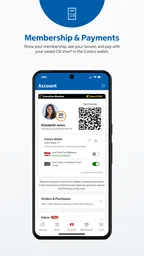
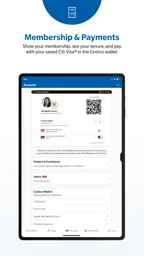
- The app supports digital membership cards at checkout.
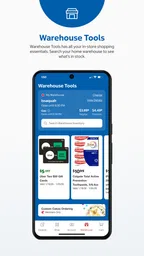
- Warehouse inventory tools can help locate nearby products.
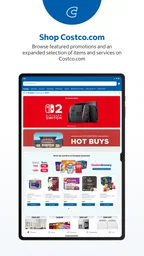
- Online ordering offers delivery and pickup options.
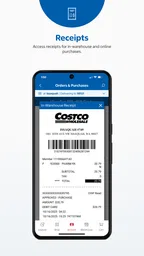
- Purchase history makes it easier to track past orders.
What could be better
- Many features require an active Costco membership.
- Product availability can vary by warehouse and region.
- Some online prices differ from warehouse prices.
- Delivery options may be limited for certain products.
- The app may request location access for store features.





