

Circle K review
 Analysis by Appsdrops
I judge a convenience-store app by a practical question: does it make a stop I was already planning any easier or more worthwhile? Circle K is a shopping app from Circle K North America, built around savings and offers connected to visits to its stores. That focus is useful when Circle K is already part of your routine; it is less compelling if you want one app to manage every kind of shopping.
How to decide whether it fits your routine
The key trade-off is relevance, not complexity. If you regularly buy fuel or grab snacks and drinks at Circle K, having its offers in one place can make sense. If you rarely visit, the app has fewer chances to earn space on your home screen. I would decide based on how often a Circle K stop naturally fits into your week, rather than installing it just because discounts sound appealing.
The app is free, and its Everyone age rating makes it suitable for a broad audience. Circle K has a 4.5 average from around 35,000 ratings, with more than 5 million installs. Those figures suggest that plenty of people find a reason to use it, but they do not tell you whether a nearby store participates in the offers you care about. Local usefulness matters more than popularity here.
Its current version is 4.14.0, and the listed minimum operating-system requirement is version 10. That makes device compatibility worth checking before you plan around the app, particularly if you use an older phone. The developer is Circle K North America, so the experience is naturally centered on that retailer rather than designed as a neutral comparison tool for shopping across different chains.
Start with your likely stops
Before relying on a promotion, check whether it applies to the Circle K location you actually use and what the offer asks you to do. A discount that is useful on your commute is more valuable than a broader-looking deal that requires a detour. I would also check the details while parked or before leaving home; trying to interpret offer conditions while driving is an avoidable hassle.
Think about the purchases you make there most often. Someone who routinely fills up and adds a drink may get more practical value than someone who visits only for an occasional emergency item. The app’s appeal is strongest when its savings can attach to a purchase you already intended to make, rather than persuading you to spend extra just to feel that you have used a deal.
Where Circle K earns its place
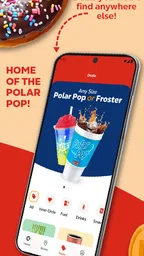
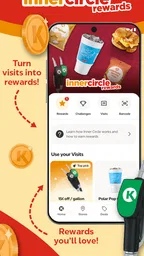
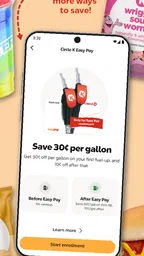
The clearest reason to use Circle K is the combination of fuel savings and complimentary favorites. I like that the app’s purpose is tied to familiar, quick-stop needs instead of trying to turn a convenience store into a general shopping destination. For a regular customer, that can make checking an offer before a stop a small, repeatable habit rather than a separate shopping project.
A useful workflow is to look at available savings before setting out, decide whether one fits your planned stop, then keep the purchase simple. This avoids a common coupon trap: changing what you buy because an offer is visible. If a free favorite matches something you would have chosen anyway, it is an easy win. If it leads you to add items you did not want, the apparent saving is less meaningful.
There is also a practical difference between a fuel offer and a food or drink offer. Fuel savings may matter more on a larger fill-up, while a complimentary favorite is easier to appreciate during a brief break. I would treat them as separate reasons to open the app, not assume every visit will produce the same kind of value. Checking which benefit is relevant to that particular trip keeps expectations realistic.
For a commuter, the everyday scenario is straightforward: you are already passing a Circle K, need fuel, and would probably pick up a drink. A quick look at the app before pulling in can tell you whether there is a relevant offer to consider. The useful part is not simply that a promotion exists; it is that you can make a decision before reaching the counter, when you still have time to skip an offer that does not suit you.
Circle K is also a better fit for repeat visits than for one-off exploration. If the same store is part of your regular route, you have more opportunities to learn which kinds of offers are worthwhile for you. That personal pattern is more helpful than treating every promotion as equally attractive. I would use the app selectively, checking it when a planned stop gives me a reason, rather than turning it into another notification-driven chore.
Where other shopping options make more sense
Compared with a broad shopping app, Circle K is deliberately narrow. A general retailer’s app may be a better choice if your main goal is browsing many product categories or collecting offers across several chains. A fuel-focused alternative may suit you better if you mainly compare places to fill up and do not care about convenience-store favorites. These are different jobs, and Circle K is most convincing when its store is already the destination.
It is not an ideal tool for choosing among nearby retailers from scratch. A store-specific app naturally frames the decision around its own locations and offers, so I would not use it as my only source when the important question is which nearby stop has the best overall value. If you are flexible about where you shop, compare your options first, then use Circle K when you decide that a Circle K visit makes sense.
Likewise, a person who rarely buys convenience-store items may get little from installing it. Occasional visitors should weigh the small effort of keeping another app against the chance that an offer will be useful at just the right time. If you prefer not to use retailer apps at all, you can simply make your usual stop without one; the app is an optional layer, not a prerequisite for deciding what to buy.
The small costs of changing your routine
Trying the app does not require a purchase, but there is still a modest cost in attention. You have to remember to check it, understand the terms of an offer, and make sure the promotion matches your stop. That is manageable when the app saves you from paying full price for something you already wanted. It is not worthwhile if checking deals becomes a reason to spend more time or money than your usual routine requires.
If you already use another retailer’s loyalty app, adding Circle K means keeping track of one more place to look. My advice is to avoid checking several apps automatically before every errand. Instead, associate each one with a specific kind of trip: open Circle K when you are heading to one of its stores, and use a broader shopping tool when you need to compare across retailers. That simple division reduces clutter and makes the app easier to remember when it is relevant.
One sensible test is to use Circle K on your next few planned visits without changing what you intended to buy. Notice whether an offer is easy to understand and whether it fits those purchases. If the app regularly helps with something already on your list, it has earned a place in your routine. If you keep opening it and finding no relevant reason to alter your plan, uninstalling it is a reasonable choice rather than a missed opportunity.
There is a second trade-off: a deal can be worthwhile in isolation but still be a poor reason to choose a less convenient stop. I would factor in the route and the purchase together. A small saving that sends you out of your way may not justify the time, while an offer at a store you are already passing is much easier to appreciate. This is especially important for fuel, where the convenience of the route can matter as much as the promotion itself.
My recommendation
I recommend Circle K to people who already visit its stores and want a simple way to check for fuel savings or a complimentary favorite before they stop. It is most useful as a companion to an existing habit, not as a reason to make every shopping decision revolve around one retailer. Treat the offers as a bonus on planned purchases, and the app’s focused approach makes sense.
I would skip it if Circle K is not a convenient part of your routine, if you mainly need to compare multiple retailers, or if managing several loyalty apps already feels like work. In those cases, a broader shopping option—or simply sticking with your normal way of buying—may suit you better. For regular Circle K customers, though, the free price makes a trial easy, and a quick pre-stop check is a practical way to see whether its benefits match your real habits.
What we like
- The app can store your loyalty card for quick checkout.
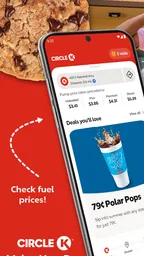
- Fuel prices can help you compare nearby Circle K stations.
- Mobile payment may make eligible purchases faster.
- Digital receipts make it easier to track recent purchases.
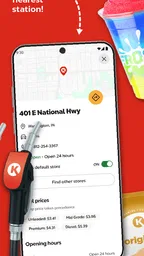
- Store and station listings help locate nearby services.
What could be better
- Some features may not be available at every location.
- Fuel price information can become outdated between updates.
- Rewards and offers may vary by region.
- Account setup is needed to access personalized features.
- The app provides limited value where Circle K locations are scarce.





