






BuzzCast: Live Stream & Chat review
 Analysis by Appsdrops
BuzzCast makes most sense when I think of it as a place to drop into live social moments rather than a conventional feed to browse quietly. It brings live video, chat, and ways to connect with people together, so the quality of the experience depends heavily on having a steady internet connection and being in the mood to interact. I would recommend it to someone curious about meeting people through live broadcasts, but not to anyone looking for a dependable offline pastime or a private, one-to-one messaging tool.
Live interaction depends on the connection
In a live room, even a short interruption can change the rhythm: the video may pause, conversation can move on, and returning to the stream may leave you feeling a step behind. That is the basic trade-off of a social app centered on live video. When my connection is stable, watching and joining chat feel immediate; when it is not, the same format can become more frustrating than browsing posts that remain available at your own pace.
I find it useful to decide what I want from a session before opening the app. If I only have a few minutes, I can treat a stream as a quick window into what other people are doing. If I want to follow a conversation or take part, I need enough uninterrupted time and a connection I trust. That small distinction helps avoid expecting a live room to behave like a saved video or a message thread.
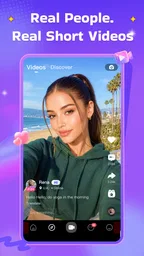
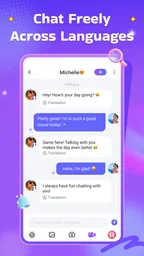
The app is listed in the social networking category, and that description fits better than calling it simply a video player. Watching is only part of the appeal; chat is what can turn a broadcast into an exchange. In practice, the experience will vary with the room and the people in it. A lively conversation can make watching feel communal, while a room that does not interest me has little to offer beyond its live video.
Why the live format can be rewarding
Live content has a spontaneity that polished clips often lack. A conversation can shift naturally, and viewers can respond while something is happening rather than leaving a comment for later. That makes BuzzCast a better fit for casual discovery and real-time social energy than for searching for a precise tutorial, a carefully edited entertainment video, or information I need to verify.
One useful way to approach it is to think of the first few minutes as a trial, not a commitment. If the host, topic, or chat feels welcoming, I can stay; if not, moving on is more sensible than hoping every room will suit me. This is especially helpful when I am opening the app without a particular person or subject in mind. The experience is shaped by what is live at that moment, so curiosity matters more than a fixed viewing plan.
Using it around everyday mobile routines
BuzzCast is easiest to picture in a relaxed break: I might check in after finishing a task, watch a stream while waiting somewhere, and leave when I need to focus again. That works best when I have a stable connection and can give the conversation some attention. Live chat is not ideal to half-follow while driving, crossing a busy street, or handling anything that requires concentration; the screen and the ongoing exchange both compete for attention.
For a realistic everyday example, imagine waiting for a friend at a café. If the connection is reliable and I have a little time, I can browse live rooms, stay briefly in one that interests me, and participate in chat if I feel comfortable. If the signal drops or my friend arrives, I can simply stop. The point is to treat the session as flexible entertainment, not a conversation I must keep up with at all costs.
That flexibility also has limits. A stream can be less convenient than a text-based social app when I am somewhere noisy, in a low-signal area, or trying to conserve attention. A conventional feed is often better when I want to scan content silently and resume later. A private messenger is a better choice when the purpose is a direct conversation with someone I already know. BuzzCast’s live setting is most appealing when I want open-ended interaction, not when I need those more focused alternatives.
Connection hiccups and getting back into the moment
When a live session is interrupted, I would first check whether the connection itself is the problem before blaming the app. Switching between weak mobile coverage and a steadier network, or moving to a place with better reception, can make a practical difference. If the broadcast still feels unstable, leaving and trying another room later may be less aggravating than repeatedly waiting for one stream to settle.
The trade-off is that recovery from a hiccup may not restore the exact conversational moment I missed. Live interaction moves forward, and a viewer who returns after an interruption can find that the subject has changed. I would avoid relying on a live room for anything time-sensitive or important. For casual social viewing, missing a few moments is usually minor; for a discussion I genuinely care about, that uncertainty is a reason to choose a format that does not depend on being present continuously.
It also helps to keep expectations realistic when opening a session in a crowded or unpredictable mobile environment. A quick check of whether other internet activities are working can distinguish a general connection issue from a single stream that is not behaving well. I would not keep refreshing repeatedly if the underlying signal is poor. Waiting until I have a more dependable connection is often the simplest way to make the app feel less temperamental.
Using mobile data with a little more care
Because live video relies on a sustained connection, I would be more cautious with it on mobile data than with a text feed. The exact amount of data used can vary with how long I watch and the conditions of the stream, so I would not assume a short visit has the same impact every time. If my plan is limited, it is sensible to save longer sessions for Wi-Fi and make mobile check-ins brief.
A practical habit is to decide on a rough stopping point before opening a stream, especially when I am away from home. I can also close the app when I am done rather than leaving a live session running while attention is elsewhere. This is not just about data: it prevents a casual visit from quietly turning into a longer one than I intended. Anyone who regularly watches live video should keep an eye on their own device’s data usage settings rather than relying on guesswork.
Battery is another everyday consideration with video and an active screen. I would use BuzzCast when I can comfortably spare the attention and charge, not as background company during a long trip when conserving battery matters. That is a general practical trade-off of watching live content on a phone, and it becomes more noticeable when a session stretches beyond a quick look.
Who is likely to enjoy it—and who may not
The app is free to install, which makes trying its live social style relatively easy. Still, free access does not mean every part of the experience is necessarily cost-free: BuzzCast includes in-app purchases, with listed items ranging from $0.49 to $999.99. I would take a moment to understand any purchase prompt before confirming it, and use the device’s purchase controls if I share a phone or want to avoid accidental spending.
BuzzCast is developed by BuzzCast LIVE. Its average rating is 4.3 from around 144,000 ratings, with roughly 3,800 written reviews, and it has more than 10 million installs. Those figures suggest a substantial audience, but they do not guarantee that a particular room will match my interests or that every session will feel smooth. For me, the more useful question is whether I enjoy spontaneous video-based interaction enough to return to it.
The age rating is Mature 17+, so I would not treat it as an all-ages social space or hand it to a younger user without considering that designation. The app runs on Android version 6.0 or later, and its current version is 3.3.01. If I were deciding whether it suits someone else, I would weigh the live social format and age rating alongside their comfort with interacting with unfamiliar people online.
People who enjoy discovering live conversations and chatting with other viewers are the clearest audience. Those who prefer carefully curated recommendations, quiet browsing, or predictable content may be happier with a standard video platform. And if my main goal is keeping up with friends, I would choose a familiar messaging app instead. BuzzCast is less compelling when I want control over exactly what I see and more compelling when I am open to whatever is happening now.
My connectivity verdict
BuzzCast works best when I have reliable internet, a little time, and an appetite for unscripted social interaction. Its live-video focus gives it a different feel from a feed of posts or a private chat, but that same immediacy makes weak coverage, distractions, and data limits more noticeable. I would open it for a casual look at live rooms, keep sessions short when using mobile data, and move on if the connection or conversation is not working for me.
Overall, I would recommend BuzzCast to adults who like the possibility of joining an active conversation rather than merely watching finished clips. I would skip it when I need offline entertainment, a dependable exchange that can pause and resume, or a low-data way to pass time. If those limits fit your routine, the app can make a spare moment feel more social; if not, a conventional video feed or direct messenger is likely the more comfortable choice.
What we like
- Live rooms make it easy to discover creators and join ongoing conversations.
- One-to-one video calls offer a more personal way to connect with other users.
- Virtual gifts give viewers a way to support streamers during broadcasts.
- Language and interest options can help users find more relevant live content.
- The app combines streaming and chat without requiring separate social apps.
What could be better
- Public live rooms may expose users to inappropriate content or behavior.
- Some features rely on paid coins or virtual gifts.
- Video streaming can use substantial mobile data.
- A stable internet connection is important for smooth calls and broadcasts.
- Users may need to manage privacy settings carefully when sharing personal details.





