






Best Buy: Shop tech deals review
 Analysis by Appsdrops
When I need a charger, a cable, or a replacement for a piece of home tech, I usually want to answer two questions quickly: what fits my needs, and where can I get it without turning the search into a project? Best Buy’s shopping app is built around that kind of errand. It gives me a mobile way to browse the retailer’s electronics selection, compare choices, and decide whether to keep shopping or take the next step through Best Buy. It is most useful when I already have a product or problem in mind; it is less compelling as a general-purpose shopping destination.
From a tech problem to a shortlist
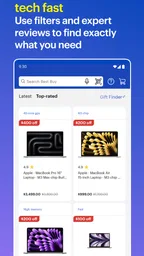
I’d start with a concrete need rather than browsing at random. Say a laptop charger has gone missing before a day of work. Searching by the device or the kind of accessory I need can narrow the field, but I still have to check the details carefully: connector type, compatibility, and the product description matter more than a familiar brand name. That is a practical strength of a retailer-focused shopping app: the search is aimed at electronics rather than trying to cover every kind of purchase.
Best Buy is a free app from Best Buy Co., Inc, and its main appeal is carrying a tech-shopping task from discovery toward a purchase decision on a phone. I wouldn’t treat the first result as an automatic answer. I’d open the product information, compare the relevant specifications, and check whether the item actually suits the device I own. That extra pause is worthwhile for accessories, where a near-match can still be the wrong match.
The app has a 4.7 average from around 493,000 ratings, with about 85,000 written reviews. Those figures suggest that many shoppers find it useful, but they don’t tell me whether a particular product will fit my needs or whether the app will suit my shopping habits. I’d use the app’s product details and my own requirements to make that call.
Search with a decision in mind
For a more involved purchase, I’d first write down what matters most: a needed feature, a form factor, or a limit I’m not willing to cross. Then I’d compare a small shortlist rather than repeatedly opening unrelated listings. That approach is especially helpful when shopping for TVs, computers, or appliances, where several models can look similar at a glance but differ in ways that affect daily use.
One useful habit is to separate “must have” from “nice to have” before opening the app. If I’m replacing a monitor, for example, I might care first about the size that fits my desk and the connections my computer supports. I can then judge the options against that list instead of being distracted by a feature that sounds impressive but won’t change how I use it.
This is also where I would slow down and read beyond a product name. A category label or short description can help with browsing, but it isn’t a substitute for checking compatibility and specifications. The app can make researching a product more convenient; it cannot know every detail of my setup unless I check those details myself.
Compare, then choose the next step
Once I have a shortlist, I’d use the listings to decide whether the differences justify choosing one model over another. The best comparison is not always the one with the longest feature list. For a home office, a dependable fit for my existing equipment may matter more than an extra feature I’ll never use. For a gift, I might prioritize a product that is easy for the recipient to use over a more complicated alternative.
A concrete example: if I’m buying headphones for a family member, I’d settle on how they’ll use them—commuting, calls, or listening at home—before comparing candidates. Then I’d check the product information for the qualities that matter to that use. This prevents a common shopping mistake: choosing on a general impression and only afterward noticing that the product doesn’t suit the person or setting.
The app’s retailer-specific focus is a trade-off compared with broad marketplaces. A general marketplace can be better when I want to scan many sellers or look for a very particular niche item. Best Buy makes more sense when I want to browse an electronics retailer’s selection and keep the decision centered on tech. I would not assume that one app always has the best option; I’d compare elsewhere if price, a rare model, or a wider seller pool is the deciding factor.
Moving from the phone to the purchase
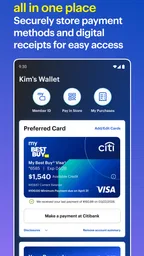
Shopping does not end at the product page. I still need to decide how I want to complete the purchase and whether the available next step works for my situation. The app is useful as a bridge between researching on a phone and acting on a choice, but I would review the final purchase details rather than assume that browsing automatically settles availability, timing, or fulfillment.
That handoff is particularly relevant when an item is needed soon. If a cable is essential for tomorrow’s work, I’d check the purchase flow and the details shown for the item before relying on it. If the timing or option presented doesn’t fit, I’d consider another retailer or a nearby alternative instead of discovering the mismatch after I have committed.
For a larger purchase, I’d use a different rhythm: research the options in the app, pause to confirm measurements and compatibility, and only then move toward checkout. A TV that looks right on a phone still needs to fit the room. A computer that seems suitable still needs to match the work I expect it to handle. The app can help organize the shopping stage, but careful decisions still depend on checking the product against real-world constraints.
Where the workflow can snag
The biggest friction is the same one I find in any phone-based product search: lots of options can make a simple errand feel like research. When I don’t know what specification matters, scrolling through listings may not help me decide. I’d first identify the device or use case, then search with that in mind. For complicated technical questions, I’d seek clearer product guidance rather than expecting a shopping interface alone to explain every compatibility issue.
Another limitation is that a retailer’s app is naturally centered on that retailer. If I’m comparing the entire market, checking specialist sellers, or hunting for an unusual component, I’d use other sources too. Best Buy is not the right tool for someone who wants a neutral catalog covering every seller, and I wouldn’t choose it simply because I want to browse all kinds of goods beyond technology.
There is also a difference between reading about an item and knowing it will work in my home. Measurements, ports, room layout, and existing equipment can all change the answer. My practical tip is to gather those details before shopping: note the model of the device an accessory must fit, measure the space for a large product, and decide which features are genuinely necessary. That small preparation makes the app’s browsing more purposeful and reduces the chance of an avoidable return or disappointing choice.
Who will get the most from it
I’d recommend the app to people who regularly shop for consumer electronics and prefer to research on a phone before buying. It can be handy for a planned replacement, a household tech upgrade, or a quick accessory search when the device and requirements are already clear. A shopper who wants to keep product research and retailer shopping in one place may find that workflow convenient.
I’d be more cautious if I were unsure what product category or specifications I needed. In that case, a conversation with someone knowledgeable or a broader research process may come first; the app is more useful once I can evaluate options. I’d also look elsewhere if my main goal were to compare every seller, find a highly specialized part, or shop for items unrelated to electronics.
The app is rated for Everyone, has more than 10 million installs, and is listed as version 26.10.10, with a minimum operating-system requirement of 9. It has been available since February 8, 2010. That long-running presence and broad adoption make it a familiar option for tech shopping, though neither should replace checking whether the current product selection and purchase route fit a particular need.
My verdict after following the shopping flow
For me, the strongest way to use Best Buy is as a focused tool: begin with a specific tech need, compare a manageable shortlist, verify the details that affect compatibility, and then decide whether the purchase handoff suits the timing and circumstances. That sequence turns a phone search into a useful decision rather than an endless scroll.
I wouldn’t rely on it as my only source for every electronics purchase, and I wouldn’t expect an app to make a complicated specification choice effortless. But when I know what I’m looking for and want a convenient route through a retailer’s tech catalog, it is a sensible option. The best result comes from pairing its focused browsing with a little preparation: know what must fit, compare only what matters, and check the final details before committing.
What we like
- Product pages include customer ratings and reviews.
- The app offers store pickup for eligible items.
- Order tracking makes it easy to follow deliveries.
- Saved items help you keep track of products you like.
- The app can show deals tailored to your interests.
What could be better
- Some products may be unavailable for pickup nearby.
- Prices and promotions can change without notice.
- A Best Buy account is needed for some features.
- Notifications may feel frequent if left enabled.
- The app's usefulness depends on your location.





