





Benjamin - Earn Cash Rewards review
 Analysis by Appsdrops
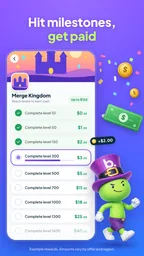
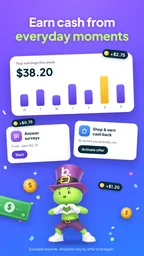
I look at Benjamin less as a dependable way to earn income and more as a shopping-side experiment: it offers activities such as games and surveys in exchange for cash rewards. That distinction matters. If you already spend spare moments on your phone and enjoy trying small tasks, the idea may appeal; if you need predictable earnings or want a straightforward shopping app, I would set expectations differently.
What Benjamin is—and what “earning” means in practice
Benjamin - Earn Cash Rewards is a free shopping app from Benjamin Capital Partners, Inc. Its central appeal is giving users activities to try rather than helping them compare products or manage a shopping list. That makes it unusual in its category: the shopping label is less informative than the rewards-focused experience suggested by its games and surveys.
I would treat the cash element as a possible bonus for time spent, not as a wage. Rewards apps can make an activity feel productive, but the value depends on what tasks are available to you, how much time they take, and what conditions apply. Before beginning any task, I would read its in-app instructions carefully and decide whether the effort is worthwhile even if the reward is modest.
The app has a 4.0 average from around 141,000 ratings, with about 30,000 reviews and over a million installs. Those figures indicate that many people have tried it, but they do not establish that every user will see the same opportunities or have the same experience. I would use the rating as a starting point, then judge the app by whether its current tasks suit my own time and comfort level.
A different fit from ordinary shopping tools
When I want to find a product, compare prices, or browse a retailer’s offers, I would choose an app built around those jobs. Benjamin is better understood as a way to spend spare phone time on reward-oriented activities. That is a meaningful difference: a shopping app usually helps me decide what to buy, while this one asks me to engage with activities in pursuit of cash rewards.
It may suit someone who likes surveys or mobile games and is comfortable exploring an app before deciding whether to keep it. It is less suited to someone who dislikes promotional tasks, expects cash for every minute spent, or wants a reliable side income. I would not install it with a particular bill in mind or count on a specific return.
Trust starts with what you can inspect
For an app involving surveys and rewards, trust is not only about whether the app feels polished. It is also about understanding what an activity asks of me, what information I am choosing to provide, and what the app explains before I proceed. I would pay attention to those moments rather than assume that every survey or game has the same terms.
The age rating is Mature 17+, so this is not an app I would recommend to younger users. That rating is a practical reminder to consider suitability before installing, particularly if a device is shared with a teenager. A parent or guardian should make the decision rather than relying on the rewards concept alone to signal that the experience is appropriate.
I would also separate two questions that are easy to blur together: whether I trust the app enough to try it, and whether I find its tasks worth my time. A clear explanation of a task can help with the first; a useful balance between effort and reward determines the second. Neither should be assumed just because the app is free to download.
Check the choices at the point they matter
Surveys are the most obvious moment to pause. Before answering, I would look at the subject and any explanation the app gives, then avoid sharing information that feels unnecessary for the task. If a survey asks about a sensitive topic, it is reasonable to stop rather than continue simply because I have already spent time on it.
Games call for a different kind of care. I would read the task’s requirements before starting, especially if it describes a goal or a sequence of actions. A quick scan at the beginning can prevent the frustrating situation of playing for a while and only then discovering that I misunderstood what counted toward a reward. I would also avoid making purchases just to chase a reward unless the terms are explicit and the spending makes sense independently.
These are useful habits for any rewards app, but they matter especially here because the experience combines distinct activity types. A survey and a game can involve different expectations and different kinds of engagement. I would assess each offer on its own instead of treating the whole app as one uniform earning opportunity.
Keep control of your time and information
My most practical way to use Benjamin would be to open it only when I have genuinely idle time, choose one activity, and decide in advance when I am ready to stop. That keeps a casual survey or game from turning into an open-ended attempt to earn more. If an activity feels tedious, unclear, or too personal, I would leave it; the time already spent is not a reason to keep going.
I would also review the app’s permission requests and account controls on my device and inside the app before relying on it. I do not assume that a rewards app needs every permission a phone can offer. If a request appears unrelated to the task I want to do, I would pause and consider whether to deny it or skip that activity. The useful principle is simple: make a deliberate choice at the moment a request appears, rather than granting access automatically.
Account settings deserve the same attention. Before building up an account, I would find the controls for managing it and understand what options are available. I would use a password I do not reuse elsewhere and avoid entering sensitive details unless the app clearly explains why they are needed. These steps do not guarantee any particular outcome, but they make my participation more considered.
A realistic way to fit it into a day
Imagine I am waiting for a friend or sitting through a quiet commute. I might open Benjamin, check whether a survey or game looks suitable, read the conditions, and try one task if the time commitment seems reasonable. When I reach my stop or the friend arrives, I would close the app instead of extending the session just because I have started. That is the kind of low-stakes use I can recommend: spare-time exploration, not a planned income routine.
There is a trade-off in that approach. Treating tasks casually reduces the chance of losing a large block of time, but it also means I should not expect a meaningful amount of cash from occasional visits. Someone who wants a structured way to earn may prefer work with clear duties and compensation. Someone who wants to shop efficiently may get more value from a retailer or comparison tool. Benjamin occupies a narrower middle ground: activities for people willing to exchange attention for a chance at rewards.
What I would check before committing
The app is currently version 4.28.1 and requires Android 7.0 or later. I would check compatibility before installing, then spend a few minutes exploring the available activities and the explanations attached to them. That first visit should answer the practical questions that matter most to me: whether the tasks are interesting, whether the requirements are understandable, and whether the app’s choices feel comfortable.
I would not judge it by a single appealing offer. I would look for consistency across several visits: do suitable activities appear when I have time, do their conditions make sense, and do I feel in control of what I share and how long I spend? If the answer is no, uninstalling is a reasonable choice. Free access lowers the barrier to trying it, but it does not make time or personal information costless.
Because the app is rated Mature 17+, I would be particularly careful about recommending it in a family setting. An adult can assess the activities and decide whether they are appropriate, but I would not hand it to a younger user simply because the interface involves games. The age guidance should be part of the decision from the start.
My cautious verdict
Benjamin - Earn Cash Rewards may be worth exploring if you enjoy mobile games or surveys, have spare moments, and are comfortable evaluating each task before taking part. I like the basic idea of turning idle phone time into an opportunity for rewards, but I would keep the promise modest in my own mind. The app is not a substitute for steady work, and its appeal depends on whether the activities available to you justify the attention they require.
My recommendation is to try it selectively rather than build a routine around it. Read task instructions, consider what you are sharing, check permissions and account choices, and stop when the experience no longer feels worthwhile. If you want an ordinary shopping assistant, choose a tool designed to help you shop. If you want predictable earnings, look elsewhere. For adults who are curious about reward activities and willing to approach them carefully, Benjamin is a reasonable experiment—not something I would rely on for cash.
What we like
- Offers a simple way to earn rewards through everyday tasks.
- The app is free to download and try.
- Reward options can suit users with different preferences.
- Progress tracking helps users see how close they are to a reward.
- Short activities can fit into spare moments.
What could be better
- Earnings may be small compared with the time spent.
- Some tasks may not be available to every user.
- Rewards can require reaching a minimum redemption threshold.
- Offers may involve sharing personal information with partners.
- Reward availability and terms can change over time.





