



Bath & Body Works review
 Analysis by Appsdrops
I think of the Bath & Body Works app less as a general shopping destination and more as a focused companion for browsing the brand’s fragrances, candles, and body care. That distinction matters: if you already shop these ranges, having products together in one place can make planning a purchase easier. If you’re looking for a broad marketplace or independent recommendations across many brands, it is a narrower fit.
Shopping with a familiar brand
Bath & Body Works is a free shopping app from Bath & Body Works- Mobile, aimed at people who want to explore the company’s own products on a phone. It has an average rating of 4.2 from around 292,000 ratings, and more than 10 million installs. Those figures suggest that it has become a well-used way to shop the brand, though popularity alone won’t tell you whether its browsing style suits you.
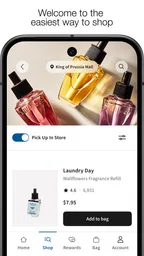
The app’s appeal is straightforward: I can use it to look through scented products without first visiting a physical store. That is useful when I have a particular kind of item in mind—say, a candle for a room or body care for a gift—but want to compare options before deciding. The experience is most valuable when you already know you enjoy the brand’s style and want a convenient route into its range.
It is a different proposition from a general retailer’s app. Those often put competing brands, unrelated household goods, and wider price comparisons in the same search results. Here, the focus is the Bath & Body Works collection. That focus can make browsing feel more relevant, but it also means the app is not the place I would start if my main goal were to compare a scent or product across several companies.
Who gets the most from it
I’d recommend trying it if you regularly buy Bath & Body Works products, like to browse fragrance families, or want to narrow down gift ideas before shopping. It can also suit someone who prefers to make a considered list on a phone rather than decide while standing in a busy shop. The app is rated for Everyone, so its audience is broad, although younger users should still make purchases with a parent or guardian’s guidance where appropriate.
On the other hand, I would skip it if you rarely shop the brand or want a neutral fragrance guide that covers many labels. A retailer’s app can help with brand-specific discovery, but it cannot replace smelling a product in person. Fragrance preferences are personal, and a product description or image may help you shortlist choices without resolving whether a scent works for you.
Trust starts with a clear scope
For a shopping app, I find it helpful to separate what the app is clearly for from assumptions about how it handles personal information. Its purpose is easy to understand: it provides a mobile route to browse and shop Bath & Body Works products. The developer is identified as Bath & Body Works- Mobile, which gives the app a clear connection to the brand it represents.
That context is reassuring in one limited sense: I’m not entering a brand’s name into an unrelated shopping tool and hoping the catalog is genuine. But a recognizable developer name is not a substitute for reading the app’s privacy details or checking the choices shown during setup. I would treat account creation, checkout, and any optional prompts as separate decisions rather than assuming that installing a shopping app requires sharing everything it asks for.
The app was released on August 29, 2017, and its current version is 13.4.0. That history indicates an established product, but I would not use age or version number alone as proof of a particular security practice or privacy policy. For a careful shopper, the practical step is to review the information and permissions presented by the app store and the app itself before proceeding.
Make choices deliberately
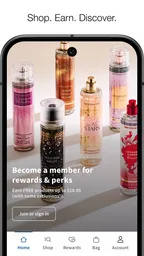
I prefer to install a shopping app only when I expect to use it, then decide whether an account is worth the convenience. If I am simply browsing, I would first see what can be explored without signing in. If a purchase or a saved-shopping workflow requires an account, I would weigh that against how often I expect to return. This is a useful habit for any retailer app, including one focused on a single brand.
Before sharing personal details, I’d pause at each request and ask whether it is necessary for the task I’m doing. A delivery address makes sense when arranging delivery; a detail that does not seem relevant deserves a closer look. I would also check the app store’s current privacy information and the app’s own settings, rather than relying on assumptions based on the company name. Those checks help me make an informed choice without guessing about what the app collects or why.
One practical trade-off with shopping apps is that account features can make repeat purchases smoother while also making the app more personally tied to the shopper. If I only want to browse once, I may prefer to keep the interaction brief. If I shop often, an account may be more worthwhile—but I would still review available account controls and keep only the information needed for the way I use it.
Use it to plan, not just scroll
A useful way to approach the catalog is to start with the occasion rather than an open-ended search. For a gift, I might first decide whether the recipient is more likely to enjoy a candle or a body-care item, then compare options within that type. That small bit of structure can prevent a long session of browsing attractive products without getting closer to a choice.
For my own shopping, I would also separate replenishment from discovery. If I need a familiar product, I can focus on finding that item; if I want something new, I can browse with a clear limit, such as choosing one category to explore. This is especially helpful for fragrance shopping, where a large assortment can be enjoyable but also make it easy to lose track of what I intended to buy.
A realistic everyday use would be planning a small gift during a commute or lunch break. I could browse at a convenient time, note a few promising choices, and make the final decision later rather than rushing in a store. The app is useful in that role as a planning tool, even if I would still want to experience an unfamiliar scent in person when that option is available.
Where the experience may fall short
The main limitation is the same as the app’s main strength: it is centered on one retailer. That makes its product browsing relevant for loyal shoppers but less helpful for anyone who wants independent comparisons, a broad range of brands, or advice that is not tied to a particular store’s assortment. A general shopping app is usually the better choice for those needs.
There is also a sensory gap. A phone can help me explore and organize choices, but it cannot reproduce how a fragrance smells on skin or in a room. Product images and descriptions can guide a shortlist, yet they are not a guarantee that the scent will suit me. When I am uncertain, I would use the app to identify candidates and then seek an in-person test rather than treating browsing as a complete substitute.
Another possible friction is simply the amount of choice. A large brand catalog can be fun to explore, but it can also turn a quick purchase into an extended browsing session. I find it more useful when I arrive with a purpose—replacing something, choosing a gift, or exploring one product type—than when I open it with no idea what I want.
My cautious verdict
With 33,000 reviews and an average rating of 4.2, the app has a substantial audience, but I would still judge it by whether it fits my shopping habits. It is free, and the current version is 13.4.0; it requires iOS 12 or later. Those details make it easy to assess basic compatibility and cost, while the real decision is whether a dedicated Bath & Body Works browsing experience is useful to you.
I would choose it if I already shop the brand and want a convenient way to explore its fragrance, candle, and body-care offerings. I would use it with a clear shopping goal, review privacy choices before sharing information, and remember that digital browsing cannot answer every question about scent. If I wanted cross-brand comparisons, independent recommendations, or the confidence of testing a fragrance before buying, I would use a broader retailer or visit a store instead.
Overall, Bath & Body Works makes the most sense as a focused tool for existing fans and curious shoppers who are happy to browse one brand at a time. Its value is not that it replaces every part of shopping; it is that it can make product discovery and purchase planning more convenient. For brand-specific browsing, that focus is a strength; for privacy-conscious shoppers, deliberate choices at each step remain essential.
What we like
- Browse fragrances and home products in one place
- Product pages make it easy to compare scent options
- Save favorites for quicker access later
- Find nearby stores with the store locator
- Check current promotions before shopping
What could be better
- Some features may require an account
- Availability can vary by location
- Frequent promotions may make regular prices harder to judge
- The app may request location access for store features
- Online purchases may involve shipping fees





