





BAND - App for all groups review
 Analysis by Appsdrops
I like group apps best when they give a team a shared place to organize, not just another chat to keep up with. BAND is built around that idea: it lets a group gather its conversations and coordination in one app. That focus makes it useful for clubs, teams, classes, and friend groups whose plans tend to get scattered across messages. It also means BAND is not automatically a better fit than a familiar chat app; the benefit depends on whether your group will actually use a dedicated shared space.
A shared home for a group
In my view, BAND’s defining strength is the group-first setup. Rather than treating a group as a string of messages, it gives members a place to return to for the ongoing life of that group. That can make a difference when people need to keep track of plans, conversations, and shared updates over time, instead of relying on whoever happens to remember what was said in a busy chat.
That distinction is practical, not just cosmetic. A quick chat works well for a spontaneous question, but recurring groups often need context: what the group is for, what is happening next, and where members can catch up. With BAND, I’d approach a group as a small online clubhouse. That is a more useful mental model than thinking of it as a replacement for every private message I already send.
The app is a social app from NAVER Corp., and its stated purpose is to help people build their teams in one place. It is free to download, with optional in-app purchases listed from $1.68 to $53.09 per item. I see the free entry point as a straightforward way for a group to try the shared-space approach, while the presence of purchases is worth keeping in mind if members are cautious about spending inside apps.
Why a group space can beat a long chat
The main advantage of a dedicated group space is continuity. In a fast-moving conversation, an important detail can disappear beneath jokes, replies, and unrelated questions. A group hub makes more sense when the same people need to coordinate repeatedly: a sports team discussing practice, a volunteer group planning a community activity, or relatives trying to keep everyone informed about a gathering.
That does not mean a shared space will magically make a group organized. Members still need to use it consistently, and someone usually has to set the tone by keeping updates clear. But when the group agrees that BAND is where its common information belongs, there is less guesswork about which conversation to search or who needs to be brought up to speed.
I would not move a group there just because it sounds tidy. If everyone already handles occasional plans easily in a chat they check every day, adding another destination may create more friction than value. BAND becomes more convincing when a group has enough recurring activity that keeping its shared life together matters.
How I would use it in everyday life
Imagine a parent coordinating a school activity with several families. A chat may be fine for a last-minute change, but it can become hard to distinguish the latest plan from an older suggestion. I would use a dedicated group space for ongoing coordination, then keep the group’s messages focused on useful updates and decisions. When someone joins late or misses a conversation, they have a clear place to return to rather than relying on a chain of forwarded messages.
A team could use the same approach for recurring meetups. One practical habit is to separate “what everyone needs to know” from casual chatter. Even without assuming any particular feature, a group can improve its experience simply by agreeing that announcements and decisions should be easy to spot in the shared space. That small bit of etiquette matters more than downloading an app and expecting it to impose order on its own.
For a group leader, I’d also recommend setting expectations early: what belongs in the BAND group, how quickly members are expected to respond, and whether urgent changes should be communicated another way. This avoids a common coordination mistake—assuming that a post in any app is automatically seen in time. A shared space is a useful record, but it should not be treated as a guarantee that every member has read an update.
For a group member, the useful question is whether the app reduces effort. If BAND is where the group’s regular coordination happens, checking one place can be simpler than piecing together information from several separate conversations. If the group rarely posts, or members forget to open it, that same routine can feel like a chore. The group’s habits determine whether the central space is genuinely central.
Where it fits beside ordinary messaging apps
Compared with a typical messaging app, BAND’s appeal is less about replacing one-to-one conversation and more about giving a group a lasting home. Messaging apps are hard to beat for quick exchanges with people who are already there. Their familiarity also lowers the barrier to participation. BAND has a clearer case when the group is organized around a shared activity and needs more than an occasional burst of messages.
I would keep ordinary messaging for private conversations and fast, informal coordination. I’d choose BAND when a club, team, class, or extended group wants a consistent place for its collective activity. That division prevents the app from becoming yet another inbox for personal conversations that do not need a group structure.
There is a tradeoff: a dedicated app asks people to adopt a new habit. A coordinator may be enthusiastic, while less active members prefer the service they already use. If only part of the group participates, the shared space can split information rather than gather it. Before moving everyone, I’d ask whether the group has a real recurring need and get agreement on which place counts as its main hub.
Small choices that make the setup work better
One non-obvious improvement is to make the group’s purpose clear from the start. A group for a team season, a recurring club, and a one-off event have different lifespans. Naming and introducing the space around its actual purpose helps members decide what belongs there and whether they should keep checking it after the activity changes.
Another useful habit is to keep important updates concise and self-contained. Instead of assuming everyone remembers earlier discussion, include the essential decision and what members need to do next. This is especially helpful for people who check in irregularly. The app can provide a shared place, but clear writing is what makes that place easy to use.
I’d also avoid making the group the only route for urgent information. Someone who misses an update might not see it until later, so time-sensitive plans deserve a communication method the group has explicitly agreed is reliable. That is not a flaw unique to BAND; it is a sensible boundary for any group platform. A shared hub is strongest for ongoing coordination, not as a substitute for judgment about urgency.
What to weigh before inviting everyone
The clearest friction is the extra app habit. Group members may already be juggling personal chats, work messages, and other social spaces. Even a well-organized destination can be ignored if it does not fit their routine. I’d invite people with a specific reason—such as keeping a recurring team’s coordination together—rather than presenting BAND as an app everyone must install for vague future convenience.
There is also a social tradeoff. A central group space can make participation easier for people who want to follow along, but it can make a group feel noisier if every casual thought becomes an update. Agreeing on what merits a post helps keep the space useful. Groups that prefer low-effort, spontaneous conversation may find a standard chat more natural.
Purchases are another consideration for families or groups that want to avoid unexpected spending. The app is free, but individual in-app items range from $1.68 to $53.09. I would make sure members understand that optional purchases are separate from simply trying the app, particularly if younger users are involved.
Who is most likely to benefit
I’d recommend BAND to people who belong to a group with recurring plans and a reason to preserve shared context: a community club, a sports team, a class group, or a volunteer effort. It is especially promising when one or two organizers are willing to establish simple posting habits and help others get comfortable with the shared space. The group-first approach can save members from having to reconstruct plans from scattered conversations.
I’d be less likely to recommend it to someone looking for a general-purpose private messenger, or to a group that only needs to arrange something once in a while. If people already respond quickly in their existing chat, the convenience of familiarity may outweigh the organizational benefit of moving. The best choice is the one the whole group will actually check.
Its audience is broad: BAND has a Teen content rating, and the app has been available since August 7, 2012. The current version is 31.0.4 and requires Android 10 or later on Android devices. Those details make it easier to judge basic fit, while the app’s popularity gives a sense that it has reached a substantial audience: it has over 50 million installs, an average rating of 4.8 from around 816,000 ratings, and about 7,400 written reviews. I treat those figures as context, not proof that the app will suit a particular group.
My take after weighing the tradeoffs
BAND works best when a group needs a shared home more than it needs another chat. I like the idea of giving recurring teams and communities a place to keep their collective activity together, and the everyday payoff is clearest when members return to it regularly. But the app cannot solve inconsistent participation by itself. A group that is already coordinated in a familiar messenger may not gain enough to justify the switch.
If I were choosing for a team or club, I’d start with one real use case, agree on what belongs in the space, and see whether members naturally return to it. That is a fair test of whether BAND makes coordination easier rather than simply adding another notification destination. For groups with ongoing plans and a willing organizer, it is a sensible option; for occasional or purely private conversations, I’d stay with a simpler messaging routine.
What we like
- Group chats keep conversations organized around shared interests.
- Members can share photos and files directly in a group.
- Calendar tools help groups coordinate events and schedules.
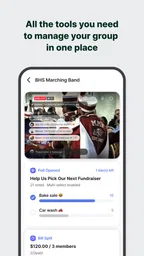
- Polls make it easy to collect opinions from members.
- Customizable notifications help reduce interruptions from busy groups.
What could be better
- The number of features can make the interface feel crowded.
- Frequent group messages may still create notification overload.
- Some features may require members to learn the app together.
- Large groups can make important messages harder to find.
- The app requires an account to create or join groups.





