

ALDI Grocery Pickup & Delivery review
 Analysis by Appsdrops
I find ALDI Grocery Pickup & Delivery most useful when a household wants to plan an Aldi shop together without turning grocery shopping into a group chat full of guesses. It is a free shopping app from ALDI International Services SE & Co. oHG, and its appeal is practical: use it to look over Aldi’s range and organize a shop around what your home actually needs. The experience makes the most sense for people who already shop at Aldi, rather than anyone looking for a general-purpose marketplace with many retailers in one place.
One household, one grocery plan
Picture a familiar situation: I’m making a list before heading to Aldi, while someone else at home remembers we’re nearly out of a few basics. An app can help turn those separate thoughts into a more deliberate shop, especially when I check what the store offers before leaving. That is the useful role I see here: it brings Aldi shopping into a digital planning routine, rather than asking a household to start with a blank note every time.
The name includes pickup and delivery, but I would treat those words as a prompt to check what is available for my location and current shopping context, not as a guarantee that every order can be handled the same way. Grocery services can depend on where you are and how a particular shop is set up. Before building a whole week’s meal plan around a delivery, I would first check the options presented in the app.
That small check is especially worthwhile for shared households. If one person expects a delivery and another plans to make a store visit, the result can be duplicate shopping or missing ingredients. I would agree on who is placing the order and use the app as the planning point for that shop. It is a simple habit, but more reliable than assuming everyone’s separate list is automatically joined together.
Make the list before the rush
A practical way to use Aldi’s app is to browse when there is no pressure to finish the shop immediately. I can think through the meals I expect to make, identify the essentials, and then check the available range. This reduces the chance of walking into the store with only a vague idea of what is needed. It also helps me separate “we need this” from “that looks tempting,” which matters when I’m trying to keep a routine shop focused.
For a household, I’d ask other shoppers to send specific items and quantities rather than a broad request such as “pick up food for dinner.” A note like “pasta and something for lunches” still leaves room for different assumptions. The app can support the shopping process, but clear coordination remains a human job: agree on the meal, the needed items, and who is responsible for buying them.
Account boundaries matter
I would not assume that installing the same app on several devices creates a shared household account or a common list. Account access and any saved shopping details should be treated as belonging to the person who sets them up unless the app itself clearly offers another arrangement. If two adults take turns shopping, decide whether one person will manage the plan or whether each will handle their own shop. That avoids confusion about whose account is in use and what information is saved there.
This is also a good moment to think about device boundaries. A phone used by several people may keep an account signed in, and the next person opening the app could interact with the previous user’s session. I would sign out or keep the device’s access restricted when appropriate, particularly if it is a shared family tablet. That is ordinary account hygiene, not a claim that Aldi provides special household controls.
For a parent coordinating a shop with an older child, I would keep the task narrow: ask them to help compare the planned items or check what the household needs, while an adult handles the account and any purchase decisions. That gives them a useful role without implying that the app has parental settings or child-specific shopping features.
Coordination without relying on automatic sharing
The app is easiest to fit into a household routine when everyone knows what it is—and is not—being used for. I would use it to plan an Aldi shop, then share the final list through whatever communication method the household already trusts if several people need to see it. I would not count on changes made on one person’s device appearing for everyone else unless the app makes that behavior clear.
One non-obvious benefit of planning separately from the moment of shopping is that it gives the household a chance to catch substitutions in the plan before anyone sets out. If the preferred item is not available in the form expected, the group can decide in advance whether a similar choice is acceptable or whether to skip it. That is especially helpful when one shopper has dietary needs to consider. The app can help with browsing, but a household should still communicate any must-have ingredients directly.
For a shared shop, I would also keep a quick record of who is buying the essentials and who is responsible for optional items. This prevents a common failure in grocery coordination: several people assume someone else has covered the basics. It is not glamorous, but it makes a focused Aldi trip more dependable than relying on memory or a last-minute message.
Age, trust, and who should make the purchase
The app is rated for Everyone, so its stated age context is broad. In practice, I would still make purchase responsibility clear in a household. A general audience rating does not mean every child should be left to place an order or manage an adult’s account. Adults should decide how devices and accounts are used, and younger family members can contribute by helping identify what is needed without being responsible for payment or final choices.
I also value being realistic about trust. A shopping app can make it easier to review Aldi’s offering, but it does not replace checking an order or confirming a plan with the person who will actually shop. If a household has strict dietary requirements, I would verify each relevant product detail in the app and at the point of purchase rather than treating a remembered item name as enough. For allergy-sensitive shopping, that extra attention is more important than convenience.
ALDI Grocery Pickup & Delivery has been available since August 26, 2011, and its current version is 11.40.0, with Android support beginning at version 8.0. Those details make it easy to judge whether an older Android device is likely to be a fit, while the Everyone rating helps explain its broad intended audience. The app has a 4.8 average from around 52,000 ratings, and more than 5 million installs. I see that reach as a sign that it is a familiar option for many Aldi shoppers, not proof that every local shopping arrangement will suit every home.
How it compares with other grocery options
Compared with a supermarket-agnostic shopping app, the main trade-off is focus. If Aldi is already where I do much of my shopping, a dedicated app keeps the experience centered on that retailer. If I routinely compare prices across several chains, combine grocery orders from different shops, or need one list that covers multiple retailers, a broader shopping tool may be more convenient. This app is best understood as an Aldi companion, not a universal household pantry manager.
It also differs from a paper list or a basic notes app. A note is flexible and easy for a household to share by copying it, but it does not provide the same retailer-specific browsing context. The Aldi app is more useful when I want to connect planning with what Aldi offers; a plain note remains better when the list must include items from several stores or when everyone needs an uncomplicated shared checklist.
Delivery and pickup can sound like the obvious reason to install it, but I would not choose an app solely on that promise without first checking the service shown for my area. If a household prefers to choose produce in person, has a store nearby, or needs to shop at several retailers in one outing, going directly to the store or using a multi-store planning method may be the better fit. The app’s value depends on whether its Aldi-focused workflow matches the way that household actually shops.
Small habits that make it more useful
I would begin by checking the app before making a detailed meal plan, rather than planning dishes first and assuming every ingredient will fit the shopping arrangement. Then I’d make a short essentials list and keep optional ideas separate. This makes it easier to adjust without losing track of the items the household genuinely needs.
For recurring shops, I’d review the list after each trip and remove items that were only relevant once. A stale list can be worse than no list because it creates false confidence that someone has checked the household’s current needs. If more than one person contributes, agree on a single person to do the final review before shopping. That small checkpoint catches duplicates and avoids the awkward “I thought you were buying it” moment.
I would also use the app as a browsing and preparation tool at a calm moment, not as the household’s only source of coordination. A quick confirmation with the person who will shop is still useful when plans change, when an item is important, or when someone has a dietary restriction. The strongest workflow is a combination: use the Aldi app for Aldi-specific planning, and use direct communication for responsibilities and exceptions.
Who I’d recommend it to
I’d recommend ALDI Grocery Pickup & Delivery to people who shop at Aldi regularly and want a more organized way to prepare for that visit. It is particularly sensible for a household where one person usually coordinates the grocery run but needs input from others. The app is free, which makes it easy to try without committing to a paid subscription, and its shopping focus is clear enough that I wouldn’t expect it to replace every list or grocery service a family already uses.
I would skip it if Aldi is only an occasional stop, if the household needs one combined plan across many supermarkets, or if everyone expects a fully shared account and synchronized list without checking how the app handles those needs. I’d also choose a different approach when local pickup or delivery availability is central to the decision and the app does not show an option that fits the household’s location or schedule.
My overall view is that this is a useful, focused tool for bringing an Aldi shop into a household routine—not a substitute for agreeing on who is buying what. Use it to browse and prepare, keep account access sensible on shared devices, and confirm important details directly with the other shoppers. With those boundaries in place, it can make the familiar weekly shop feel more considered while staying honest about what a retailer-specific app can do.
What we like
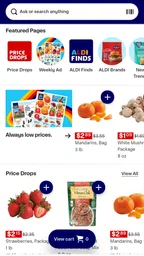
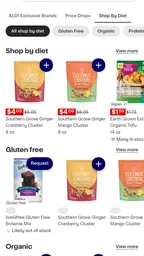
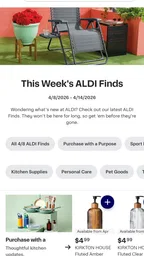
- Browse weekly specials and add them to your order.
- Pickup can save time compared with shopping in store.
- Delivery brings groceries to your home where available.
- Save favorite products for quicker repeat orders.
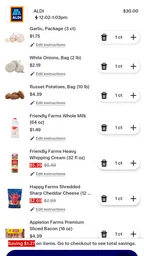
- Order ahead and choose an available fulfillment time.
What could be better
- Pickup and delivery options vary by location.
- Some orders may require a minimum purchase.
- Popular time slots can fill up quickly.
- Substitutions may differ from the products you selected.
- Delivery fees may apply to home orders.





