




Afterpay: Pay over time review
 Analysis by Appsdrops
I find Afterpay: Pay over time easiest to judge as a personal checkout tool, not as a household wallet. It can help when one person needs to spread a planned purchase across payments, but it is not a shared budgeting system and should not be treated like one. That distinction matters if several people use the same phone, shop together, or rely on one household account to keep spending visible.
Where it fits in a shared household
Picture a household replacing a worn-out appliance or buying a set of school supplies. One adult spots an eligible purchase and considers using Afterpay rather than paying the full amount at once. The app’s appeal is straightforward: it gives that shopper another way to manage the checkout, while the household still needs to decide who is responsible for the bill and how the payments fit alongside rent, utilities, and other commitments.
That last part is easy to underestimate. Splitting a purchase into payments changes when money leaves your account; it does not make the purchase cheaper. I’d use the app only after checking that the planned payments will remain comfortable on the dates they are due. If another person in the household is contributing, agree on the amount and timing before placing the order rather than relying on a vague promise to settle up later.
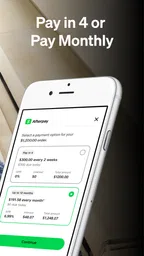
Afterpay is a shopping app from developer Afterpay. It is free to download, and its central purpose is to support purchases that are paid over time. That makes it most useful for someone who already has a specific shopping need and wants to consider a payment schedule at checkout. I would not open it simply to browse for things to buy: browsing can make optional purchases feel more manageable than they really are.
In ordinary shopping, the main alternatives are paying in full with a debit or credit card, waiting until the money is available, or using another payment arrangement offered at checkout. Paying in full is simpler and avoids keeping track of future instalments. Waiting is often the safer choice if the purchase is not urgent. Afterpay occupies a middle ground: useful for a planned expense when the payment timing genuinely helps, but less suitable when a shopper is already struggling to cover routine bills.
Keep the account personal on a shared device
If a phone or tablet is used by several people, I would treat the Afterpay account as belonging to one adult rather than as a household login. Payment apps involve personal shopping and financial decisions, so sharing access can blur who made a purchase, who is expected to pay, and who can see account information. A shared device does not turn an individual account into a family account.
Before handing a device to someone else, make sure the account is not left open where another person could accidentally continue a shopping session. I also recommend making the purchase decision while the account holder is present, rather than asking someone else to browse or complete checkout on their behalf. These are simple habits, but they reduce confusion when several people take turns using the same screen.
For a household with separate personal budgets, keeping shopping and payment decisions on each adult’s own account is usually clearer than pooling them. If one person is buying something for another, decide in advance whether it is a gift, a shared expense, or a purchase that will be repaid. The app cannot settle that household agreement for you, and assuming everyone has the same understanding can create more friction than the payment schedule solves.
Set boundaries before checkout
A practical workflow I like is to decide the spending limit before opening a shopping app, then compare the final purchase with that limit before choosing how to pay. With a pay-over-time option, I’d look at the total cost first and the payment timing second. If the total is outside the budget, dividing it into smaller amounts should not be the reason to proceed.
For shared household purchases, write down the basic plan somewhere both adults can see: what is being bought, whose account is being used, and who will cover each payment. This does not need to become a complicated spreadsheet. A note or a conversation can be enough, provided it is specific. The useful insight is that the app’s convenience can make checkout quick, while household coordination often needs a slower step beforehand.
I would also avoid using a payment option as a substitute for an emergency fund. If an essential item breaks and replacing it cannot wait, a flexible payment schedule might be worth considering only if the future payments are already realistic. If those payments depend on uncertain income or on another person contributing later, waiting, borrowing a suitable item, or comparing lower-cost replacements may be the better move.
One trade-off is mental load. A single planned purchase may be easy to track; several purchases with overlapping payment dates are harder to hold in your head. Before making another purchase, review what you have already committed to and decide whether the new expense still fits. That check is especially useful in a household where each person shops separately, because one person may not know what the other has already scheduled.
Coordination without assuming shared controls
Afterpay works best when the account holder takes responsibility for the whole transaction. If a partner or roommate is contributing, agree on the contribution before purchase and choose a reliable way to remind each other. Do not assume that another household member will automatically see the same account activity or understand the payment plan. Clear communication is more dependable than treating a personal shopping app as a shared household dashboard.
For a joint purchase, I’d compare the available payment choices together before the account holder checks out. That conversation should include the full price, the amount each person is taking on, and what happens if someone’s circumstances change. If you cannot reach a clear agreement, paying separately or postponing the purchase may be cleaner than putting the entire transaction on one person’s account and sorting out responsibility afterward.
There is also a useful distinction between coordinating a shopping list and sharing payment access. Household members can decide together what they need without sharing credentials or leaving a financial app open on a communal device. That keeps the decision collaborative while leaving account responsibility with the person who actually owns it. For families with teenagers, I would keep adult payment accounts out of a child’s unsupervised shopping routine.
Age, trust, and who should use it
The app carries a Mature 17+ content rating, so it is not presented as a general-purpose children’s shopping tool. In a household, I would take that age context seriously: adults can explain how payment commitments work, but a young person should not be given access to an adult’s account simply because the device is shared. A rating is a prompt to consider suitability, not a replacement for an adult deciding what is appropriate in their home.
Trust also means being honest about what a payment schedule can and cannot do. It can change the timing of a purchase’s cost; it cannot remove the obligation to meet the payments. I would recommend it to an adult who can plan ahead, wants a flexible checkout option, and is comfortable keeping track of commitments. I would steer away from it for anyone who regularly loses track of bills, is using new credit-like arrangements to cover everyday shortfalls, or feels pressured to buy because the first payment seems small.
The app has an average rating of 3.9 from around 170,000 ratings, with roughly 71,000 written reviews. It has been downloaded over 10 million times. Those figures suggest it has a substantial audience, but popularity does not tell me whether it fits a particular household’s budget or habits. I would use the app’s own checkout experience and my personal finances as the deciding factors, rather than assuming a widely used service is automatically right for me.
What to expect from the app itself
Afterpay was released on August 5, 2018, and the current version is 1.148.0. It supports devices running Android 7.0 or later. Those details are useful when deciding whether an older phone can run it, but they do not change the more important question: whether the payment arrangement suits the purchase. I’d keep the app updated through the app store and make sure the person using it understands the account and checkout before relying on it for an important household order.
Because this is a shopping app built around paying over time, I would approach it with a purchase-first mindset: know what you need, check the total, and then decide whether the payment timing is useful. That is a more disciplined way to use it than browsing until a purchase feels affordable. It also makes comparison easier, since you can weigh the same item against paying in full, delaying the purchase, or choosing another checkout method.
Afterpay is free to install, but the app’s price is not the same thing as the cost of the items you buy or the responsibility attached to a payment plan. I’d keep those ideas separate. A free app can still facilitate spending that needs careful planning, and a convenient checkout should never be mistaken for extra income.
My household verdict
For one adult making a considered purchase, Afterpay: Pay over time can be a useful option when payment timing matters and the future commitments are affordable. Its strongest household use is modest and practical: one person manages a specific purchase, discusses any shared contribution in advance, and keeps the account boundary clear. That can make a planned expense easier to coordinate without pretending the app manages the household budget.
I would skip it if you want a shared family wallet, a place to track everyone’s spending, or a way to make an unaffordable purchase feel harmless. I would also choose paying in full or waiting when the purchase is optional and the budget is tight. My recommendation is conditional rather than automatic: use it for a clear need, keep the account personal, and count every scheduled payment as money already committed. Under those conditions, it can help with checkout flexibility; without them, a simpler payment choice is likely better.
What we like
- Splitting purchases can make larger expenses easier to budget.
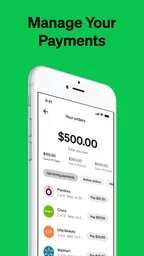
- The app lets you track payment schedules in one place.
- Eligible purchases can be divided into scheduled installments.
- Payment reminders can help you keep upcoming due dates in view.
- The app offers a digital card for shopping with participating retailers.
What could be better
- Late payments may lead to fees or account restrictions.
- Approval is not guaranteed for every purchase.
- Availability depends on your country and participating retailers.
- Missed installments can affect your ability to use the service.
- Using installments may encourage spending beyond your budget.





